31
10.2 Selection and printing of recorded cooking processes
The connecting cable shall only be plugged or unplugged if both, the steamer and the printer,
are switched off, otherwise the control unit or the printer may be damaged
The appliance must be switched on with no program in progress.
Any exact HACCP recording presupposes the correct setting of the real time. Refer to Sec. 11.2.1.
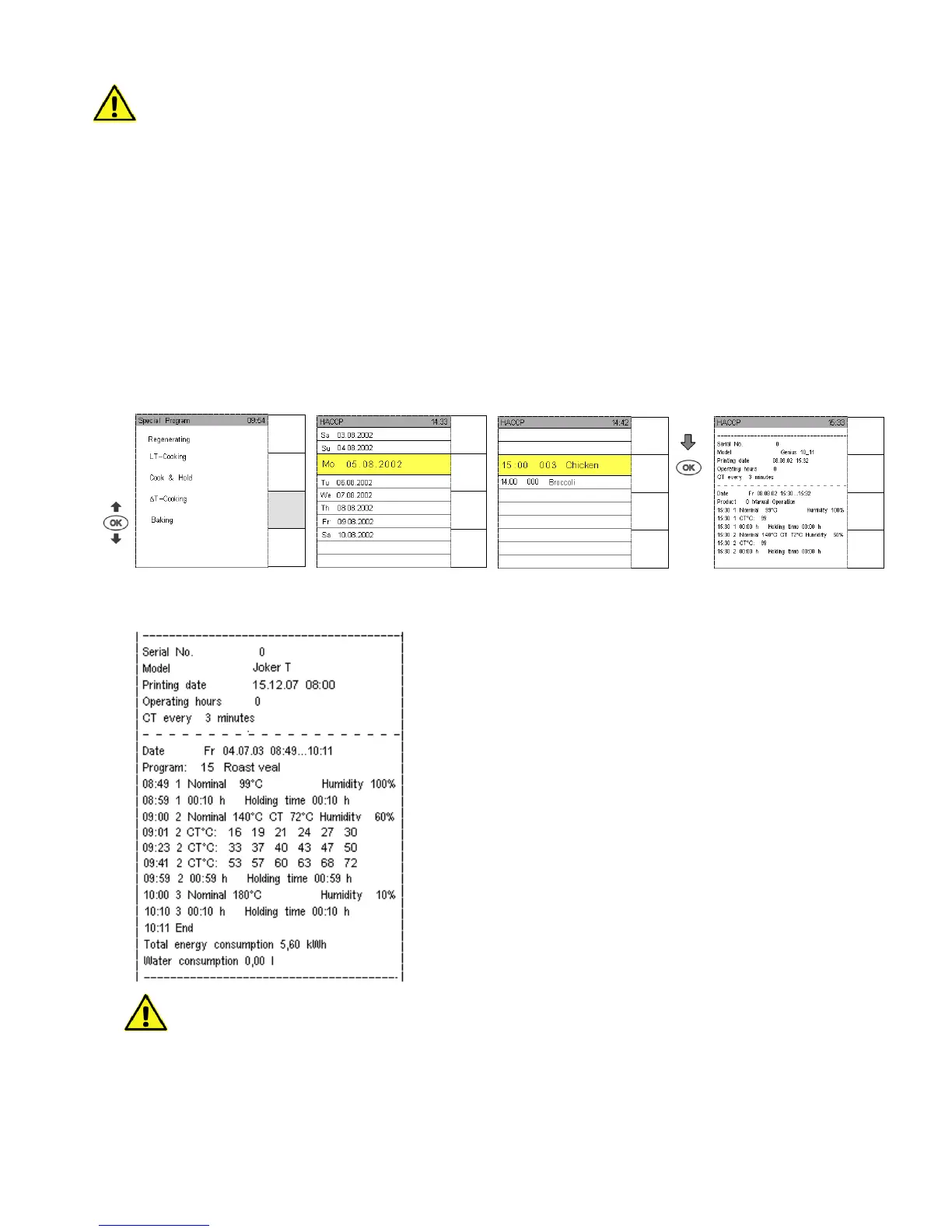
Touch sensor key Special Program and select HACCP with the sensor key.
A list appears stating day and date, one day being marked yellow.
Use Joker Scout arrow to scroll the HACCP list upwards to the desired day then marked yellow.
Touch sensor key Print to have the protocol of this day printed.
Once a week day is marked yellow and confirmed with OK, the individual programs of this day can be
selected by scrolling with the Joker arrows. Confirm the program that is supposed to be printed with
OK and touch sensor key Print to have it printed.
By pressing sensor key Print 7 the programs, including Autoclean, of the last 7 days are printed.
Printed record example
For combi cooking, there are no explicit logs for KT values starting with
the time of selecting Fct. Combi cooking.
Serial number
Unit Type
Print date of protocol
Total operating hours of the appliance
Program date start and end
Program name
Nominal time, set time and humidity degre in percent
Program start
Hold time, i. e. period the set temperature was held
Recording of core temperature in a set 3 min.-cycle, resp. 10 min cycle
Nominal time, set time and humidity degre in percent
Hold time, i. e. period the set temperature was held
Program End
Energy consumption
Water consumtion
Manual
Input
Autoclean
HACCP
Special
Menu
back
Print
Print 7
Menu
back
Print
Menu
back
Print
Print 7


 To Next Page