17
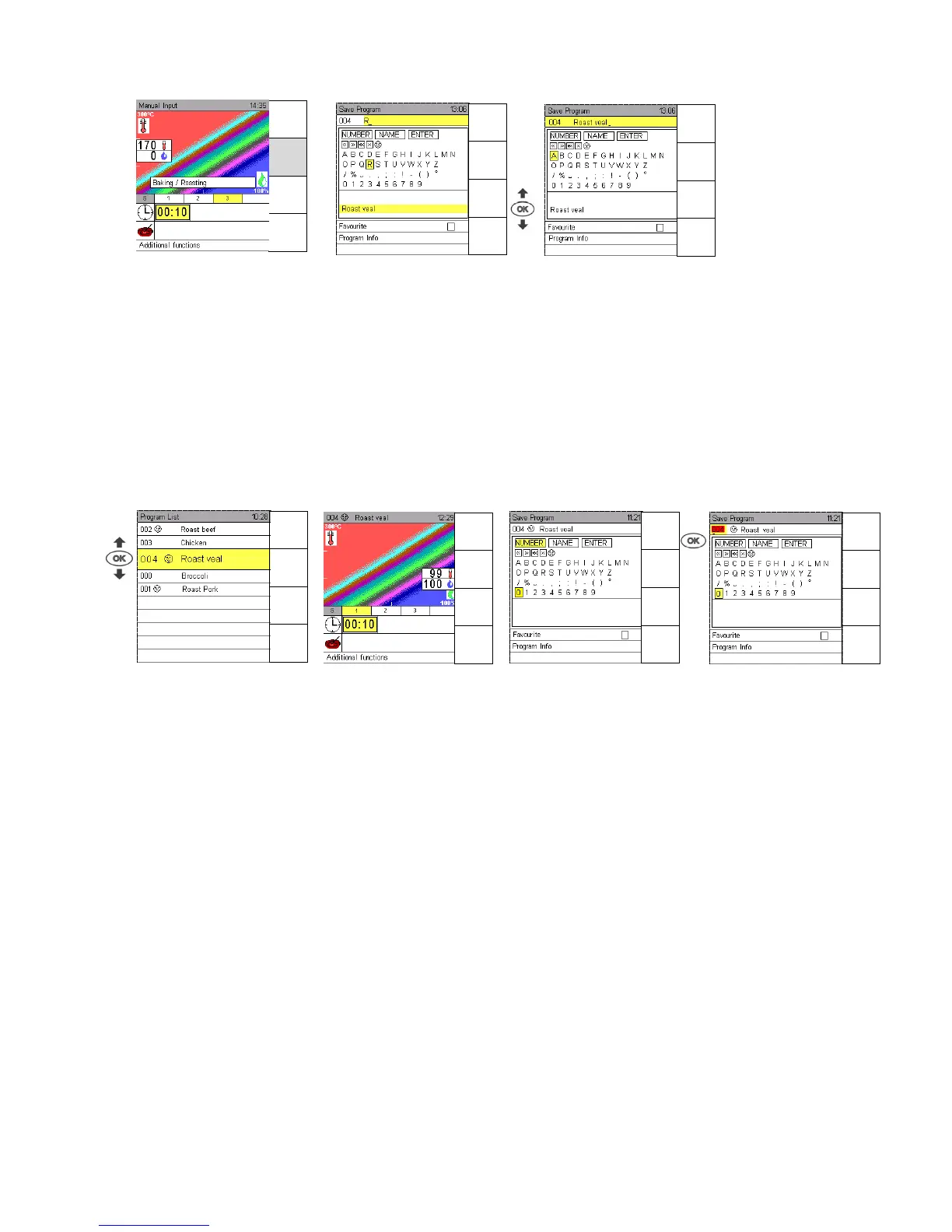
Select and edit a program name out of the name proposals
Use Joker direction arrows to bring up the first letter, confirm with OK.
Use Joker Scout arrow to bring up name proposals.
Two already existing program names starting with the same letter are displayed.
Use Joker Scout arrow to bring up further program names, starting with the same letter, if available.
Confirm a proposal with OK and change or complete the program name.
Go to Enter to save the program.
For further inputs see Sec. 5.1.
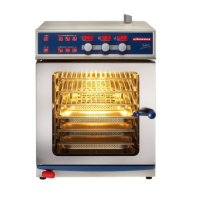
Change Program numbers
Select program and confirm with OK.
Press sensor key Save.
Use Joker Scout direction arrows and proceed to input field “Number“, confirm with OK.
The input field “Number“ is marked yellow and the number can be changed.
In case the new number is marked red, this number has already been allocated, however, it can be
overwritten.
Press sensor key Save to return to the input screen.
Menu
back
Save
Next
Step
Preheat
OFF
Menu
back
Save
A -> a
a -> A
Help
Menu
back
Save
A -> a
a -> A
Help
Menu
back
Save
A -> a
a -> A
Help
Menu
back
Save
A -> a
a -> A
Help
Manual
Input
Menu-
group
Favourites
Preheat
OFF
Menu
back
Save
Next
Step
Start
Time


 To Next Page