4.2 Enable access to the off-line menu of the display
ProLink III Device Tools → Configuration → Transmitter Display → Display Security
Field communicator Configure → Manual Setup → Display → Display Menus → Offline Menu
By default, access to the off-line menu of the display is enabled. If it is disabled, you must enable it if you want
to use the display to configure the transmitter.
Restriction
You cannot use the display to enable access to the off-line menu. You must make a connection from another
tool.
4.3 Disable HART security
If you plan to use HART protocol to configure the device, HART security must be disabled. HART security is
disabled by default, so you may not need to do this.
Prerequisites
• Strap wrench
• 3 mm hex key
Procedure
1. Power down the meter.
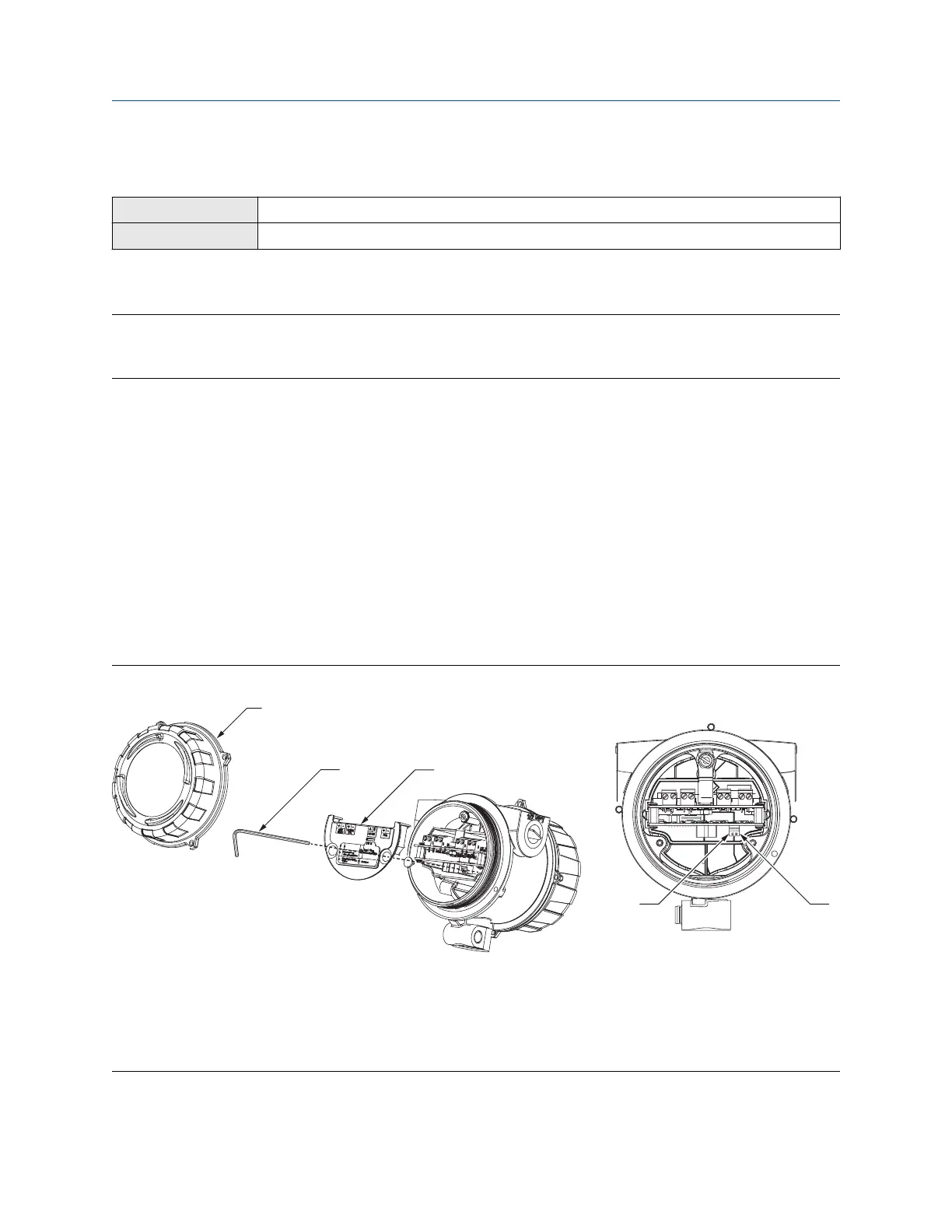
2. Using the strap wrench, loosen the grub screws and remove the transmitter end-cap.
Figure 4-1: Transmitter with end-cap removed
A. Transmitter end-cap
B. 3 mm hex key
C. Safety spacer
D. HART security switch
E. Unused
3. Using the hex key, remove the safety spacer.
Configuration and Use Manual Introduction to configuration and commissioning
MMI-20020954 March 2021
Configuration and Use Manual 25















 To Next Page