Reference Manual
00809-0100-4716, Rev JA
May 2008
3-5
Rosemount 3095 MultiVariable
HART
Connecting to a Personal Computer
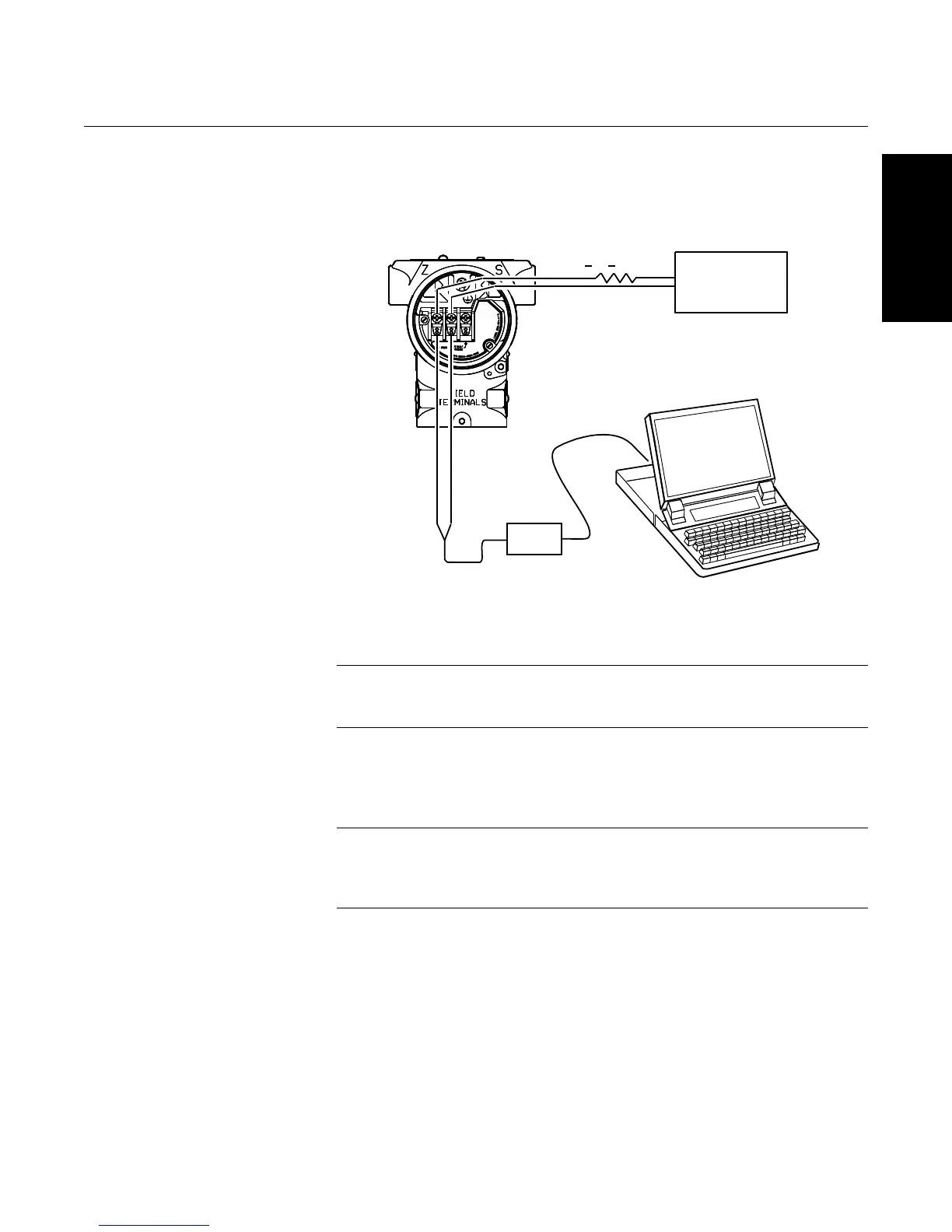
Figure 3-3 shows how to connect a computer to a 3095.
Figure 3-3. Connecting a PC to
the 3095
1. Power the device as outlined in Section 2.
2. Connect the 9-pin HART modem cable to the 9-pin serial
communications port on the PC.
NOTE
If your PC does not have a 9-pin serial port, you will need a USB-HART
modem, PN 03095-5105-0002.
3. On the side marked “Field Terminals,” connect the modem
mini-grabbers to the two terminals marked “Comm.”
4. Launch the 3095 Engineering Assistance Software.
NOTE
It may be necessary to access the COM port properties on your PC. In the
advanced port settings, adjust the receive buffer to its lowest setting (1) and
re-boot the computer to apply the change.
1100 > R > 250
Modem
User-Provided
Power Supply









 To Next Page