15
IP2288EN
EN
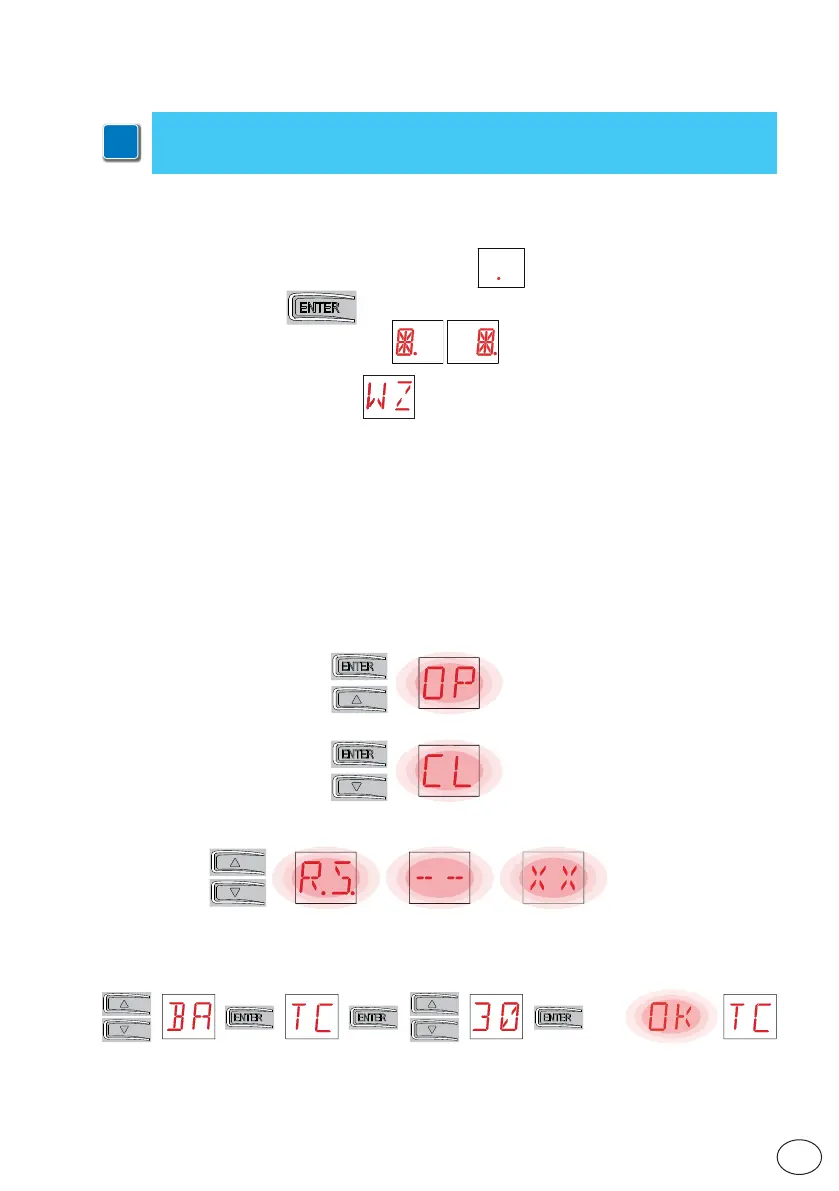
The procedure to switch on the display is as follows:
• press the ENTER key
• the display functioning check starts
• the first level menu is displayed
The procedure to switch off the display is as follows:
• press the ESC key
NB: there is no automatic exit from the WZ quick configuration menu. For all the other menus,
the display switches off automatically after 60 seconds of inactivity.
10.1 Switching the display ON and OFF
10. Using of the menus
i
NB: pressure on the keys may be quick (less than 2 s) or prolonged (longer than 2 s).
Unless specified otherwise, quick pressure is intended.
To confirm the setting of a parameter, prolonged pressing is necessary.
• The simultaneous pressing of the ↑ and ENTER keys produces an opening command.
• The simultaneous pressing of the ↓and ENTER keys produces a closing command.
• The simultaneous pressing of the ↑ and ↓ keys produces a POWER RESET command (pow-
er supply interruption and automation restart).
• Keep the UP ↑ or DOWN ↓ key pressed to begin fast menu scrolling.
To set a parameter, select the desired value and press ENTER for 2 seconds to save.
Example: setting of 30 seconds for parameter TC
x 2 s
• In some menus, the parameter measurement unit can be viewed by pressing the ENTER key
once the value has been displayed.
10.2 Navigation keys



 To Next Page