20
IP2288EN
EN
12. Commands
i
You are advised to read paragraph 15 for all the details about the possible adjustments.
WARNING: terminal 30 (common positive for commands) has the same functions as terminal 1, so
the commands visualised on the display are indicated with 1-5, 1-3, etc.
It is different from terminal 1, however, because of the maximum current that can be dispensed
and it is also active when the control panel is in standby
→ .
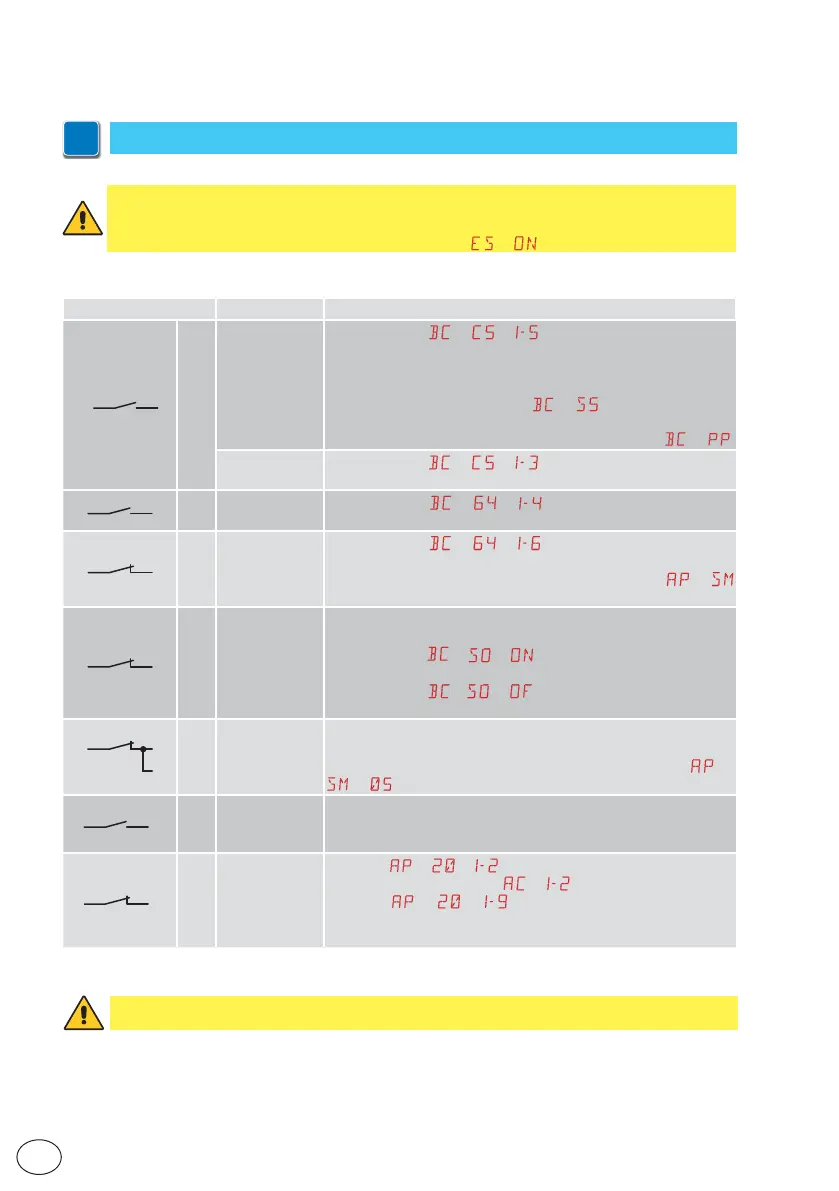
Command Function Description
30
5 NO
STEP-BY-STEP
When selecting
→ → , the closure of the contact ac-
tivates a sequential opening or closing operation: opening-stop-
closing-opening.
WARNING: if automatic closure is enabled, the duration of the
stop can be defined by selecting
→ .
The “opening-stop-closing-opening” sequence can be changed
to “opening-stop-closing-stop-opening” by selecting
→ .
OPENING
When selecting
→ → , the closure of the contact ac-
tivates an opening operation.
1
6 NO CLOSURE
When selecting
→ → , closing the contact activates
a closing operation.
1
6
NC SAFETY STOP
When selecting → → , opening of the safety contact
stops and prevents any movement.
NB: to set different safety contact functions, see the
→
parameter settings.
1
8
NC
CLOSING
SAFETY
DEVICE
The opening of the safety contact triggers a reversal of the
movement (reopening) during the closing operation.
When selecting
→ → , the opening of the contact pre-
vents any operation when the automation is idle.
When selecting
→ → , the opening of the contact only
prevents closure when the automation is idle.
1
6
8
NC
CLOSING/
OPENING
SAFETY
DEVICE
The opening of the safety contact stops and prevents any move-
ment.
NB: operation corresponds to that of contact 1-6 with
→
→ .
1
20 NO
PARTIAL
OPENING
The closure of the contact activates a partial opening operation.
Once the automation stops, the partial opening control performs
the opposite operation to the one performed before the stop.
1
20
NC
AUTOMATIC
CLOSURE OR
STOP
Selecting → → , the permanent closure of the contact
enables automatic closure if
→ .
Selecting
→ → , the opening of the safety contact
causes the movement to stop.
NB: the flashing light flashes.
WARNING: make a jumper for all NC contacts if not used, or deactivate them via the relative menu.
Terminals with the same number are equal.



 To Next Page