18
IP2288EN
EN
11. Product start-up
11.1 WZ configuration wizard menu
for 2 sec.
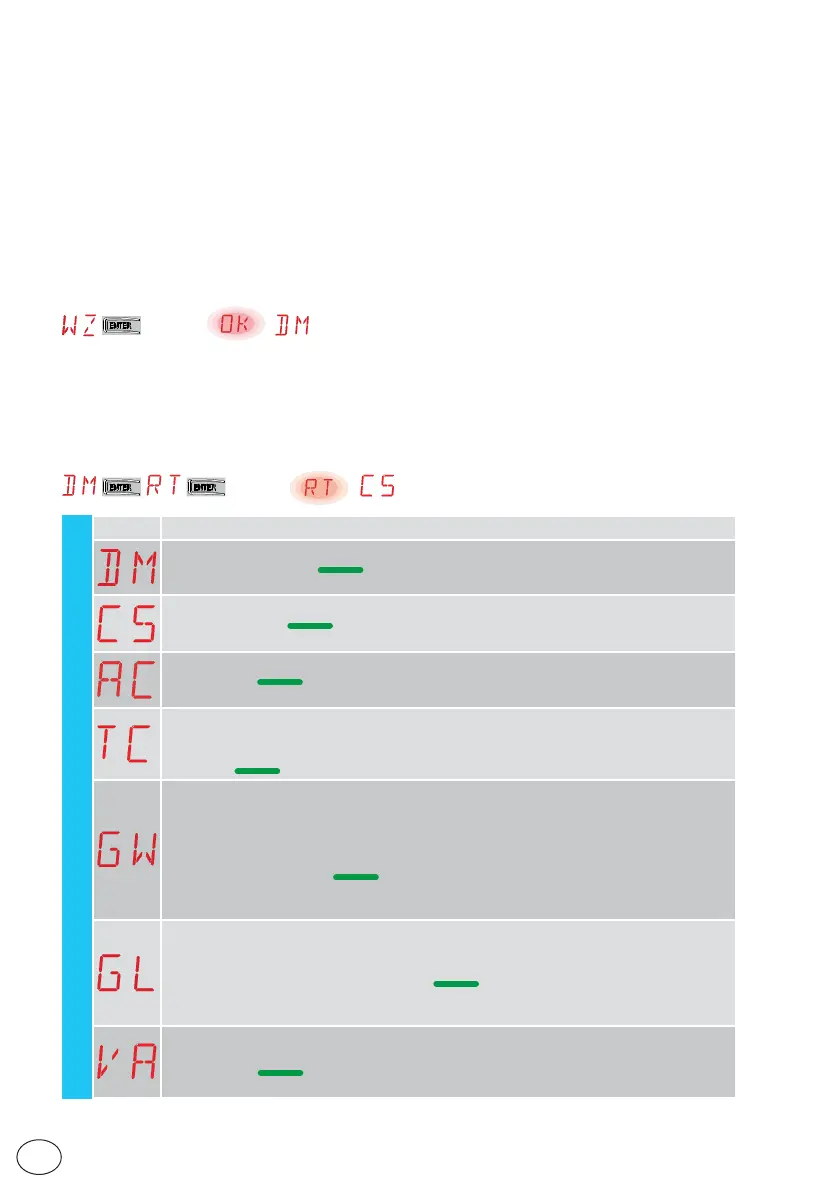
To access the WZ configuration wizard menu:
Hold down the ENTER button for 2 seconds.
When OK has stopped flashing, DM, the first menu parameter, is displayed.
For rapid configuration of the product, use the WIZARD (WZ) menu or the second level AT (Auto-
matic Configurations) menu [See par. 15.2].
For detailed, customised configuration, use the main menus BC, BA, RO, SF, CC, EM, AP.
To set a parameter:
1. Press ENTER to access the configuration items.
2. Scroll UP/DOWN the possible options.
3. To confirm, press the ENTER button for 2 seconds. The selected value flashes and when it has
finished, the next parameter appears.
for 2 sec.
WZ - Wizard
Display Description
DM - Selection of opening direction (looking at the automation from the side being examined)
• RT: opens to the right (default)
• LF: Opens to the left
C5 - Operation of command associated with contact 30-5
• 1-5: step-by-step (default)
• 1-3: Opening
AC - Enabling of automatic closure
• ON: enabled (default)
• OF: disabled
TC - Setting of automatic closing time [seconds]
[N.B.: only visible if you have selected AC = ON in the previous step]
• from 0” to 59” with intervals of 1 second.
• - from 1’ (default) to 2’ with intervals of 10 seconds.
GW - Selection of gate weight.
The selected value sets parameters R1 and R2 to adjust the maximum thrust current of the
motor.
• LG: up to 200 kg → (R1=R2=30%)
• MG: between 200 kg and 300 kg for ION4 and ION4J, between 200 kg and 400 kg for ION6
and ION6J → (R1=R2=50%) (default)
• HG: between 300 kg and 400 kg for ION4 and ION4J; between 400 kg and 600 kg for ION6
and ION6J → (R1=R2=70%)
GL - Selection of gate length
The selected value sets parameters OB and CB for adjusting the deceleration space
• 02: between 0 and 2 m → (OB=CB=50cm)
• 04: between 2 and 4 m → (OB=CB=60cm) (default)
• 06: between 4 and 6 m → (OB=CB=70cm)
• >6: over 6 m → (OB=CB=80cm)
VA - Selection of opening speed
• LO: 15 cm/s
• ME: 20 cm/s (default)
• HI: 25 cm/s



 To Next Page