34
IP2288EN
EN
Display Description
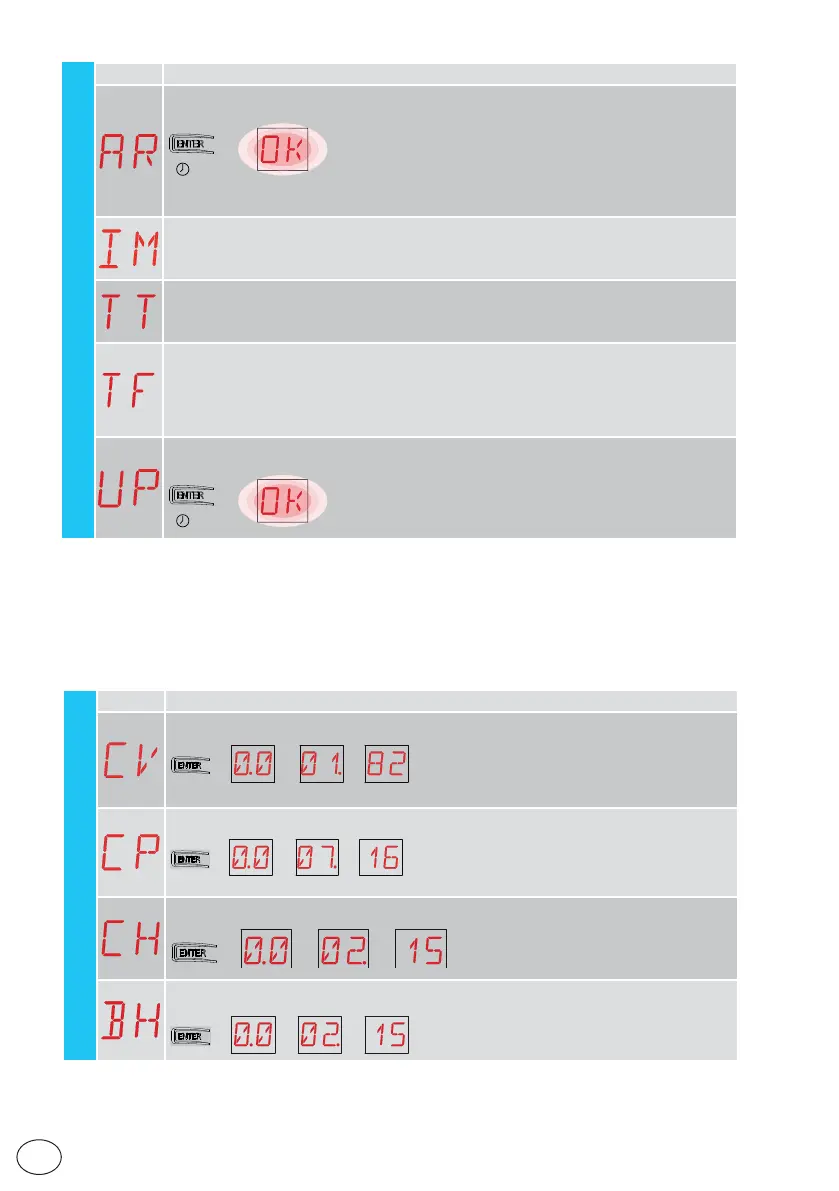
AR - Alarm reset
Resets all the alarms in the memory (counters and log).
→
2”
NB: when the installation has been completed, you are advised to delete the alarms in
order to facilitate future checks.
IM - Motor current visualisation
TT - Display min / max temperatures recorded
- by pressing for 2 seconds the values are reset
- minimum value with active right point
TF - Limit switch test
Only FA / FC are displayed when the respective limit switches are configured and active.
If the limit switches are active but not configured:
- FA = N.O. (both active points)
- FC = NO (no active point)
UP - Firmware update
Activates the card bootloader in order to update the firmware.
→
2”
SF
15.7 Second level menu - CC (Cycles Counter)
Display Description
CV - Display of total operations counter
→→→ → 182 manovre [esempio]
CP - Display of partial operations counter
→→→ → 716 manovre [esempio]
CH - Display of power supply hour counter
→→→
215 ore di funzionamento
in batteria [esem
io]
→
BH - Visualisation of counter for power supply hours via battery
→→→
215 ore di funzionamento
in batteria [esempio]
→
CC - Cycle Counter
operations (example)
operations (example)
215 hours of power supply
(example)
215 operating hours via battery
(example)



 To Next Page