37
IP2288EN
EN
Display Description Selections
available
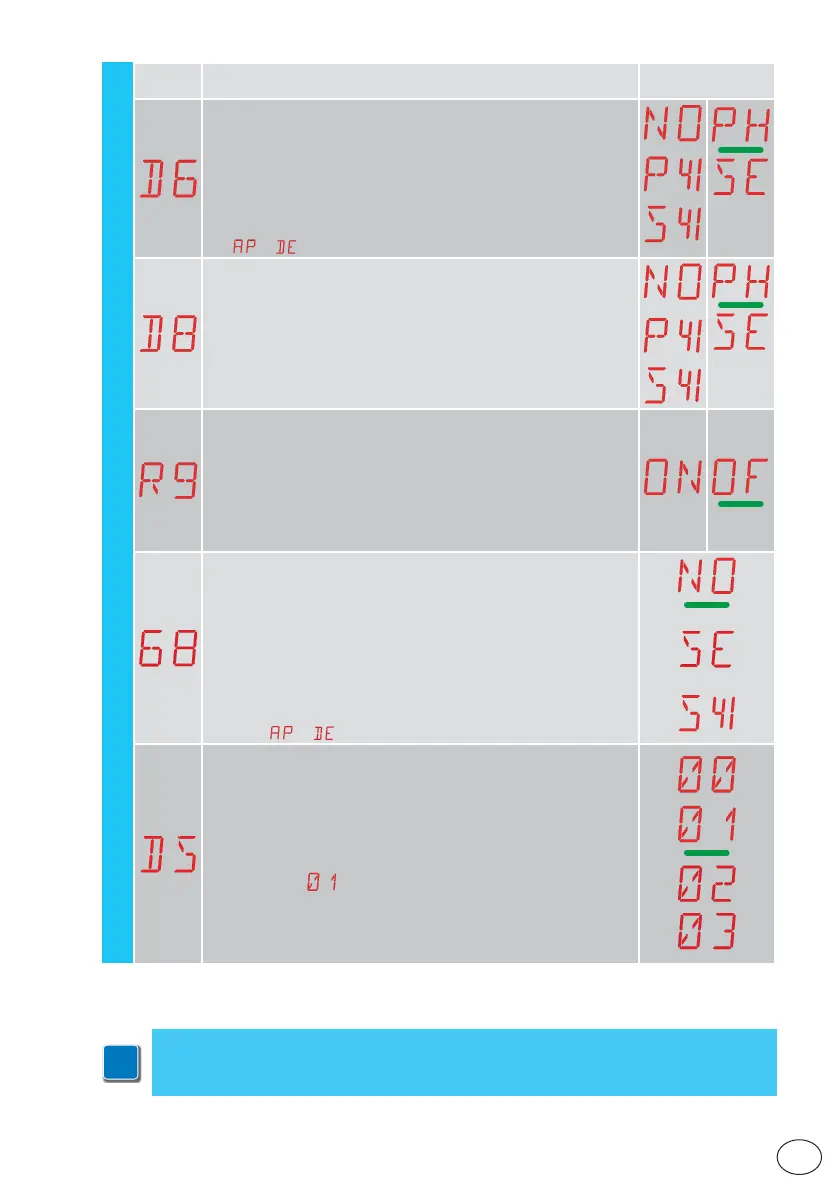
D6 - Selection of device connected to terminals 1-6
NO - None
PH - Photocells
P41 - Photocells with safety test
SE - Safety edge (if contact 1-6 opens, there is a disengagement of
10cm after the stop)
S41 - Safety edge with safety test (if contact 1-6 opens, after the stop
there is a disengagement of a duration depending on the selection
→ )
D8 - Selection of device connected to terminals 1-8
NO - None
PH - Photocells
P41 - Photocells with safety test
SE - Safety edge
S41 - Safety edge with safety test
R9 - Enabling automatic closing after command 1-9 (STOP).
ON - Enabled
OF - Disabled
When enabled (ON), after a command 1-9, the automation carries
out automatic closing (if enabled), after the set time
.
68 - Selection of the device simultaneously connected to termi-
nals 1-6 and 1-8
NO - None
SE - Safety edge
S41 - Safety edge with safety test
If different from NO, the simultaneous opening of inputs 1-6 and 1-8
causes:
- movement stop and reversal during a closing operation
- movement stop and disengagement of a duration depending on the
selection
→ during an opening operation
DS - Setting of display visualisation mode
00 - No visualisation
01 - Commands and safety devices with radio test
Display of countdown to automatic closure.
02 - Automation status
03 - Commands and safety devices
NB: the setting
allows you to see when a radio transmission is
received, for range checks.
AP - Advanced Parameters
i
NB: make adjustments gradually and only after performing at least three complete
operations to allow the control panel to be set correctly and detect any friction during
operations.



 To Next Page