10 Troubleshooting
The blue Status LED flashes to indicate the status of the internal security module.
10.1.7 Power button
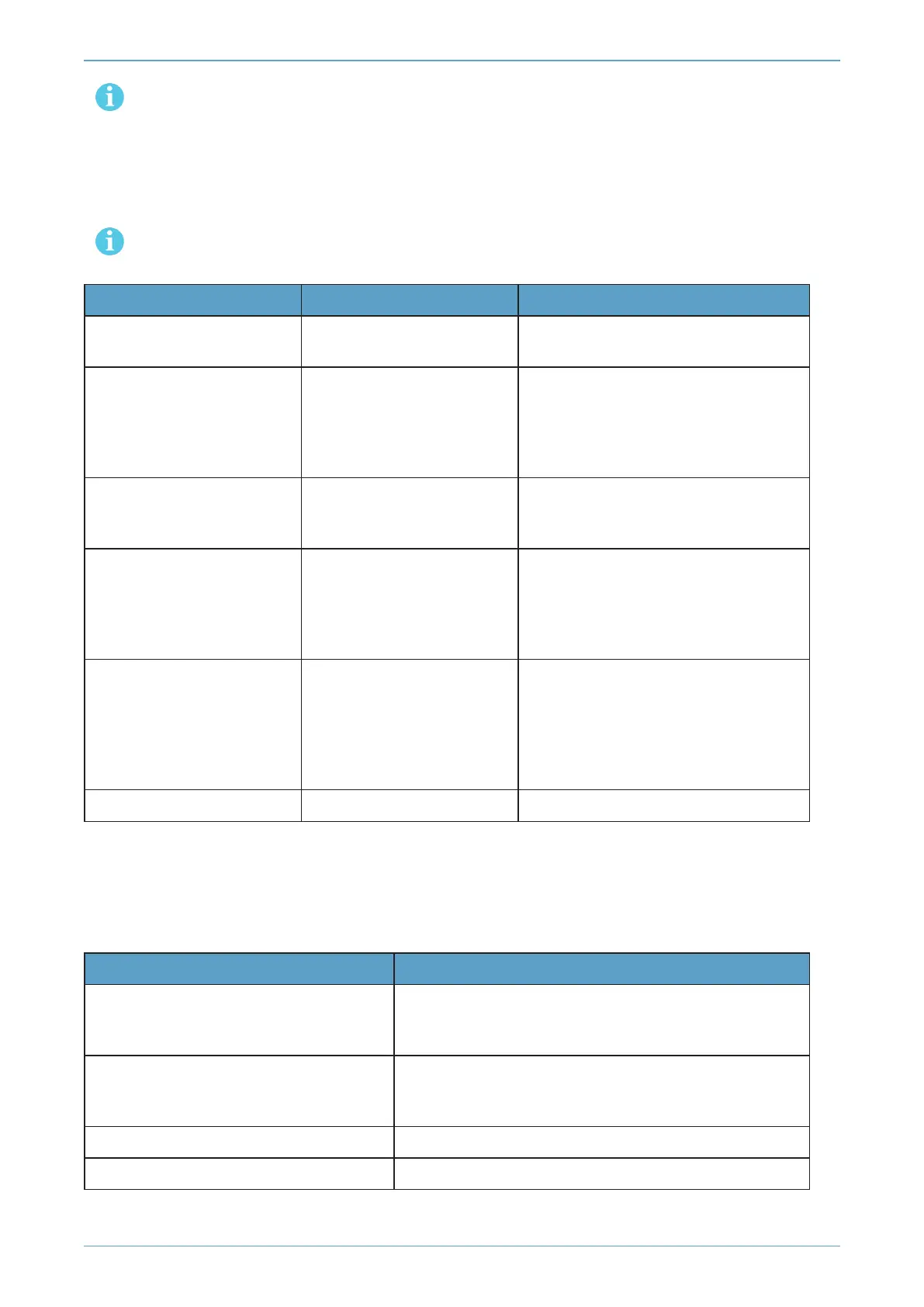
The Power button, in combination with the display screen, indicates the general status of the module.
The display screen turns off automatically if the front panel buttons are inactive for more than
three minutes. Use the touch wheel to turn the display screen back on.
Power button Display screen Status
On
On, displaying menus and
dialogs
The module is operational.
On
On, displaying messages
but not displaying labels for
the navigation buttons
The module is running an upgrade. A
color-coded footer indicates the
specific status: yellow for
initialization, red (maintenance) for
upgrade.
On, flashes occasionally
On, displaying messages
but not displaying labels for
the navigation buttons
The module is performing start-up.
Mostly off, flashes
occasionally
Off
The module is in Standby mode (that
is, it has been powered down from
the front panel using the Power
button). Press the Power button to turn
it on.
Flashes regularly
On, with “Critical Error”
message
The module is unable to start-up or
has failed. The error message
describes the problem. If you can
remedy the problem, do so, and press
the Power button to restart the
module. Otherwise, contact Support.
Flashes irregularly Off A low-level critical error has occurred.
10.1.8 Ethernet LEDs
There are four Ethernet LEDs, two for each of the two Ethernet ports on the module. The Ethernet LEDs
indicate the status of the connection with other Ethernet devices.
Ethernet LEDs Status
Flashes regularly
The status of the Ethernet link is currently unknown
(the Ethernet LEDs flash when the module is powering
up).
Off
There is no Ethernet link. The Ethernet cable is either
not connected to the module or the cable is not
connected to a functioning Ethernet device.
On, green only Indicates a 10Mb or 100Mb Ethernet link.
On, green and orange Indicates a 1Gb Ethernet link.
Page 66
nShield® Connect - Installation Guide



 To Next Page