53
REV. 09/2020
BRAKE SYSTEM
6
52
NOTE:
6.1 Parking Brake
6.1.1 Removal and Installation
- Turn o the truck power and remove the key;
- Use triangle wooden wedges to x the wheels;
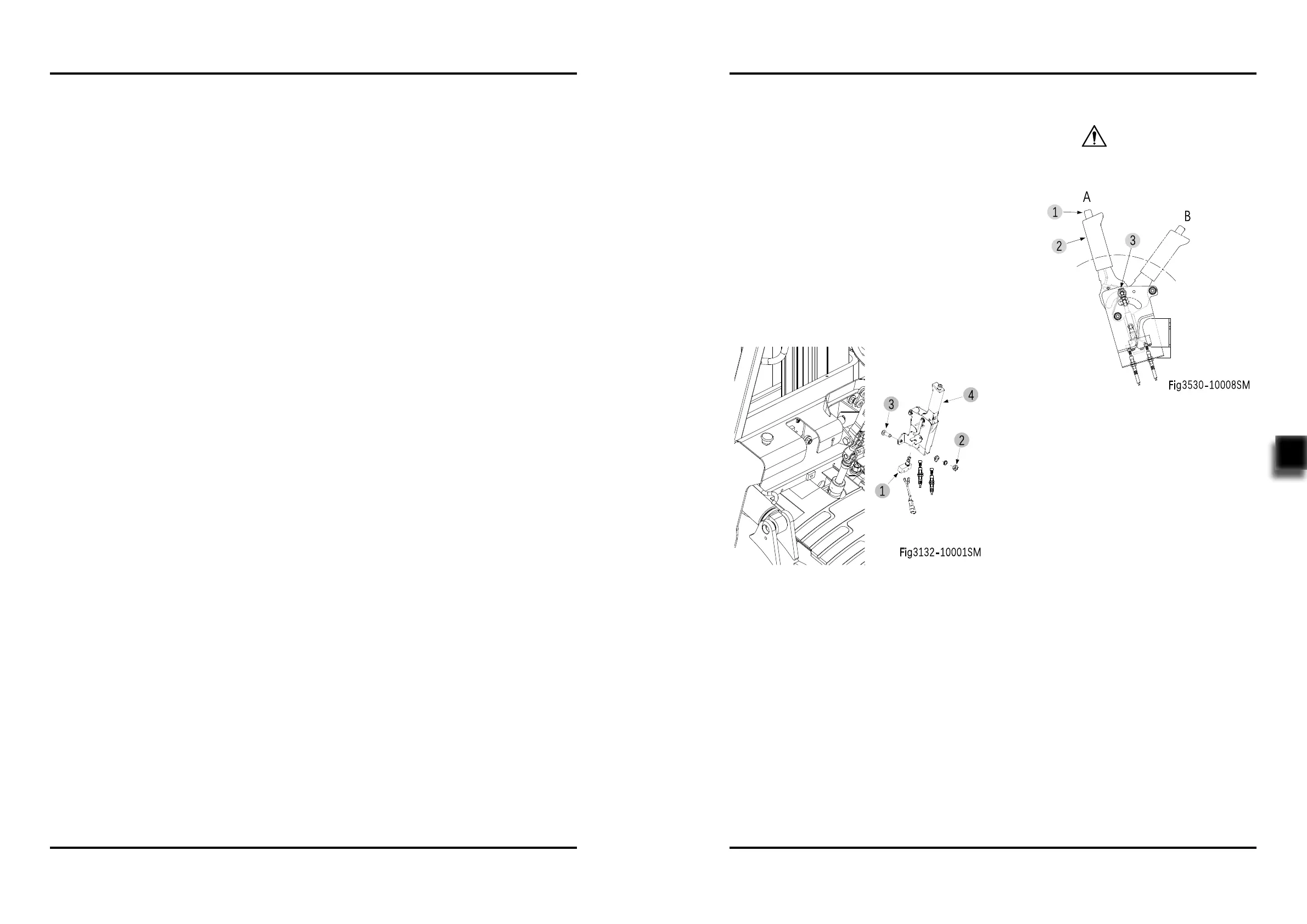
- Disconnect the connection between the brake
switch (1,Fig3132-10001SM) on the parking
brake (4) and the main wiring harness;
- Remove left / right brake cable on the parking
brake;
- Loosen the two nuts (2) and bolts (3), remove
the parking brake (4).
- Install according to the reverse order of rem-
oval.
6.1.2 Adjustment
Prior to parking brake adjustment, please use
triangle wooden wedges to x the wheels.
CAUTION
- Press and hold the button (1), push the
parking brake lever (2) from A position (brak-
ing) to B position (released);
- Through adjusting bolt (3) to adjust the opera-
ting torque for pulling the brake lever (2) from
B position to A position.
- Operating torque: 147~196 Nm



 To Next Page