MMS6110Directionforuse
Configuration Page12
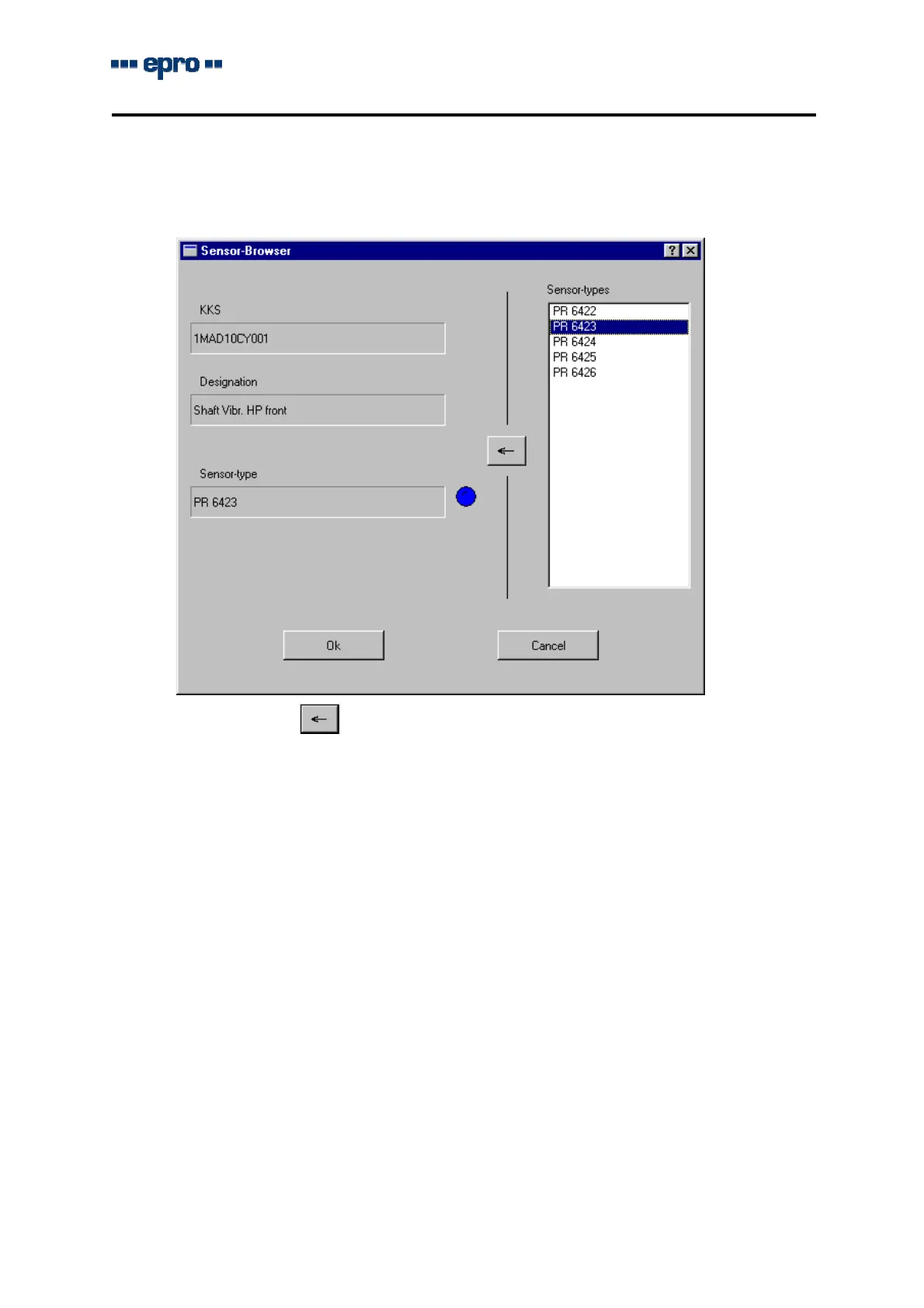
Byclickingbutton"Selection",withthemouse,windowSensor-Browserwillbeopenedand
willindicatethelistwithallsensortypestobeusedforthismonitor.Thehandlingofthislistis
identicaltothatoftheCONtype.
Byclickingbutton
withthemouseorbychoosingitwiththetabulator-keyandconfir-
mingwithkeyENTER(↵)onthekeyboard,thesensortypewillbetakenoverintothedeter-
minationfield.
FieldsKKSresp.DesignationshowschanneldesignationandKKSnumberthatwereentered
inpropertypageChannel.
ByclickingbuttonOKwiththemousetoconfirmthechoiceorbuttonCANCELtoabortthe
action,theprogramreturnstotheparameterinput.Onselectingasensorofthetypelist,its
sensitivitywillalsobetakenover.
Thetypemayalsobeentereddirectlyinfieldsensortype.Inthiscase,thesensitivityof
thesensormustbeenteredmanually.
Ifthesensitivitytakenoverfromthesensorlistwaschanged,thesensordesignationinfield
Sensortypewillbeshowninsquarebrackets.
EntryfieldundListSensitivity
Thisfieldmustshowthesensitivityindicatedinthesensorlistbyselectingoneofthetypes.
Thisvaluemaybemodifiedand,incasethesensor-typewasentereddirectly,thesensitivity
mustbeenteredmanuallywithoutusingwindowSensorBrowser.
Thesensitivityisindicatedwiththemeasuringunitchosenfromthelist.Theprogramcon-
vertsthevaluetothechosenunit.


 To Next Page