EasyManua.ls Logo

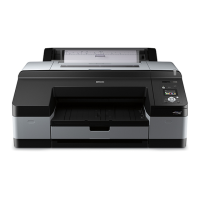
Epson Stylus Pro 4880 - User Manual

Epson Stylus Pro 4880
338 pages
Print Icon
To Next Page IconTo Next Page
Loading...
User’s Guide
NDP2997-00

Table of Contents

Other manuals for Epson Stylus Pro 4880

Questions and Answers

  • S
    Sharon RaymondSep 8, 2025
    What to do if my Epson Printer stops printing unexpectedly due to PRINTER ERROR RESTART THE PRINTER?
    • J
      John MccartySep 9, 2025
      If your Epson Printer stops printing unexpectedly and displays 'PRINTER ERROR RESTART THE PRINTER', turn the printer off, and then turn it on again.
  • S
    Sarah BurgessAug 25, 2025
    What to do if my Epson Stylus Pro 4880 Printer doesn't turn on?
    • M
      Michael McleanAug 25, 2025
      If your Epson Printer does not turn on: * Turn off the printer and make sure the power cord is securely plugged into the printer. * Make sure your outlet works and is not controlled by a wall switch or timer. * Make sure the supplied voltage to the printer matches the rating voltage labeled on the printer.
  • J
    John VillegasAug 25, 2025
    What to do if my Epson Stylus Pro 4880 stops printing unexpectedly due to MNT TNK FULL?
    • N
      Nathan PittmanAug 26, 2025
      If your Epson Printer stops printing unexpectedly and displays 'MNT TNK FULL', it means the maintenance tank is full. You need to replace the maintenance tank with a new one.
  • T
    tanyacookSep 22, 2025
    What to do if my Epson Printer stops printing unexpectedly due to LOAD PAPER?
    • J
      joseph77Sep 22, 2025
      If your Epson Printer stops printing unexpectedly and displays 'LOAD PAPER', move the paper lever to the secured position.
  • H
    Holly MaynardSep 9, 2025
    What to do if my Epson Stylus Pro 4880 Printer stops printing unexpectedly due to PAPER NOT CUT?
    • D
      Dana FernandezSep 9, 2025
      If your Epson Printer stops printing unexpectedly and displays 'PAPER NOT CUT', open the top cover and remove the uncut paper.
  • X
    xwuSep 14, 2025
    What to do if my Epson Stylus Pro 4880 Printer stops printing unexpectedly due to FORBIDDEN MEDIA FROM P. TRAY?
    • A
      Autumn DaltonSep 14, 2025
      If your Epson Printer stops printing unexpectedly and displays 'FORBIDDEN MEDIA FROM P. TRAY', remove the cut sheet media from the paper tray.
  • J
    Jacob WhiteheadSep 3, 2025
    What to do if my Epson Stylus Pro 4880 stops printing unexpectedly due to NON-GENUINE CARTRIDGE MAY NOT PERFORM AT OPTIMUM. CONTINUE? ?
    • E
      Elizabeth CisnerosSep 4, 2025
      If your Epson Printer stops printing unexpectedly and displays 'NON-GENUINE CARTRIDGE MAY NOT PERFORM AT OPTIMUM. CONTINUE? ', select NO (press the Menu button) to replace the ink cartridge with a genuine Epson ink cartridge.
  • J
    janicemasonSep 4, 2025
    What to do if my Epson Stylus Pro 4880 Printer stops printing unexpectedly due to DO YOU ACCEPT THIS? ?
    • N
      nhowardSep 4, 2025
      If your Epson Printer stops printing unexpectedly and displays 'DO YOU ACCEPT THIS? ', select DECLINE (press the Menu button) to replace the ink cartridge with a genuine Epson ink cartridge.
  • A
    Ashley SmithSep 23, 2025
    How to fix RTC error (Real Time Clock) on Epson Plotter?
    • M
      michaelsmithSep 23, 2025
      To fix an RTC error (Real Time Clock) on your Epson Plotter, check the battery and reset the date and time.
  • M
    Matthew MorenoAug 29, 2025
    What to do if my Epson Stylus Pro 4880 Printer stops printing unexpectedly due to REMOVE PAPER?
    • T
      Tina MosleyAug 29, 2025
      If your Epson Printer stops printing unexpectedly and displays 'REMOVE PAPER', remove the paper. If thick paper is used, also move the paper lever to the secured position.

Summary

Safety Instructions

Important Safety Instructions

Essential safety guidelines to follow before using the printer.

When setting up this product

Instructions and precautions for setting up the printer correctly.

Chapter 1 Using the Printer Software (Windows)

EPSON Status Monitor 3

Utility for monitoring printer status, ink levels, and errors.

Using the Printer Utilities

Overview of utilities for checking status and performing printer maintenance.

Chapter 2 Using the Printer Software (Mac OS X)

Printer driver

Explanation of the printer driver's functions for printing documents on Mac OS X.

EPSON Printer Utility2

Utility for executing printer maintenance functions on Mac OS X.

EPSON StatusMonitor

Utility for monitoring printer status, ink levels, and errors on Mac OS X.

EPSON LFP Remote Panel

Utility for controlling printer functions to optimize print quality on Mac OS X.

Canceling printing

Procedures for canceling print jobs on Mac OS X.

Using Printer Utilities

Overview of utilities for checking status and performing printer maintenance on Mac OS X.

Chapter 3 Variety of Printings

Using Color Management

How to use color management settings for better print quality.

Black-and-White Photo Printing

How to achieve advanced black-and-white photo prints via driver settings.

Borderless Printing

Instructions for printing documents without margins on paper.

Poster Printing

Guide to printing poster-sized images by enlarging pages across multiple sheets.

Chapter 4 The Control Panel

Buttons, Lights, and Messages

Overview of the printer's control panel components and their functions.

Chapter 5 Paper Handling

Maintenance Mode

Procedures for entering and operating the printer's maintenance mode.

Using Roll Paper

Detailed instructions for using and loading roll paper.

Loading roll paper

Step-by-step guide for loading roll paper into the printer.

Using Cut Sheet Media

Information on using and loading cut sheet paper.

Loading cut-sheet media

Detailed instructions for loading cut-sheet paper into the printer.

Chapter 6 Maintenance and Transportation

Replacing Ink Cartridges

Step-by-step guide for replacing the printer's ink cartridges.

Replacing the Maintenance Tank

Instructions for replacing the printer's maintenance ink tank.

Replacing the Paper Cutter

Guide on how to replace the paper cutter blade.

Chapter 7 Problem Solver

Troubleshooting

General guide to identifying and resolving printer issues.

Contacting Customer Support

Information and procedures for contacting Epson customer support.

Chapter 8 Product Information

Printer Specifications

Technical specifications of the printer, including nozzle configuration and printing modes.

Chapter 9 Options and Consumable Products

Consumable Products

List of available consumable products like paper cutters and maintenance tanks.

Ink cartridges

Information on various ink cartridges, including colors and part numbers.

Epson Stylus Pro 4880 Specifications

General IconGeneral
ColorYes
Maximum resolution2880 x 1440 DPI
Number of print cartridges9
Roll top margin3/15 mm mm
Maximum print sizeA2 (420 x 594 mm)
Standard media sizes8\
Maximum roll diameter150 mm
Print margin cut-sheet3 x 3 x 3 x 14 mm
ISO A-series sizes (A0...A9)A2, A3, A4
Country of originPortugal
Sound pressure level (printing)50 dB
Compatible operating systemsWindows 2000, XP, XP 64-bit, Vista, MAC OSX 10.x.x
Sustainability certificatesENERGY STAR
Power consumption (active)53 W
Power consumption (standby)5 W
Power consumption (typical)59 W
Power consumption (PowerSave)1 W
USB connectorUSB Type-A
USB 2.0 ports quantity1
Pallet width1200 mm
Pallet height1000 mm
Quantity per pack1 pc(s)
Pallet length (UK)1890 mm
Quantity per pallet3 pc(s)
Package depth990 mm
Package width810 mm
Package height580 mm
Package weight77000 g
Weight and Dimensions IconWeight and Dimensions
Dimensions (WxDxH)848 x 765 x 354 mm
Maximum dimensions (W x D x H)848 x 1105 x 354 mm

Related product manuals