1514
3 Everyday Use
Certain tasks are performed daily. This chapter describes how
to add a co-driver, change drivers, review and correct logs,
insert missing records, add remarks, delete records, certify your
logs, and log out of the EROAD ELD.
3.1 DRIVING MODE
Your duty status automatically changes to Driving as soon
as your vehicle reaches five miles per hour. The ELD driving
mode only displays a minimal amount of information, for
safety reasons.
Tip:
Safety is essential.
• A driver cannot access any other screen while
driving.
• A co-driver can view logs while the vehicle is in
motion.
3.1.1 Changing Views Between Drivers
A co-driver can review his/her logs while the vehicle is in
motion by changing views between drivers. Perform the
following steps to change views.
1. Tap the Co-Driver icon.
2. Co-Driver: enter your PIN at the prompt. The Home screen
displays, where you can view and certify your logs.
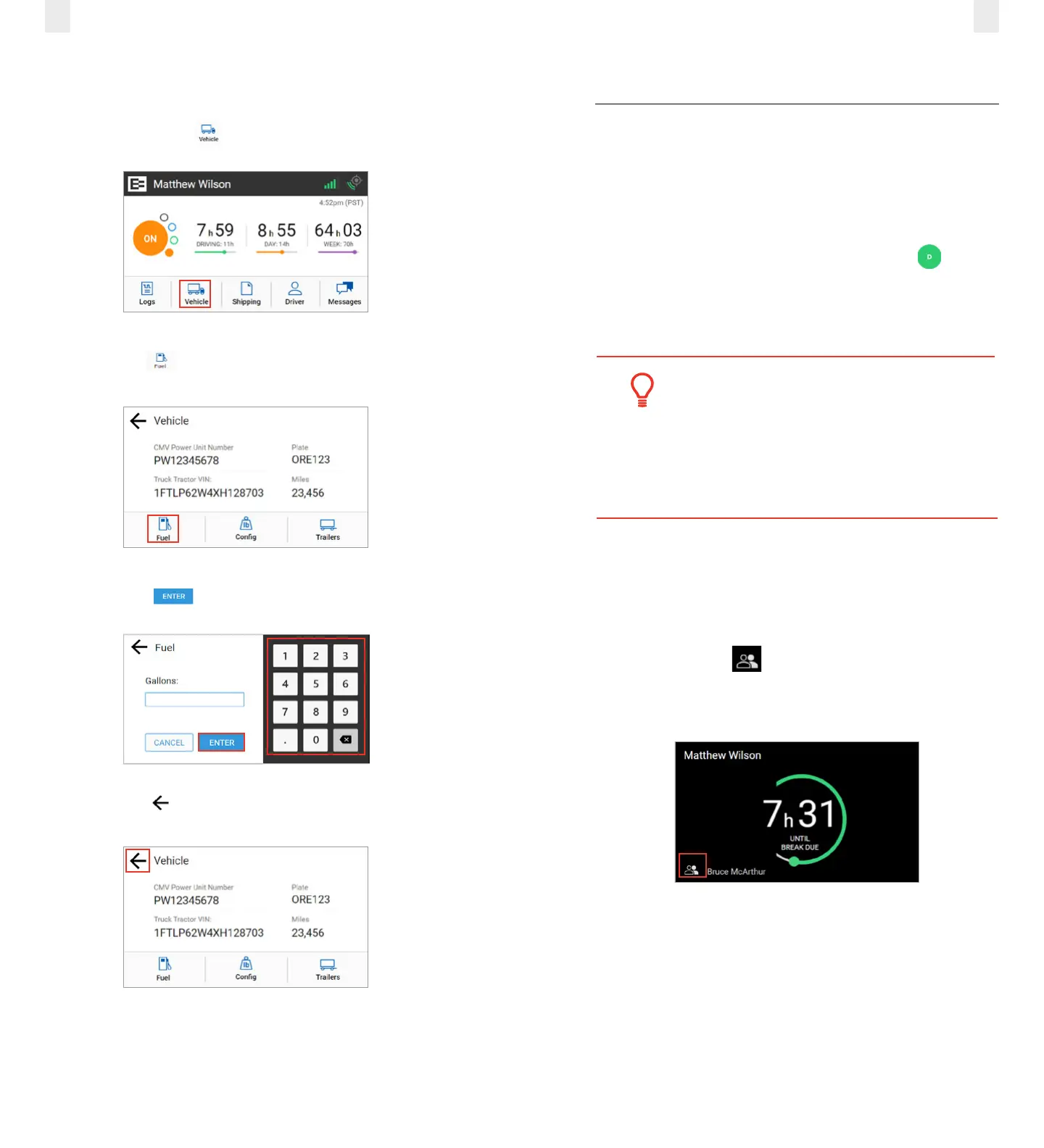
2.8 ENTERING FUEL GALLONS
Perform the following steps to enter fuel gallons.
1. Tap the Vehicle icon on the Home menu.
2. Tap the Fuel icon on the Vehicle screen.
3. Enter the number of gallons using the key pad.
4. Tap the Enter button.
5. Tap the Back arrow to return to the Home screen.



 To Next Page