3130
3. Tap the Accept button if you agree with the change
or tap the Reject button. The Carrier Edits screen
displays a confirmation message when completed. An
accepted change updates your log, and you have to re-
certify any aected days. See section 3.8, Certifying Your
Logs for more information.
4.1.2 Reviewing Suggested Edits from the Home Page
Perform the following steps to review motor carrier
suggestions if any new edits are made after you logged into
the EROAD ELD.
Tip:
An alert
appears on the Logs icon on the Home
screen when there are new edits to review.
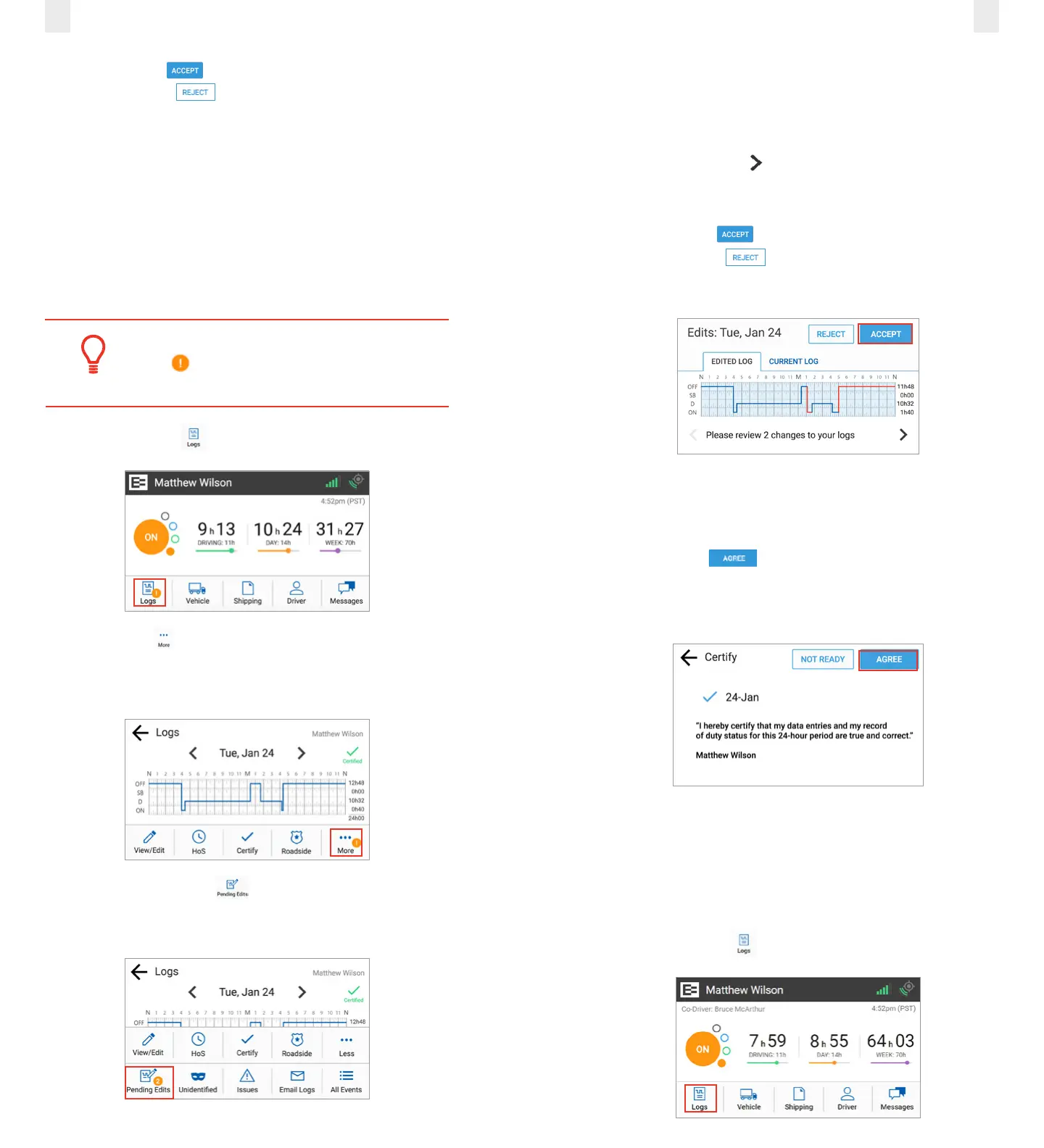
1. Tap the Logs icon on the Home screen.
2. Tap the More icon on the Logs screen. Notice the alert
icon in the following illustration. The Logs menu expands to
reveal a second row of menu options.
3. Tap the Pending/Edits icon on the Logs screen. The
EROAD ELD contacts Depot to display any pending log
edits.
A summary of the changes for the edited day are shown
under the Edited Tab when there are pending edits to review.
Changes on multiple days are arranged in order from the least
recent to the most recently edited day.
4. Tap the Right Arrow to see additional changes in the
logs.
5. Tap the Accept button if you agree with the change
or tap the Reject button. A confirmation message
appears when completed.
The Certify screen appears because you must re-certify the day
for the changes that you just accepted.
6. Tap the Agree button to re-certify the day. The
EROAD ELD then synchronizes with Depot. You are
prompted to review the next day if there are other edited
days.
4.2 SWAPPING DRIVING TIME
The driver and co-driver are responsible for setting status
changes. The EROAD ELD lets the co driver swap driving time
on a portion of the log if the active driver forgot to change
driving status. The co-driver performs the following steps to
swap driving time.
1. Tap the Logs icon on the Home screen.



 To Next Page