2524
Tip:
You cannot delete driving time that was not
manually entered.
3.7.3 Inserting a Missing Record
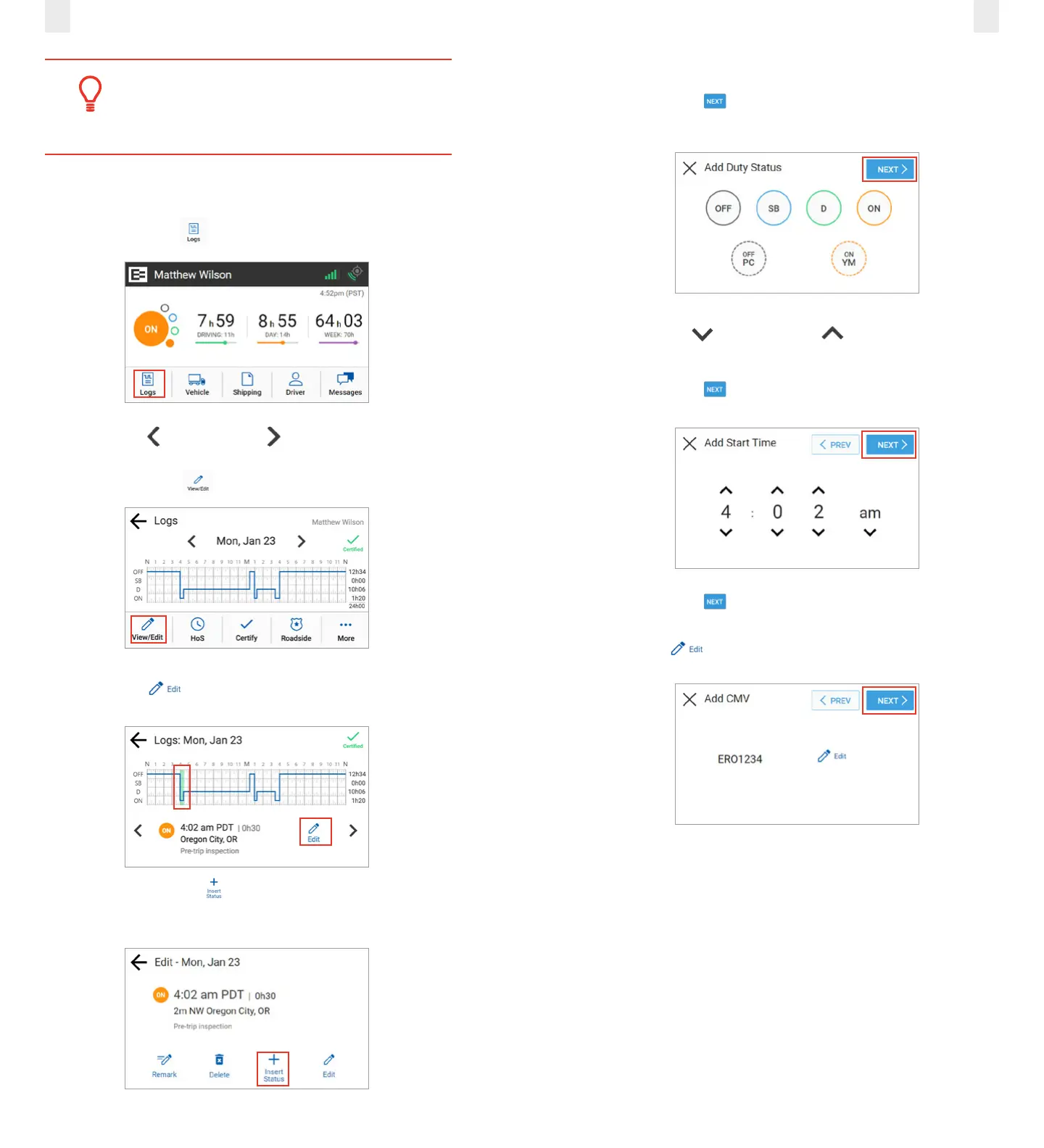
Perform the following steps to insert a missing record.
1. Tap the Logs icon on the Home screen.
2. Tap the Left arrow or Right arrow until you locate
the point in your logs where you want to insert a record.
3. Tap the View/Edit icon on the Logs screen.
4. Tap the Edit icon on the View/Edit screen. The Edit
Summary screen appears.
5. Tap the Insert Status icon. The Add Status screen
appears.
6. Tap the duty status that you want to insert.
7. Tap the Next button. The Add Start Time screen
appears.
8. Tap the Up arrow or Down arrow to set the hour,
minute, and AM or PM setting.
9. Tap the Next button. The Add CMV screen appears.
10. Tap the Next button to confirm the CMV. The Add
Location screen appears. Note: You have the option to tap
the Edit icon if a CMV change is needed.
11. Enter your location in the Add Location field.
Note: This is prepopulated with the current location, but
might require correction.



 To Next Page