76
2.3 CHANGING YOUR DUTY STATUS
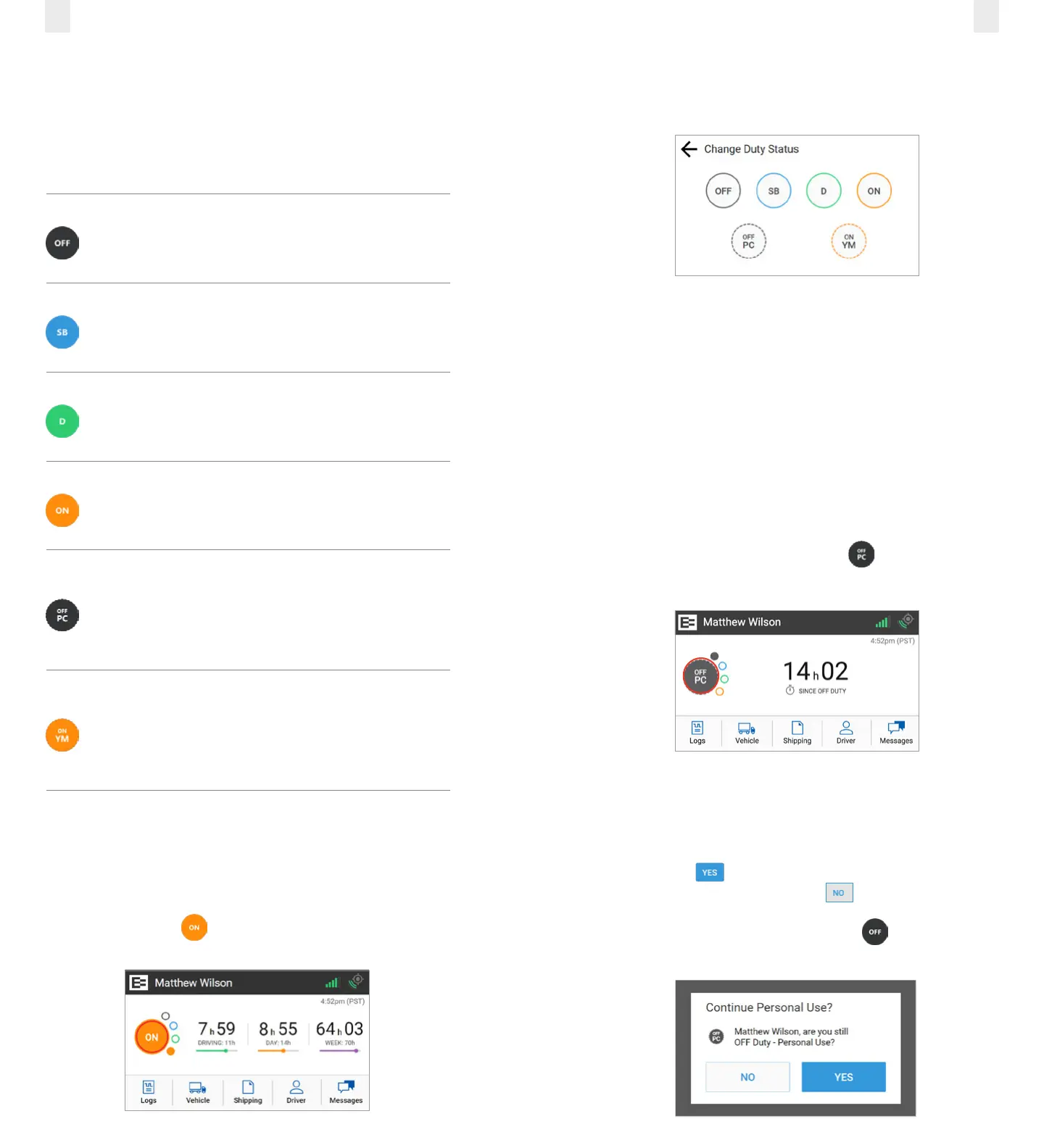
There are four standard duty status options on the EROAD
ELD. Your carrier might allow you to use the two optional
statuses. Each status is color-coded.
Duty Status Icon Description
OFF
O duty, you are not working.
SB
Sleeper berth; time spent in the berth.
D
Driving; your status changes to Driving
as soon as the vehicle is in motion (at
5 miles per hour).
ON
On duty, but you are not driving.
OFF PC
O duty/personal conveyance; you
are using the truck for personal
conveyance. This time counts as o
duty in your hours of service. (optional
per motor carrier)
ON YM
On duty/yard move; you are moving
around the yard or o public roads.
Your time counts as On Duty in your
hours of service. (optional per motor
carrier)
2.3.1 Duty Status
Perform the following steps to change your duty status.
1. Tap the large circle on the left side of the Home screen.
Your duty status is listed in the middle of the circle.
Example: Tap On The Change Duty Status screen
appears.
2. Tap the new duty status that you want. The Home screen
appears with the new duty status that you selected.
2.3.2 Personal Conveyance Status
This is a special driving category that might be provided by
your carrier. This duty status counts as O Duty in your hours
of service. You must add a remark in your logs when you use
this duty status.
Note: See section 3.7.1, Adding a Remark to learn more about
adding a remark.
1. Tap the large circle on the left side of the Home screen. The
Change Duty Status screen appears
(as shown in section 2.3.1., Duty Status above).
2. Tap the OFF - Personal Conveyance status. The Home
screen appears with the changed status.
The EROAD ELD is designed to prompt the driver about the
O - Personal Conveyance duty status if the vehicle is shut
o while in this status. The Continue Personal Use screen
displays when the ignition is activated in the vehicle.
3. Tap the Yes button to continue the OFF – Personal
Conveyance status or tap the No button to end this
duty status.
Note: Your duty status changes to OFF duty, if this
prompt is ignored



 To Next Page