T-IM114b P9/62
T20
Series
OPERATION TABLE
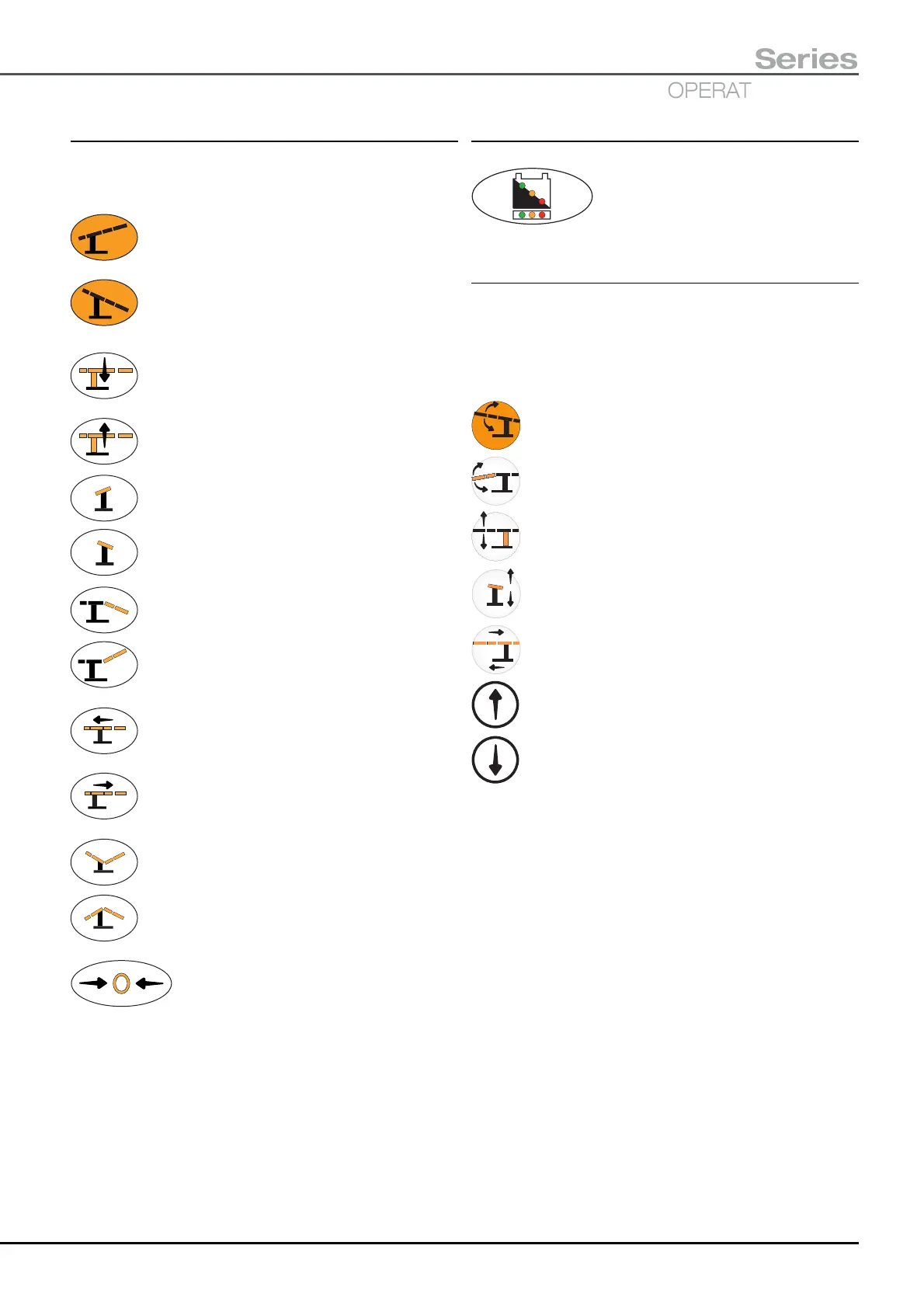
2.2.2 Handset button symbols
The following symbols are shown on the handset buttons
to indicate their function. Use of the handset is fully detailed
in section 5.3.3 of this manual.
Trendelenburg - Press to rotate tabletop in the
Trendelenburg (head down) direction.
Reverse Trendelenburg - Press to rotate
tabletop in the Reverse Trendelenburg (head
up) direction.
Height down - Press to move tabletop down.
Height up - Press to move tabletop up.
Tilt - Press to tilt tabletop down on the left (when
viewed from the long trunk end)
Tilt - Press to tilt tabletop down on the right
(when viewed from the long trunk end)
Break down - Press to move the break down
(i.e. short trunk moves down w.r.t. long trunk)
Break up - Press to move the break up
(i.e. short trunk moves up w.r.t. long trunk)
Traverse Cranially (towards the head) - Press
to move the tabletop Cranially (i.e. tabletop
moves in the long trunk direction).
Traverse Caudally (towards the feet) - Press
to move the tabletop Caudally (i.e. tabletop
moves in the short trunk direction).
Flexion - Press to move tabletop into Flexion.
Extension - Press to move table into Extension.
Return to Level - Press to return tabletop
to a preset level position.
2.2.3 Handset graphics
This graphic is shown on the corded
handset to indicate the battery charge
level for both the main and standby
batteries, see section 5.3.1.
2.2.4 Standby control panel button symbols
The following symbols are shown on the standby control
panel buttons, indicating the function they select. The
arrows (upper or lower) indicate the direction the selected
function will move, if the corresponding direction button
(i.e. upper or lower) is pressed, see section 5.3.4.
Button selects Trendelenburg function.
Button selects Break function.
Button selects Height function.
Button selects Tilt function.
Button selects Traverse function.
Direction button - Press button to obtain movement
indicated by upper arrow of function button.
Direction button - Press button to obtain movement
indicated by lower arrow of function button.


 To Next Page