15
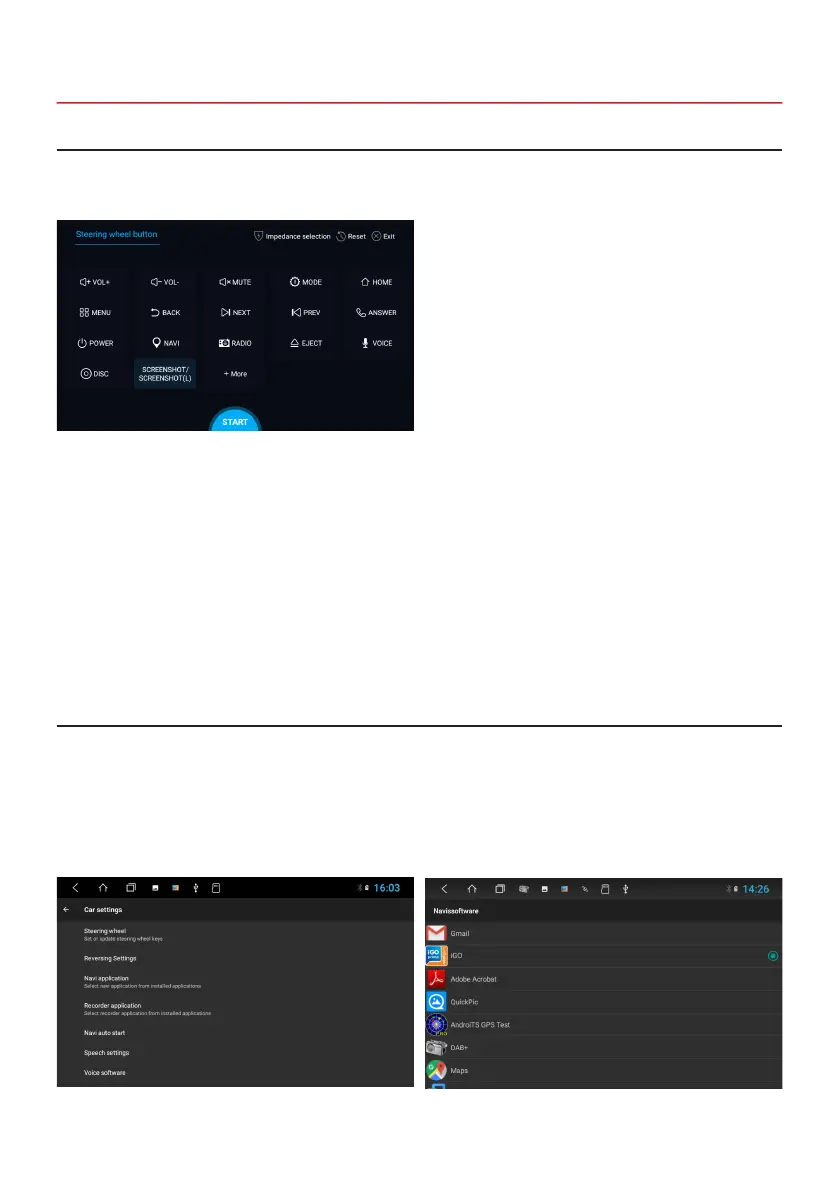
Here you can set the steering wheel control buttons and match them with the device.
Apps > Steering wheel button
2.4 STEERING WHEEL CONTROL
Note: some vehicles are not compatible. The device is CAN-BUS compatible, but you may need a vehicle-
specic adapter or module.
A. First to click “Start”
B. Click the buttons as you want
C. Click the corresponding button on the steering wheel. If the status displays successful, there will be
a change on the corresponding color on the screen.
D. Repeat step 1 and 2 until you have completed all the button settings on the steering wheel.
E. Exit the menu when the steering wheel control settings are completed.
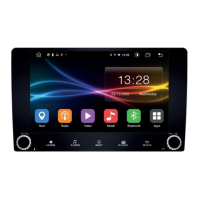
Select an appropriate navigation application, then it can be associated with the navigation button on the device and
navigation icon on the main screen.
Apps > Settings
> Car settings
> Navi application
> For example: Google Maps or iGO
Note: If you want the reset the steering wheel assignments and the re-learn the functions, press RESET and
repeat the procedure.
2.5 NAVIGATION


 To Next Page