28
In order to be able to fully use the Android ™ operating system, such as Google Maps, it is useful to connect the device
to the Internet via Wi-Fi. All you need is a smartphone with a mobile internet connection and the so-called hotspot
function.
> First, enable the Wi-Fi / Hotspot feature in your smartphone
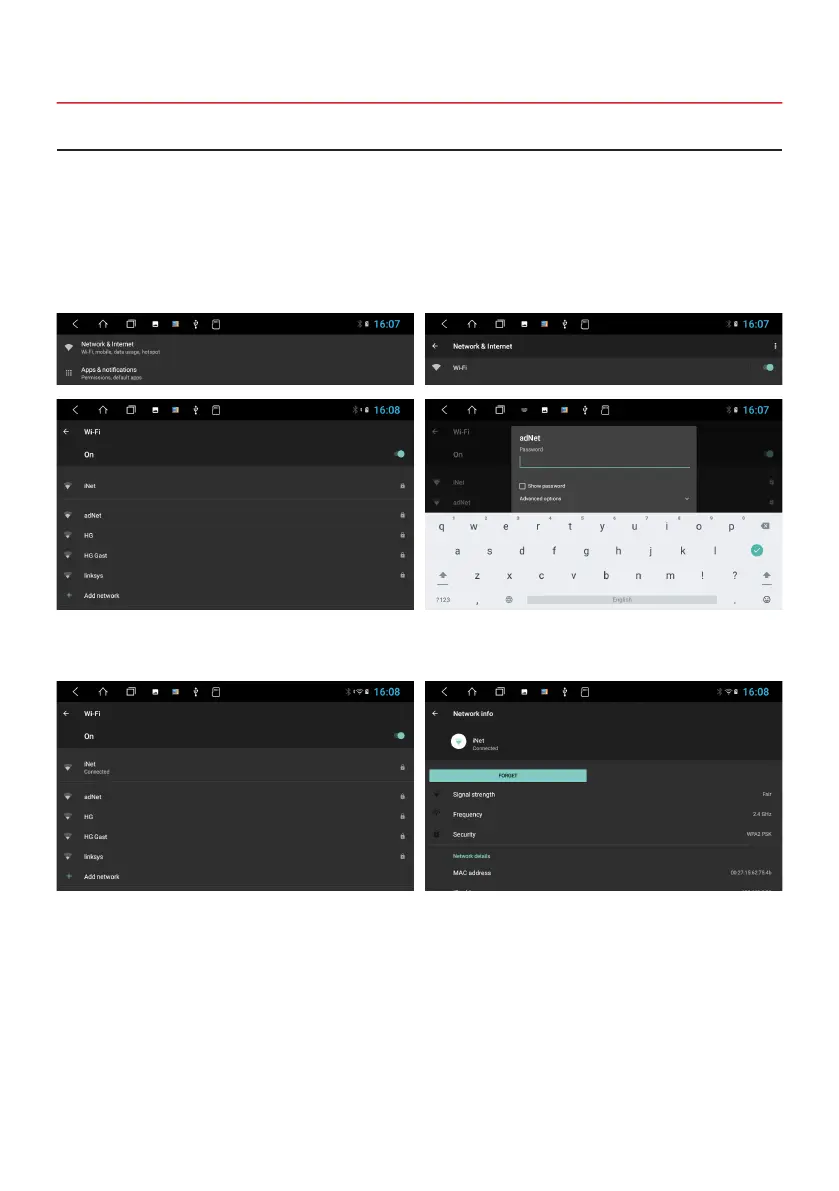
> Then open the Settings in the main menu.
> Click on Network & Internet
> Click on Wi-Fi
Click on your smartphone network in the list.
After successful entry, the device will be connected to your
smartphone after a few seconds.
Then enter its password. Then click on the green tick on
the right.
If you click on the network name again in the „Connected“
status, you will get some information about the currently
active internet connection. If you want to interrupt the
connection with your smartphone, click on „Forget“.
After that you have to enter the password again when
reconnecting.
2.17 INTERNET CONNECTION VIA WI-FI
Note: Depending on the operating system and type of smartphone, you may need to restart the Wi-Fi / Hotspot
feature if the connection with the device has been lost. It is therefore advisable to have the Wi-Fi / Hotspot
function permanently activated on your smartphone.



 To Next Page