17
Symbol Function
Click on TA to activate the TA function. This function enables the interruption of the media playback (audio player, CD,
DVD, etc.) for trafc announcements. After the announcement, the previous media playback starts again.
Click on AF to activate the AF function. This function enables the automatic switching of the receiving frequency when
leaving the reception range of a RDS radio station. The device then checks the reception quality and automatically
switches to a different frequency, when the same program in another reception area is also available.
The PTY function is a classication of radio stations in different categories. Each program of a RDS radio station is
classied categorically. After you have selected a category, the unit automatically searches for the next matching
radio station in this category.
Click on REG, it will only search the RDS stations with the same national area code (PI 8-Bit representation of the
high country area code) of the current RDS station. If REG is not highlighted, you can search RDS station while
ignoring the area code (excluded the high 8-Bit PI code)
2.6.1 RDS
Symbol Function
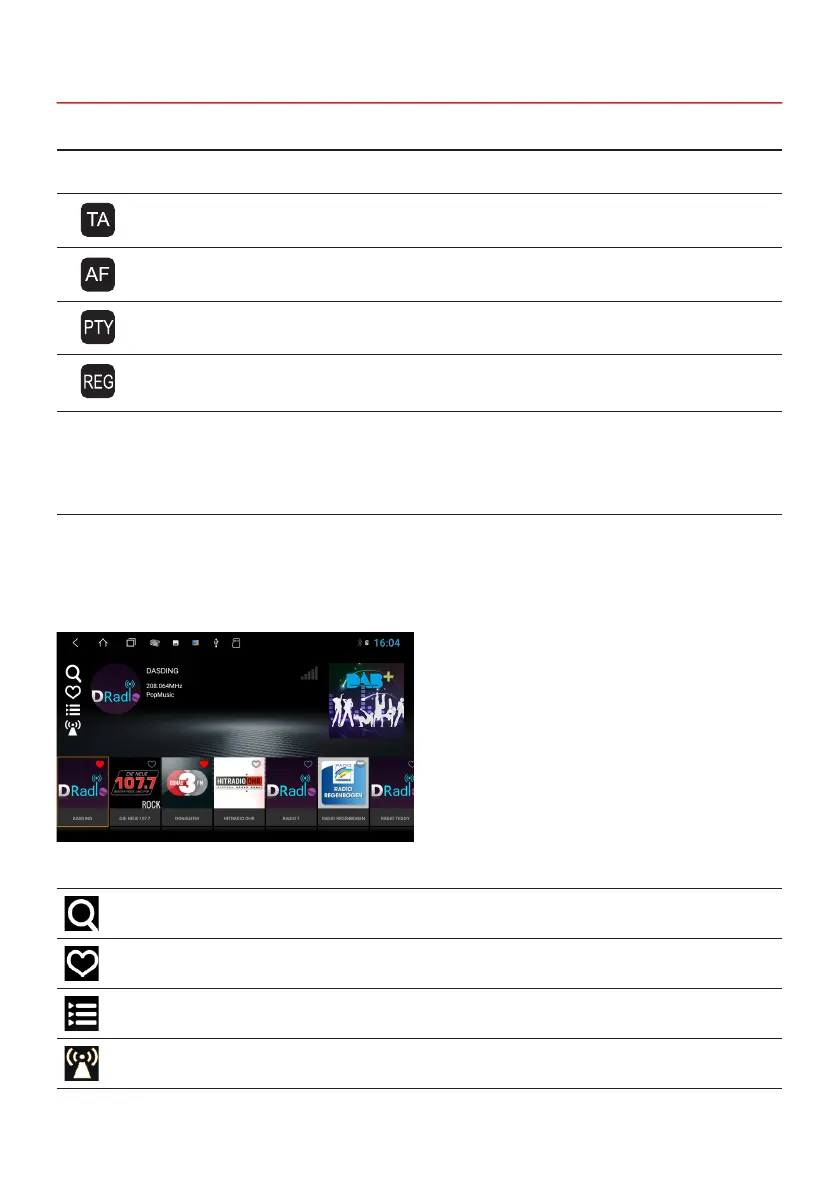
Click here to search for all available radio stations.
Click here if you only want to display your channels saved as favorites
Click here to set the program type such as classical, jazz, news, etc.
Click here to start the follow function for all DAB + stations
Click on DAB + in the Apps Menu.
> Swipe right or left to view all available channels.
> Select a station by clicking on it in the lower gray bar.
> When you tap the channel logo, you select this channel as a favorite.
2.7 DAB+ RADIO



 To Next Page