14 Source 4WRD Installation and User Manual
Focus the fixture
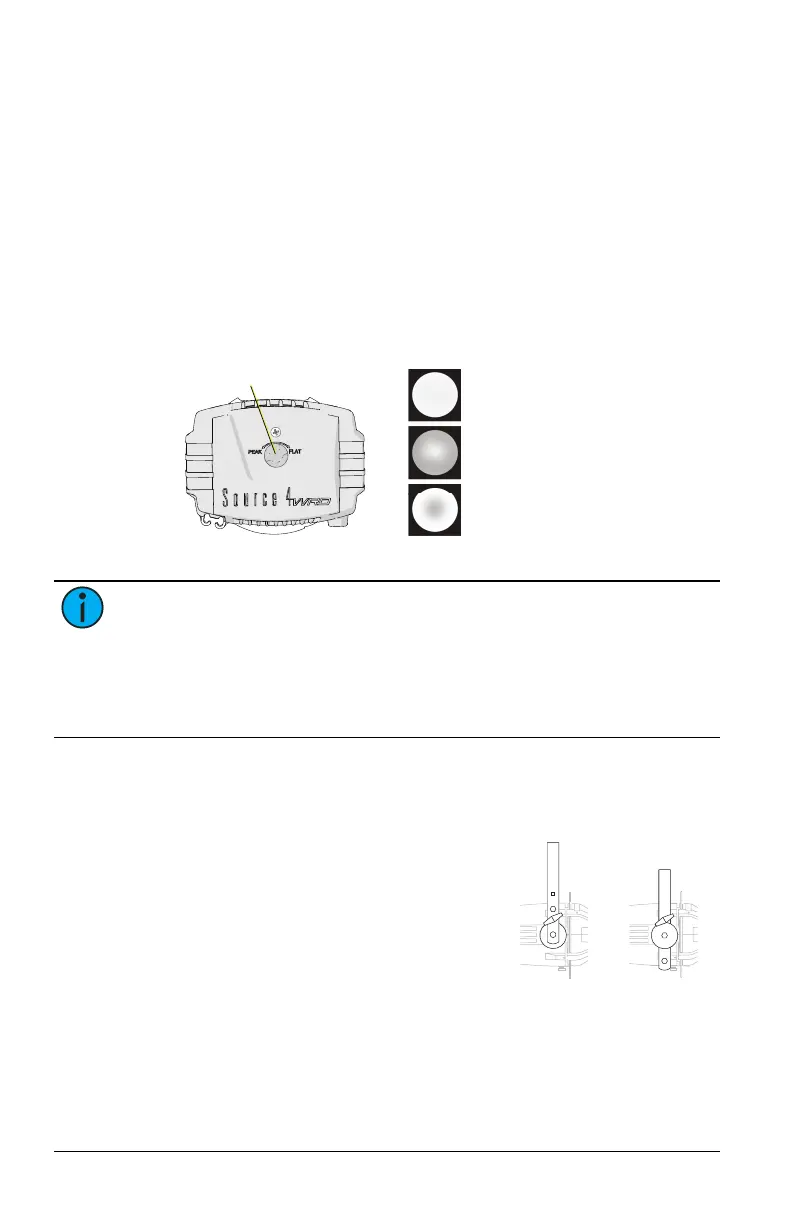
Set the Z-adjustment
Use the Z-adjustment knob located on the rear of the fixture to adjust
the field of the LED light for specific applications.
1. Turn on the fixture and aim it at a flat surface.
2. Slide the fixture barrel toward or away from the Source
4WRDLED to create a hard-edged beam of light.
3. Turn the knob toward PEAK or FLAT until you achieve the
desired field.
Ideal beam of
uniform light
Adjust toward PEAK to
blend overlapped beams
Adjust toward FLAT to
improve sharp focus
Z-adjustment knob
Note: The Source 4WRD PAR and PARNel optics are optimized for
PEAKfocus. When using the Source 4WRDLED in a Source 4WRD PAR
or PARNel Fixture Body, turn the Z-adjustment knob toward PEAK until
the knob becomes loose, and then tighten the Z-adjustment knob an
additional quarter turn. This sets the LED light source into the
appropriate position within the Source 4WRD PAR or PARNel fixture.
Adjust the yoke position
Change the height position
Low clearance
position
General use
position
1. Remove the yoke locking knobs,
washers, and hex bolts from either
side of the fixture.
2. Raise or lower the fixture to the
desired position within the yoke.
3. Reinstall the yoke’s hex bolts,
washers, and locking knobs.
4. Tighten the yoke knobs to secure
the yoke in position.













 To Next Page