Source 4WRD Installation and User Manual 7
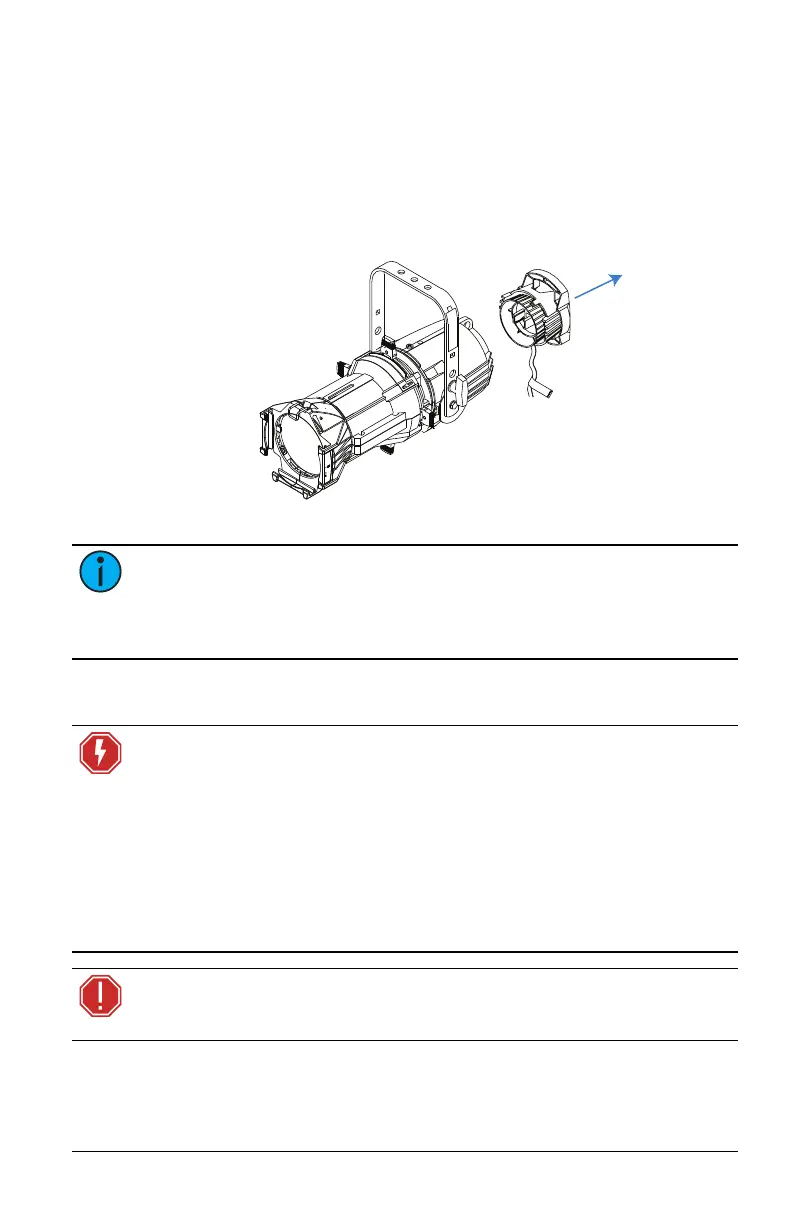
Remove incandescent lamp housing
1. Unplug the Source Four incandescent fixture and place it on a
flat, stable surface.
2. Loosen the brass thumb screw located above the beam
adjustment knob. The lamp housing is now loose.
3. Remove the lamp housing from the fixture body.
Note: The burner assembly is no longer needed. If you would like
ETC to recycle the burner assembly, contact ETC Technical Services
for more information. See Help from ETC Technical Services on
page2.
Install the Source 4WRD retrofit
WARNING: RISK OF FIRE OR ELECTRIC SHOCK! Install this kit only
onto luminaires that have the construction features and dimensions
shown in the images in this document and where the input rating of
the retrofit kit does not exceed the input rating of the luminaire.
AVERTISSEMENT : RISQUE D'INCENDIE OU DE DÉCHARGE
ÉLECTRIQUE! N’installer ce kit que sur les projecteurs qui ont les
caractéristiques de construction et les dimensions indiquées sur les
images de ce document et où la puissance électrique nécessaire à la
conversion n’excède pas la puissance maximale du projecteur.
WARNING: Do not make or alter any open holes in an enclosure of
wiring or electrical components during kit installation.













 To Next Page