EasyManua.ls Logo

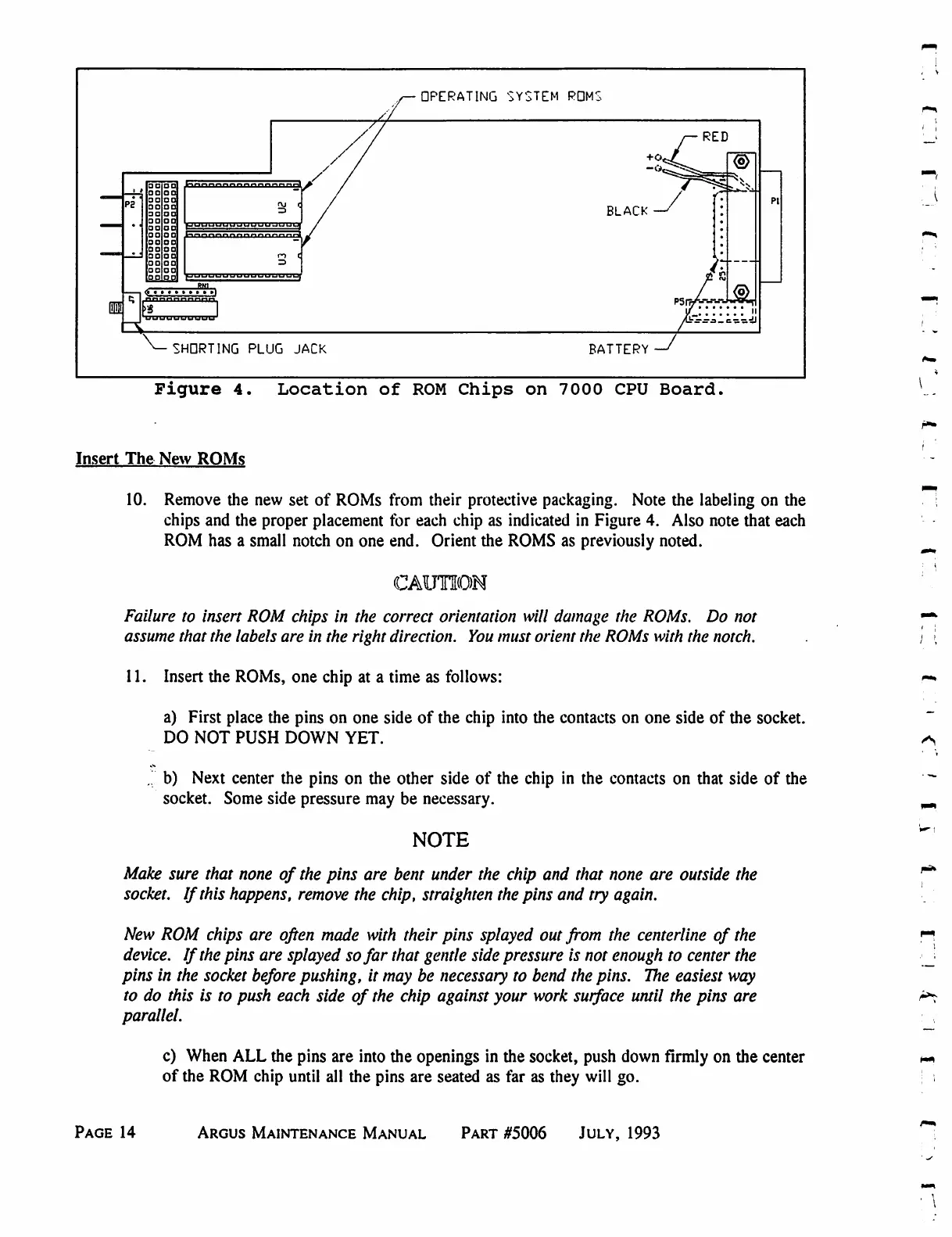
Eventide ARGUS 3000 - Location of ROM Chips on 7000 CPU Board

Eventide ARGUS 3000
68 pages
Print Icon
To Next Page IconTo Next Page
To Previous Page IconTo Previous Page
Loading...
OPERATING
SYSTEM
RDMS
RED
BLACK
SHDRTING
PLUG
JACK
BATTERY
Figure
4.
Location
of
ROM
Chips
on
7000
CPU
Board.
Insert
The
New
ROMs
10.
Remove
the
new
set
of
ROMs
from
their
protective
packaging.
Note
the
labeling
on
the
chips
and
the
proper
placement
for
each
chip
as
indicated
in
Figure
4.
Also
note
that
each
ROM
has
a small
notch
on
one
end.
Orient
the
ROMS
as
previously
noted.
CAUTION
Failure
to
insert
ROM
chips
in
the
correct
orientation
will
damage
the
ROMs.
Do
not
assume
that
the
labels
are
in
the
right
direction.
You
must
orient the
ROMs
with
the
notch.
11.
Insert
the
ROMs,
one
chip
at
a
time
as
follows:
a)
First
place
the
pins
on
one
side
of
the
chip
into
the
contacts
on
one
side
of
the
socket.
DO
NOT
PUSH
DOWN
YET.
.
b)
Next
center
the
pins
on
the
other
side
of
the
chip
in
the
contacts
on
that
side
of
the
socket.
Some
side
pressure
may
be
necessary.
NOTE
Make
sure
that
none
of
the
pins
are bent
under
the
chip
and
that
none
are
outside
the
socket.
If
this
happens,
remove
the
chip,
straighten
the
pins
and
try
again.
New
ROM
chips
are
often
made
with
their
pins
splayed
out
from
the
centerline
of
the
device.
If
the
pins
are
splayed so
far
that
gentle
side
pressure
is
not
enough
to
center
the
pins
in
the
socket
before
pushing,
it
may
be
necessary
to
bend
the
pins.
The
easiest
way
to
do
this
is
to
push
each
side
of
the
chip
against
your
work
surface
until
the
pins
are
parallel.
c)
When
ALL
the
pins are
into
the
openings
in
the
socket,
push
down
firmly
on
the
center
of
the
ROM
chip
until
all
the
pins
are
seated
as
far
as
they
will
go.
Page
14
Argus
Maintenance
Manual
Part
#5006
July,
1993

Table of Contents

Related product manuals