EasyManua.ls Logo

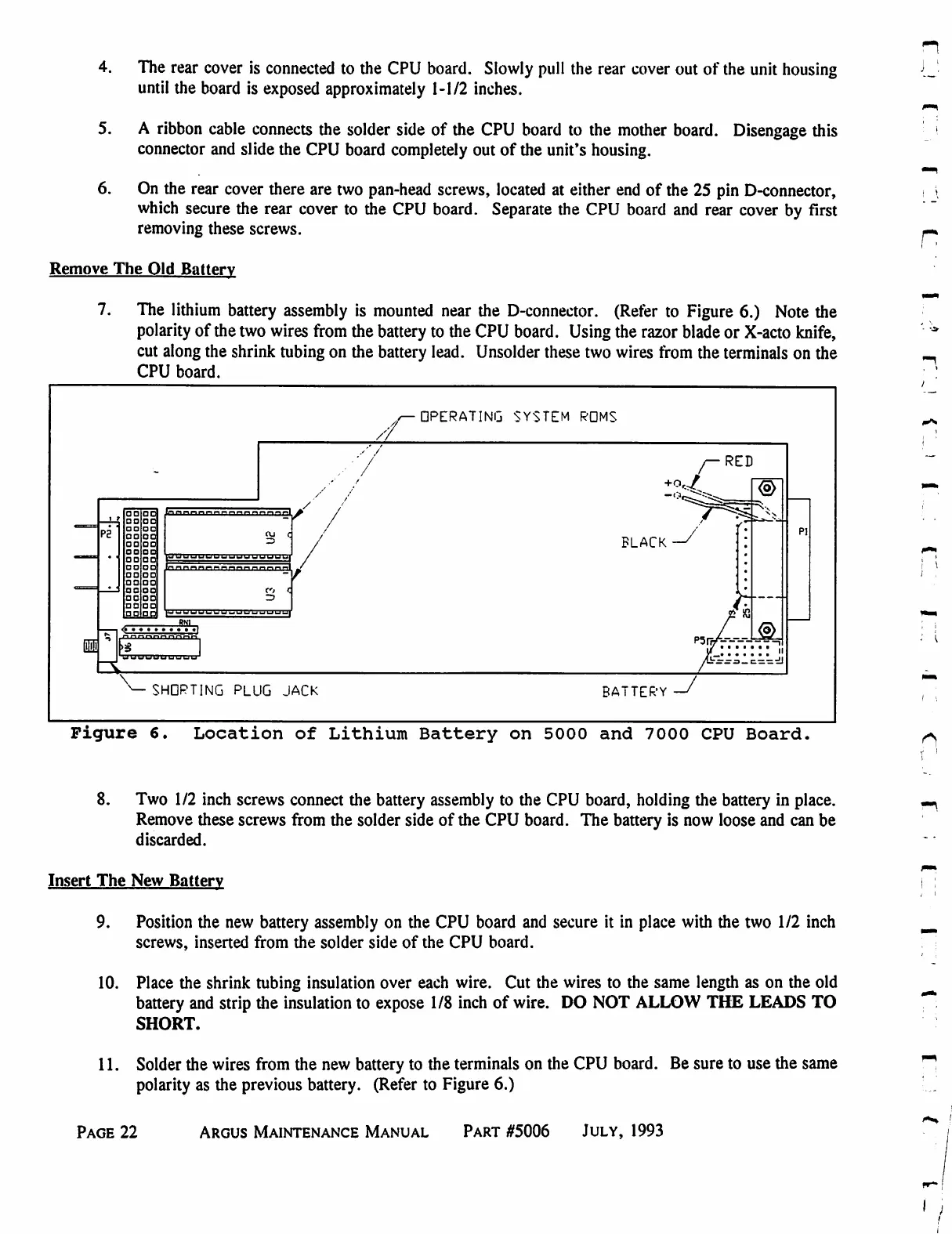
Eventide ARGUS 3000 - Location of Lithium Battery on 5000 and 7000 CPU Boards

Eventide ARGUS 3000
68 pages
Print Icon
To Next Page IconTo Next Page
To Previous Page IconTo Previous Page
Loading...
4.
The
rear
cover
is
connected
to
the
CPU
board.
Slowly
pull
the
rear
cover
out
of
the
unit
housing
until
the
board
is
exposed
approximately
1-1/2
inches.
5.
A
ribbon
cable
connects
the
solder
side
of
the
CPU
board
to
the
mother
board.
Disengage
this
connector
and
slide
the
CPU
board
completely
out
of
the
unit's
housing.
6.
On
the
rear
cover
there
are
two
pan-head
screws,
located
at
either
end
of
the
25
pin
D-connector,
which
secure
the
rear
cover
to
the
CPU
board.
Separate
the
CPU
board
and
rear
cover
by
first
removing
these
screws.
Remove
The
Old
Battery
7.
The
lithium
battery
assembly
is
mounted
near
the
D-connector.
(Refer
to
Figure
6.)
Note
the
polarity
of
the
two
wires
from
the
battery
to
the
CPU
board.
Using
the
razor
blade
or
X-acto
knife,
cut
along
the
shrink
tubing
on
the
battery
lead.
Unsolder
these
two
wires
from
the terminals
on
the
CPU
board.
OPERATING
SYSTEM
ROMS
'
/
RED
00 OO
O
00
OO OO
OO OO
OO
OO
OO OO
OO DO
OO
OO
OO OD
OO OO
OO
OO
DO
OO
DO OD
OO
OD
BLACK
fr—
SHDPTING
PLUG
JACK
BATTERY
Figure
6.
Location
of
Lithium
Battery
on
5000
and
7000
CPU
Board.
8.
Two
1/2
inch
screws
connect
the
battery
assembly
to
the
CPU
board,
holding
the
battery
in
place.
Remove
these
screws
from
the
solder
side
of
the
CPU
board.
The
battery
is
now
loose
and
can
be
discarded.
Insert
The
New
Battery
9.
Position
the
new
battery
assembly
on
the
CPU
board
and
secure
it
in
place
with
the
two
1/2
inch
screws,
inserted
from
the
solder
side
of
the
CPU
board.
10.
Place
the
shrink
tubing
insulation
over
each
wire.
Cut
the
wires
to
the
same
length
as
on
the
old
battery
and
strip
the
insulation
to
expose
1/8
inch
of
wire.
DO
NOT
ALLOW
THE
LEADS
TO
SHORT.
11.
Solder
the
wires
from
the
new
battery
to
the terminals
on
the
CPU
board.
Be
sure
to
use
the
same
polarity
as
the
previous
battery.
(Refer
to
Figure
6.)
r
Page
22
Argus
Maintenance
Manual
Part
#5006
July,
1993

Table of Contents

Related product manuals