EasyManua.ls Logo

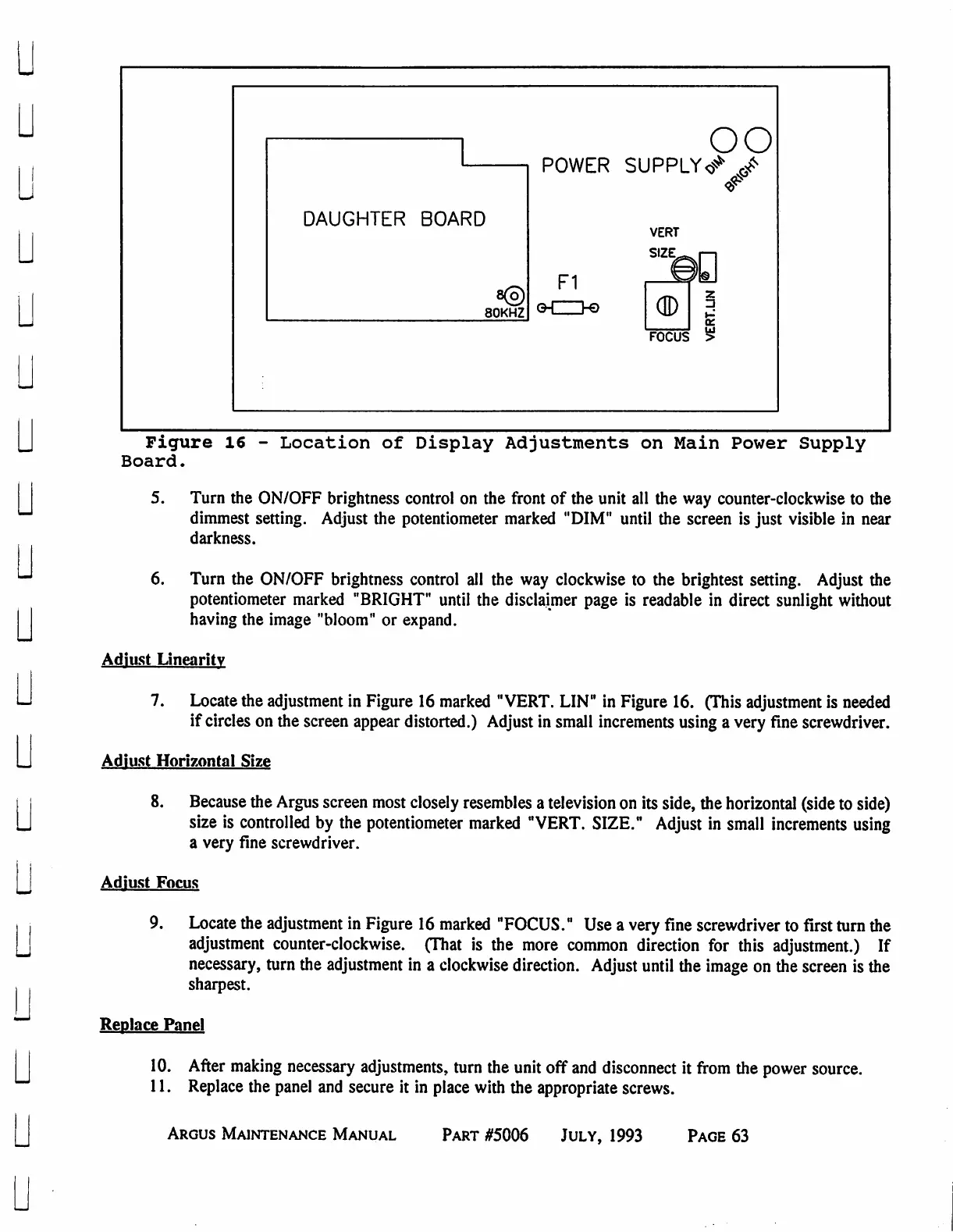
Eventide ARGUS 3000 - Location of Display Adjustments on Main Power Supply Board

Eventide ARGUS 3000
68 pages
Print Icon
To Previous Page IconTo Previous Page
Loading...
u
u
u
DAUGHTER
BOARD
80KHZ
oo
POWER
SUPPLY«*
J>
VERT
SIZE.,
F1
G-CZD-©
($)
I
FOCUS
Figure
16
-
Location
of
Display
Adjustments
on
Main
Power
Supply
Board.
5.
Turn
the
ON/OFF
brightness
control
on
the
front
of
the
unit
all
the
way
counter-clockwise
to
the
dimmest
setting.
Adjust
the
potentiometer
marked
"DIM"
until
the
screen
is
just
visible
in
near
darkness.
6.
Turn
the
ON/OFF
brightness
control
all
the
way
clockwise
to
the
brightest
setting.
Adjust
the
potentiometer
marked
"BRIGHT"
until
the
disclaimer
page
is
readable
in
direct
sunlight
without
having
the
image "bloom"
or
expand.
Adjust
Linearity
7.
Locate
the
adjustment
in
Figure
16
marked
"VERT.
LIN"
in
Figure
16.
(This
adjustment
is
needed
if
circles
on
the
screen
appear
distorted.)
Adjust
in
small
increments using
a
very
fine
screwdriver.
Adjust
Horizontal
Size
8.
Because
the
Argus
screen
most
closely
resembles
a
television
on
its
side,
the
horizontal
(side
to
side)
size
is
controlled
by
the
potentiometer
marked
"VERT.
SIZE."
Adjust
in
small
increments
using
a
very
fine
screwdriver.
Adjust
Focus
9.
Locate
the
adjustment
in
Figure
16
marked
"FOCUS."
Use
a
very
fine
screwdriver
to
first
turn
the
adjustment
counter-clockwise.
(That
is
the
more
common
direction
for
this
adjustment.)
If
necessary,
turn the
adjustment
in
a
clockwise
direction.
Adjust
until
the
image
on
the
screen
is
the
sharpest.
Replace
Panel
10.
After
making
necessary
adjustments,
turn
the
unit
off
and
disconnect
it
from
the
power
source.
11.
Replace
the
panel
and
secure
it
in
place
with
the
appropriate
screws.
Argus
Maintenance
Manual
Part
#5006
July,
1993
Page
63

Table of Contents

Related product manuals