EasyManua.ls Logo

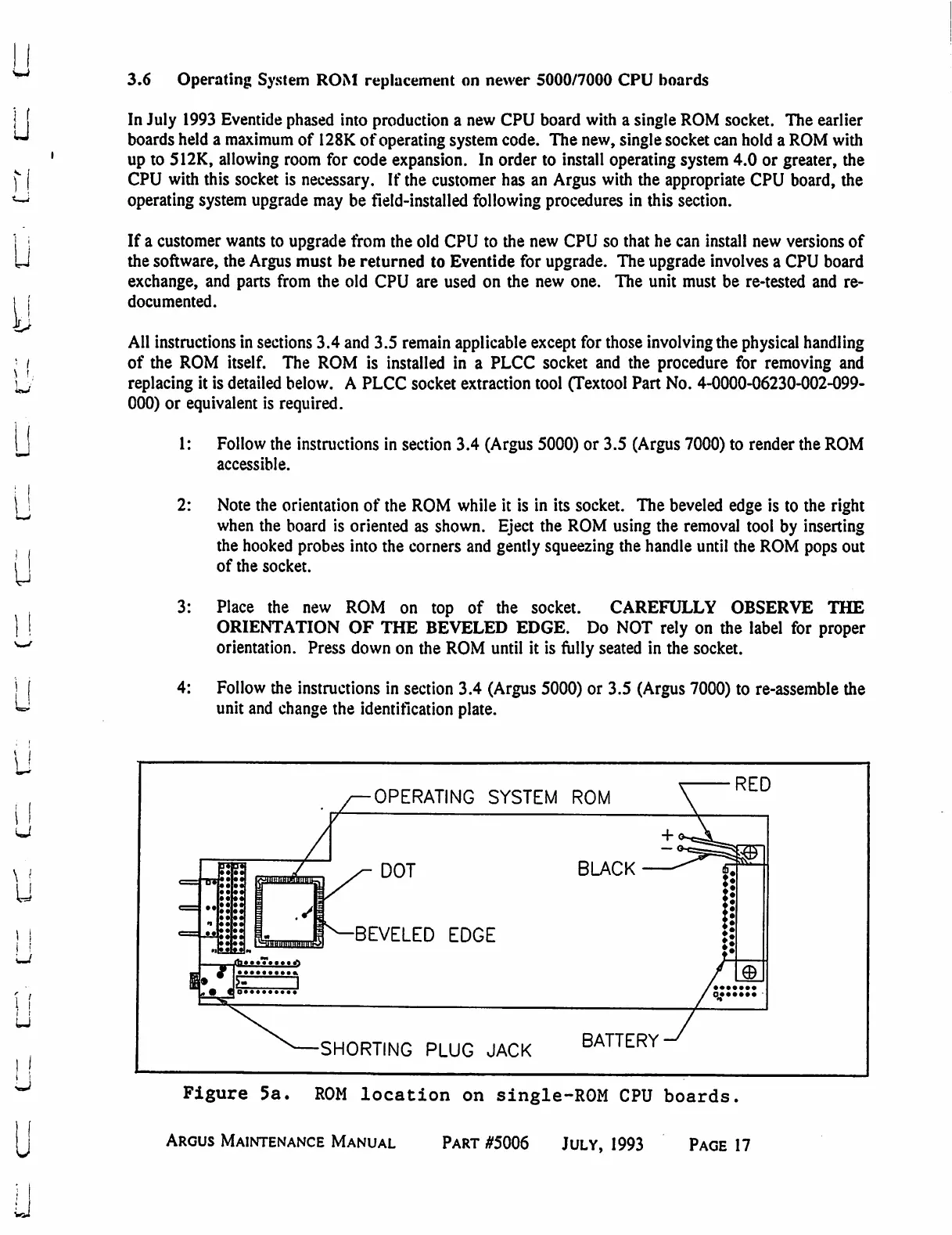
Eventide ARGUS 3000 - ROM Replacement on Single-ROM CPU Hoards; ROM Location on Single-ROM CPU Board

Eventide ARGUS 3000
68 pages
Print Icon
To Next Page IconTo Next Page
To Previous Page IconTo Previous Page
Loading...
3.6
Operating
System
ROM
replacement
on
newer
5000/7000
CPU
boards
u
U
y
In
July
1993
Eventide
phased
into
production
a
new
CPU
board
with
a
single
ROM
socket.
The
earlier
boards
held
a
maximum
of
128K
of
operating
system
code.
The
new,
single
socket
can
hold
a
ROM
with
up
to
512K,
allowing
room
for
code
expansion.
In
order
to
install
operating
system
4.0
or
greater,
the
CPU
with
this
socket
is
necessary.
If
the
customer
has
an
Argus
with
the
appropriate
CPU
board,
the
operating
system
upgrade
may
be
field-installed
following
procedures
in
this
section.
If
a
customer
wants
to
upgrade
from
the
old
CPU
to
the
new
CPU
so
that
he
can
install
new
versions
of
the
software,
the
Argus
must
be
returned
to
Eventide
for
upgrade.
The
upgrade
involves
a
CPU
board
exchange,
and
parts
from
the
old
CPU
are
used
on
the
new
one.
The
unit
must be
re-tested
and
re-
documented.
All
instructions
in
sections
3.4
and
3.5
remain
applicable
except
for
those
involving
the
physical
handling
of
the
ROM
itself.
The
ROM
is
installed
in
a
PLCC
socket
and
the
procedure
for
removing
and
replacing
it
is
detailed
below.
A
PLCC
socket
extraction
tool
(Textool
Part
No.
4-0000-06230-002-099-
000)
or
equivalent
is
required.
1:
Follow
the
instructions
in
section
3.4
(Argus
5000)
or
3.5
(Argus 7000)
to
render
the
ROM
accessible.
2:
3:
4:
Note
the
orientation
of
the
ROM
while
it
is
in
its
socket.
The
beveled
edge
is
to
the
right
when
the
board
is
oriented
as
shown.
Eject the
ROM
using
the
removal
tool
by
inserting
the
hooked
probes
into
the
corners
and
gently
squeezing
the
handle
until
the
ROM
pops
out
of
the
socket.
Place
the
new
ROM
on
top
of
the
socket.
CAREFULLY
OBSERVE
THE
ORIENTATION
OF
THE
BEVELED
EDGE.
Do
NOT
rely
on
the
label
for
proper
orientation.
Press
down
on
the
ROM
until
it
is
fully
seated
in
the
socket.
Follow
the
instructions
in
section
3.4
(Argus
5000)
or 3.5
(Argus
7000)
to
re-assemble
the
unit
and
change
the
identification
plate.
U
u
if
U
OPERATING
SYSTEM
ROM
RED
DOT
■BEVELED
EDGE
BLACK
SHORTING
PLUG
JACK
BATTERY
Figure
5a.
ROM
location
on
single-ROM
CPU
boards.
Argus
Maintenance
Manual
Part
#5006
July,
1993
Page
17

Table of Contents

Related product manuals