EasyManua.ls Logo

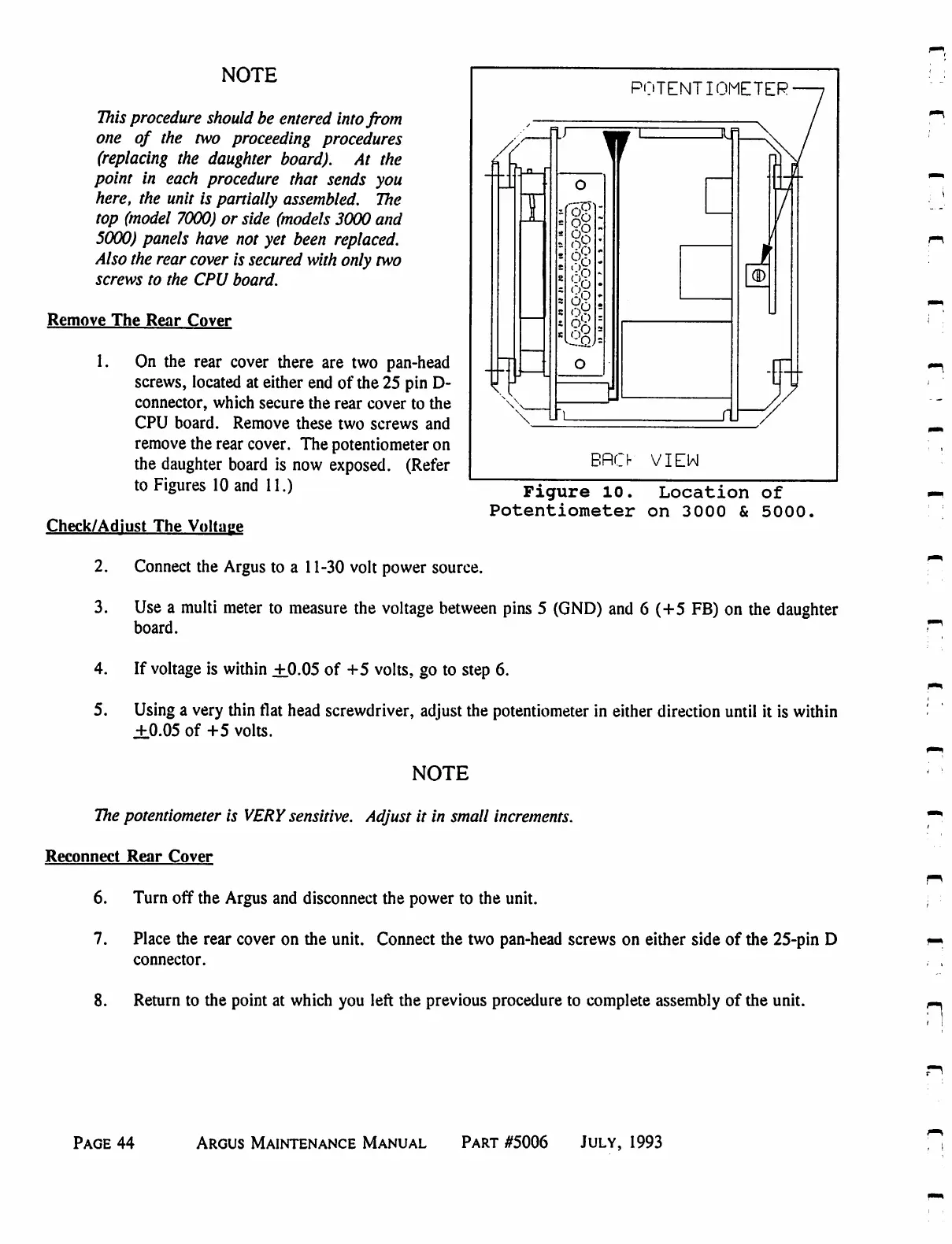
Eventide ARGUS 3000 - Location of Potentiometer on 3000 and 5000

Eventide ARGUS 3000
68 pages
Print Icon
To Next Page IconTo Next Page
To Previous Page IconTo Previous Page
Loading...
NOTE
This
procedure
should
be
entered
into
from
one
of
the
two
proceeding
procedures
(replacing
the
daughter
board).
At
the
point
in
each
procedure
that
sends
you
here,
the
unit
is
partially
assembled.
The
top
(model
7000)
or
side
(models
3000
and
5000)
panels
have
not
yet
been
replaced.
Also
the
rear
cover
is
secured
with
only
two
screws
to
the
CPU
board.
Remove
The
Rear
Cover
1.
On
the
rear
cover
there
are
two
pan-head
screws,
located
at
either
end
of
the
25
pin
D-
connector,
which
secure
the
rear
cover
to
the
CPU
board.
Remove
these
two
screws
and
remove
the
rear
cover.
The
potentiometer
on
the
daughter
board
is
now
exposed.
(Refer
to
Figures
10
and
11.)
POTENTIOMETER
1
r
BRO
VI
EN
Figure
10.
Location
of
Potentiometer
on 3000
&
5000.
Check/Adiust
The
Voltage
2.
Connect
the
Argus
to
a
11-30
volt
power
source.
3.
Use
a
multi
meter
to
measure
the
voltage
between
pins
5
(GND)
and
6
(+5
FB)
on
the
daughter
board.
4.
If
voltage
is
within
+0.05
of
+5
volts,
go
to
step
6.
5.
Using
a
very
thin
flat
head
screwdriver,
adjust
the
potentiometer
in
either
direction
until
it
is
within
±0.05
of
+5
volts.
NOTE
The
potentiometer
is
VERY
sensitive.
Adjust
it
in
small
increments.
Reconnect
Rear
Cover
6.
Turn
off the
Argus
and
disconnect
the
power
to
the
unit.
7.
Place
the
rear
cover
on
the
unit.
Connect
the
two
pan-head
screws
on
either
side
of
the
25-pin
D
connector.
8.
Return
to
the
point
at
which
you
left
the
previous
procedure
to
complete
assembly
of
the
unit.
Page
44
Argus
Maintenance
Manual
Part
#5006
July,
1993

Table of Contents

Related product manuals