EasyManua.ls Logo

Eventide ARGUS 3000 - Page 25

Eventide ARGUS 3000
68 pages
Print Icon
To Next Page IconTo Next Page
To Previous Page IconTo Previous Page
Loading...
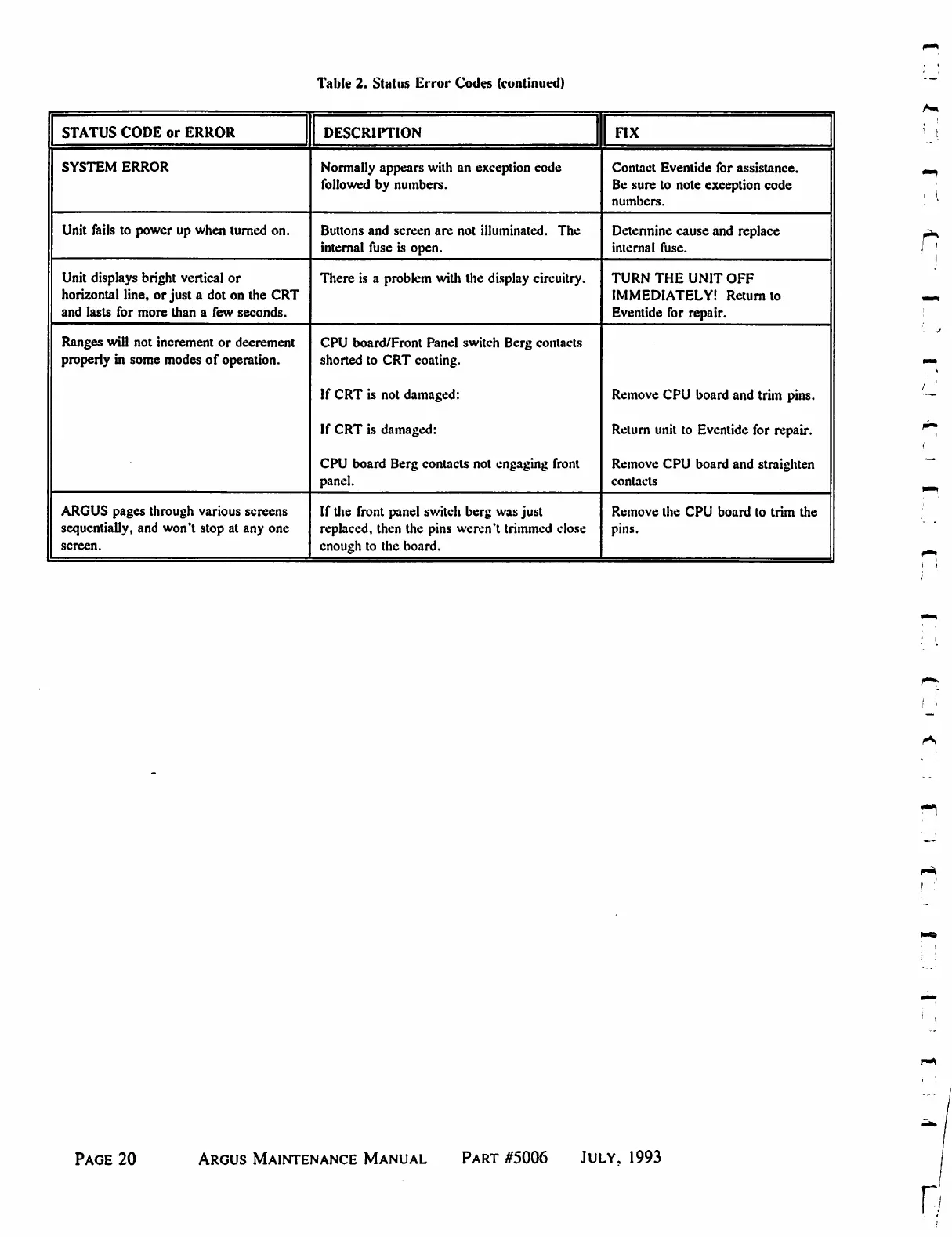
Table
2.
Status
Error
Codes
(continued)
STATUS
CODE
or
ERROR
SYSTEM
ERROR
Unit
fails
to
power
up
when
turned
on.
Unit
displays
bright
vertical
or
horizontal
line,
or
just
a
dot
on
the
CRT
and
lasts
for
more
than
a
few
seconds.
Ranges
will
not
increment
or
decrement
properly
in
some
modes
of
operation.
ARGUS
pages
through
various
screens
sequentially,
and
won't
stop
at
any
one
screen.
DESCRIPTION
Normally
appears
with
an
exception
code
followed
by
numbers.
Buttons
and
screen
are
not
illuminated.
The
internal
fuse
is
open.
There
is
a
problem
with
the
display
circuitry.
CPU
board/Front
Panel
switch
Berg
contacts
shorted
to
CRT
coating.
If
CRT
is
not
damaged:
If
CRT
is
damaged:
CPU
board
Berg
contacts
not
engaging
front
panel.
If
the
front
panel
switch
berg
was
just
replaced,
then
the
pins
weren't
trimmed
close
enough
to
the
board.
FIX
Contact
Eventide
for
assistance.
Be
sure
to
note
exception
code
numbers.
Determine
cause
and
replace
internal
fuse.
TURN
THE
UNIT
OFF
IMMEDIATELY!
Return
to
Eventide
for
repair.
Remove
CPU
board
and
trim
pins.
Return
unit
to
Eventide
for
repair.
Remove
CPU
board
and
straighten
contacts
Remove
the
CPU
board
to
trim
the
pins.
Page
20
Argus
Maintenance
Manual
Part
#5006
July,
1993
n

Table of Contents

Related product manuals