EasyManua.ls Logo

Eventide ARGUS 5000 - Page 119

Eventide ARGUS 5000
237 pages
Print Icon
To Next Page IconTo Next Page
To Previous Page IconTo Previous Page
Loading...
Getting
INFOrmation
on
SELected
Facilities
To
get
information
about
any
on-screen
facility,
you
first
SELect
it
as
described
previously.
You
then
press
INFOrmation,
either
by
hitting
AUX
and
ENR,
or
by
hitting
the
remote
INFO
switch
if
you
have
one
installed
in
your
aircraft.
A
text
infomiation
page
will
replace
the
map
display.
The
navigation
infomiation
in
the
upper
and
lower
windows
remains
present
and
continues
to
be
updated
even
though
the
map
is
not
visible.
Depending
upon
the
type
of
facility,
different
information
is
displayed.
248°
BRG
TK
263.6
NM
088'
229
kts
01:09=03
SRP-v
SALT
RIVER
N
33°
25.88
W
111°
53.28
'--•
1185'MSL
H°E
VORTAC
HIGH
FREQ:
115.60
MHZ
CHAN:
103X
RAD:
259V6.1NM
ALBUQUERQUE
ARTCC
125.40
MHZ
132.35
MHZ
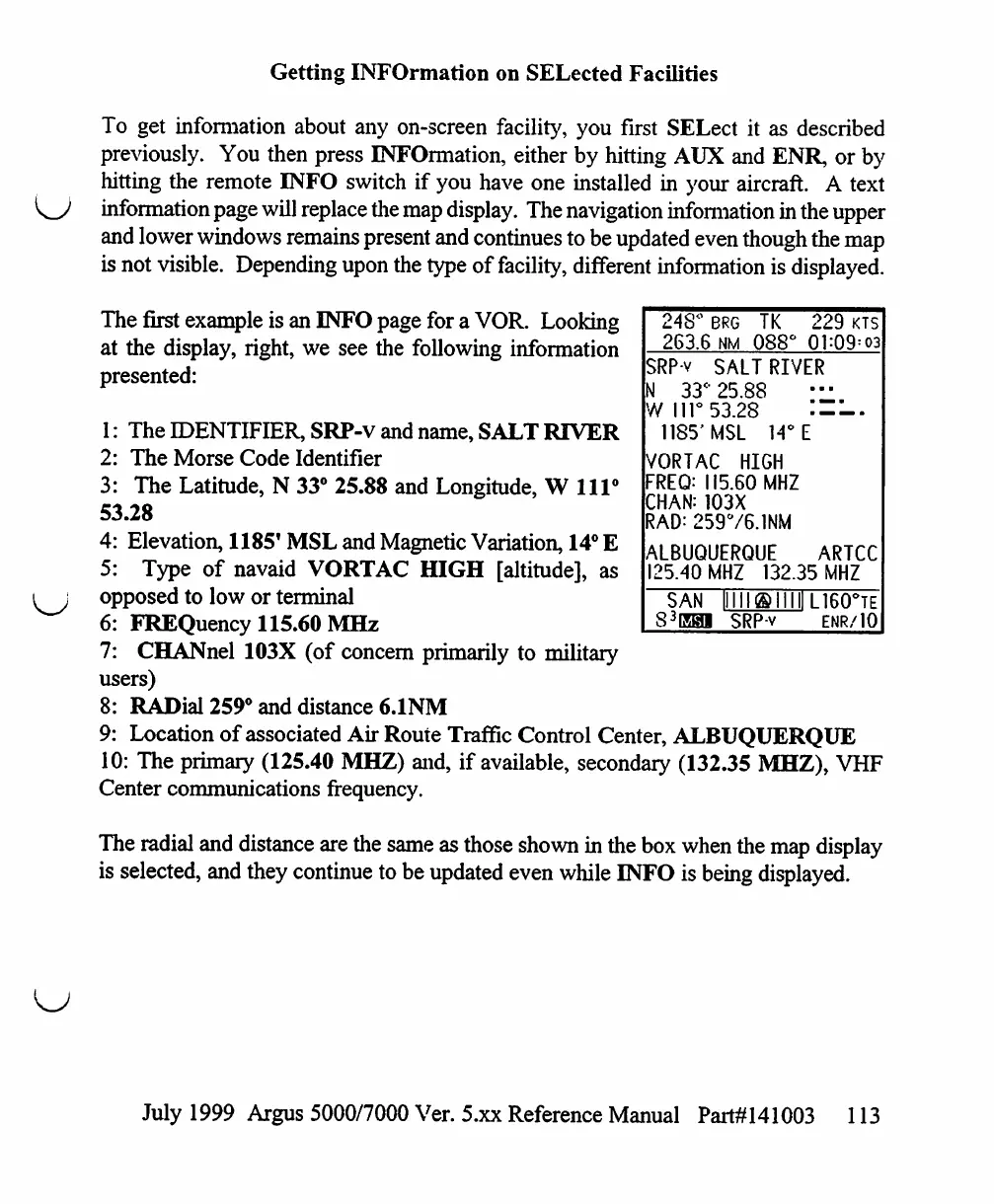
The
first
example
is
an
INFO
page
for
a
VOR.
Looking
at
the
display,
right,
we
see
the
following
information
presented:
1:
The
IDENTIFIER,
SRP-V
and
name,
SALT
RIVER
2:
The
Morse
Code
Identifier
3:
The
Latitude,
N
33°
25.88
and
Longitude,
Will0
53.28
4:
Elevation,
1185'
MSL
and
Magnetic
Variation,
14°
E
5:
Type
of
navaid
VORTAC
HIGH
[altitude],
as
opposed
to
low
or
terminal
6:
FREQuency
115.60
MHz
7:
CHANnel
103X
(of
concern
primarily
to
military
users)
8:
RADial
259°
and
distance
6.1NM
9:
Location
of
associated
Air
Route
Traffic
Control
Center,
ALBUQUERQUE
10:
The
primary
(125.40
MHZ)
and,
if
available,
secondary
(132.35
MHZ),
VHF
Center
communications
frequency.
The
radial
and
distance
are
the
same
as
those
shown
in
the
box
when
the
map
display
is
selected,
and
they
continue
to
be
updated
even
while
INFO
is
being
displayed.
SAN
S3EH1
SRP-v
L160°TE
ENR/10
July
1999
Argus
5000/7000
Ver. 5.xx
Reference
Manual
Part#141003
113

Table of Contents

Other manuals for Eventide ARGUS 5000

Related product manuals