EasyManua.ls Logo

Eventide ARGUS 5000 - Argus Front Panel Controls and Indicators

Eventide ARGUS 5000
237 pages
Print Icon
To Next Page IconTo Next Page
To Previous Page IconTo Previous Page
Loading...
Argus
Front
Panel
Controls
and
Indicators
The
Argus
Moving
Map
Display
uses
very
few
controls
to
accomplish
quite
a
bit.
This
section
covers
the
physical
description
of
the
controls
and
CRT.
A
detailed
description
of
the
display
and
of
the
function
of
each
control
is
provided
elsewhere
in
this
manual.
The
Argus
CRT
The
CRT
presents
the
moving
map
and
all
other
information
to
the
pilot.
It
is
a
bright,
high
resolution
display
that
can
be
viewed
in
direct
sunlight
or
adjusted
for
comfortable
night
viewing.
The
Argus
5000
useable
viewing
area
is
1.7
inches
wide
by
2.3
inches
high;
the
7000
is
2.1
by
3
inches.
While
this
may
seem
small,
its
exquisite
sharpness
and
the
close
viewing
position
make
it
perfect
for
use
as
a
navigation
display.
The
Argus
Operating
Controls
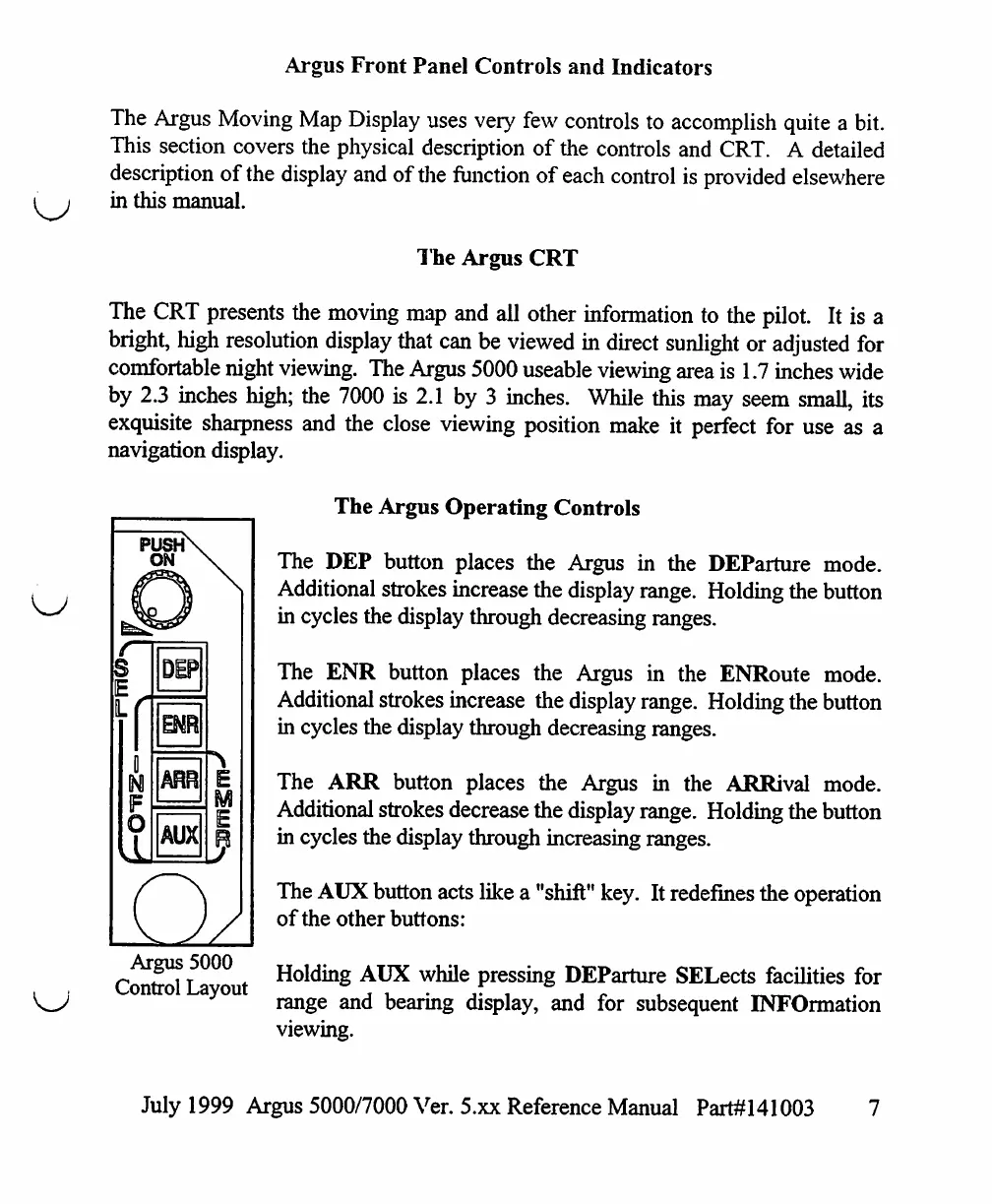
The
DEP
button
places
the
Argus
in
the
DEParture
mode.
Additional
strokes
increase
the
display
range.
Holding
the
button
in
cycles
the
display
through
decreasing
ranges.
push\
ON
S
I
0
N
O
DEP
Bffi
ARR
AUX
o
\
E
M
E
V
Argus
5000
Control
Layout
The
ENR
button
places
the
Argus
in
the
ENRoute
mode.
Additional
strokes
increase
the
display
range.
Holding
the
button
in
cycles the
display
through
decreasing
ranges.
The
ARR
button
places
the
Argus
in
the
ARRival
mode.
Additional
strokes
decrease
the
display
range.
Holding
the
button
in
cycles
the
display
through
increasing
ranges.
The
AUX
button
acts
like
a
"shift"
key.
It
redefines
the
operation
of
the
other
buttons:
Holding
AUX
while
pressing
DEParture
SELects
facilities
for
range
and
bearing
display,
and
for
subsequent
INFOrmation
viewing.
July
1999
Argus
5000/7000
Ver.
5.xx
Reference
Manual
Part#141003

Table of Contents

Other manuals for Eventide ARGUS 5000

Related product manuals