EasyManua.ls Logo

Eventide ARGUS 5000 - Emergency Mode

Eventide ARGUS 5000
237 pages
Print Icon
To Next Page IconTo Next Page
To Previous Page IconTo Previous Page
Loading...
EMERgency
Mode
The
purpose
of
the
EMERgency
mode
is
twofold:
It
helps
you
find
a
suitable
aiiport
for
landing,
and
it
helps
you
report
your
position
(and
situation)
to
Air
Traffic
Control.
And,
it
does
it
quickly.
The
EMERgency
mode
is
a
"hybrid"
of
several
operational
modes
and
features
of
the
Argus.
Each
has
been
selected
to
achieve
those
purposes
as
nearly
automatically
as
possible.
046°
BRG
88.8
NM
TK
045
246
KTS
00:21
=
39
47
53K
OKSO
KS93
.
15K!
KS14
17KS
8K3
KS91
MCI
32MSL
ll&ll
L1°TE
ENR/30
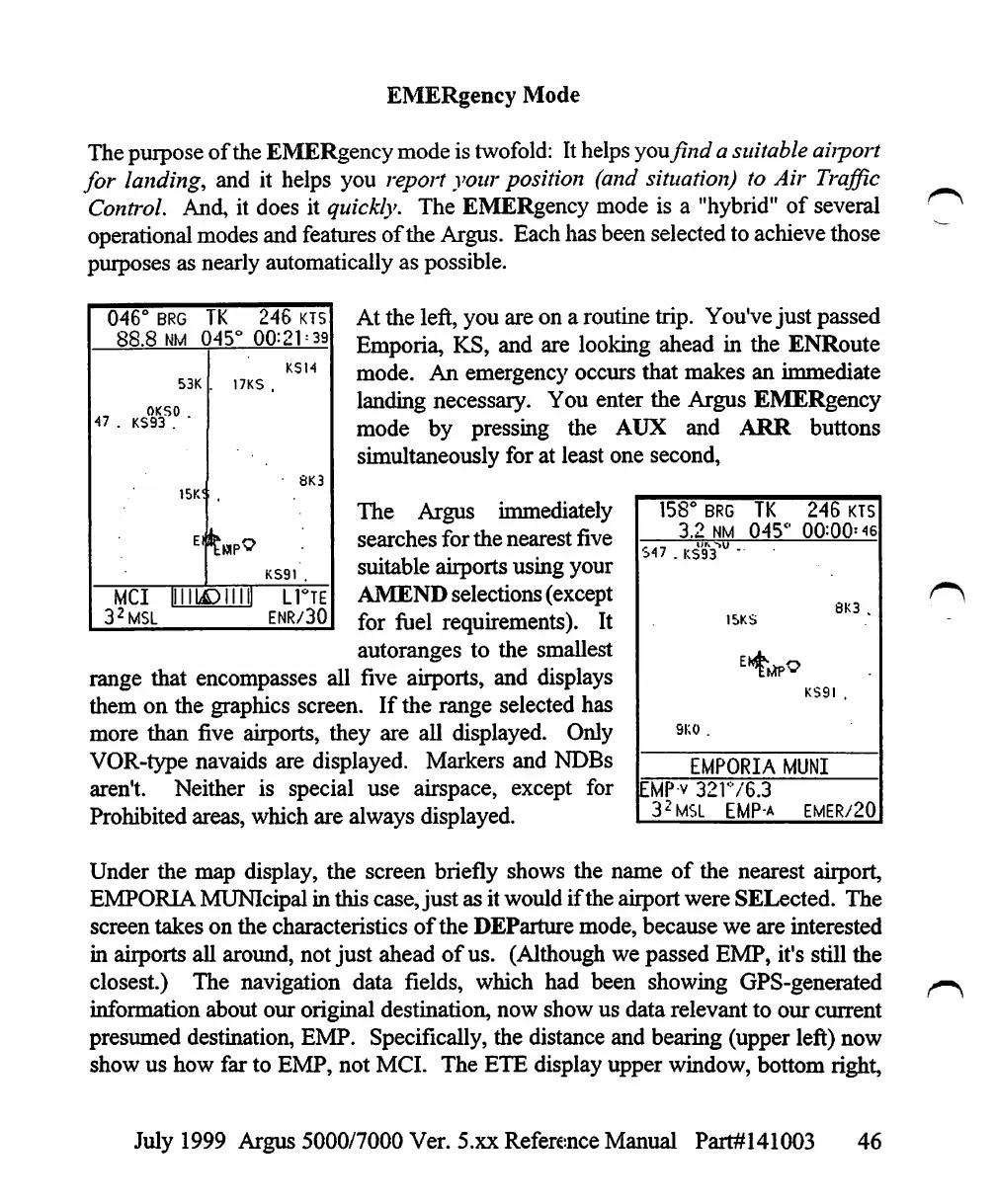
At
the
left,
you
are
on
a
routine
trip.
You've
just
passed
Emporia,
KS,
and
are
looking
ahead
in
the
ENRoute
mode.
An
emergency
occurs
that
makes
an
immediate
landing
necessary.
You
enter
the
Argus
EMERgency
mode
by
pressing
the
AUX
and
ARR
buttons
simultaneously
for
at
least
one
second,
The
Argus
immediately
searches
for
the
nearest
five
suitable
airports
using
your
AMEND
selections
(except
for
fuel
requirements).
It
autoranges
to
the
smallest
158°
BRG
TK
3.2
nm
045
S47
.
KSaV"
'
1SKS
9K0
.
EMPORIA
EMPv
321V6.3
32MSL
EMP-a
246
KTS
°
00=00=46
8K3
.
KS9I
.
MUNI
EMER/20
range
that
encompasses
all
five
airports,
and
displays
them
on
the
graphics
screen.
If
the
range
selected
has
more
than
five
airports,
they
are
all
displayed.
Only
VOR-type
navaids
are
displayed.
Markers
and
NDBs
aren't.
Neither
is
special
use
airspace,
except
for
Prohibited
areas,
which
are
always
displayed.
Under
the
map
display,
the
screen
briefly
shows
the
name
of
the
nearest
airport,
EMPORIA
MUNIcipal
in
this
case,
just
as
it
would
if
the
airport
were
SELected.
The
screen
takes
on
the
characteristics
of
the
DEParture
mode,
because
we
are
interested
in
airports
all
around,
not
just
ahead
of
us.
(Although
we
passed
EMP,
it's
still
the
closest.)
The
navigation
data
fields,
which
had
been
showing
GPS-generated
information
about
our
original
destination,
now
show
us
data
relevant
to
our
current
presumed
destination,
EMP.
Specifically,
the
distance
and
bearing
(upper
left)
now
show
us
how
far
to
EMP,
not
MCI.
The
ETE
display
upper
window,
bottom
right,
July
1999
Argus
5000/7000
Ver.
5.xx
Reference
Manual
Part#141003
46

Table of Contents

Other manuals for Eventide ARGUS 5000

Related product manuals