EasyManua.ls Logo

Eventide ARGUS 5000 - Arrival Mode

Eventide ARGUS 5000
237 pages
Print Icon
To Next Page IconTo Next Page
To Previous Page IconTo Previous Page
Loading...
ARRival
Mode
Both
the
DEParture
and
ENRoute
modes
place
the
aircraft
at
a
fixed
location
on
the
Argus
screen,
and
the
map
continually
reorients
to
the
position
and
track
of
the
ircraft.
The
ARRival
mode
presents
an
entirely
different
picture.
When
activated
by
pressing
ARR,
a
stationaiy
map
centered
on
the
destination
(or
intermediate)
wavpoint
is
placed
on
the
screen.
The
scale
of
the
map
is
determined
by
the
range
selection,
and
the
symbolic
aircraft
(or
an
arrow,
if
the
aircraft
would
be
off-screen,)
"flies"
around
on
the
map.
The
map
orientation
is
true-north
UP,
and
the
direction
of
the
arrow
or
symbolic
aircraft
represents
the
aircraft's
track.
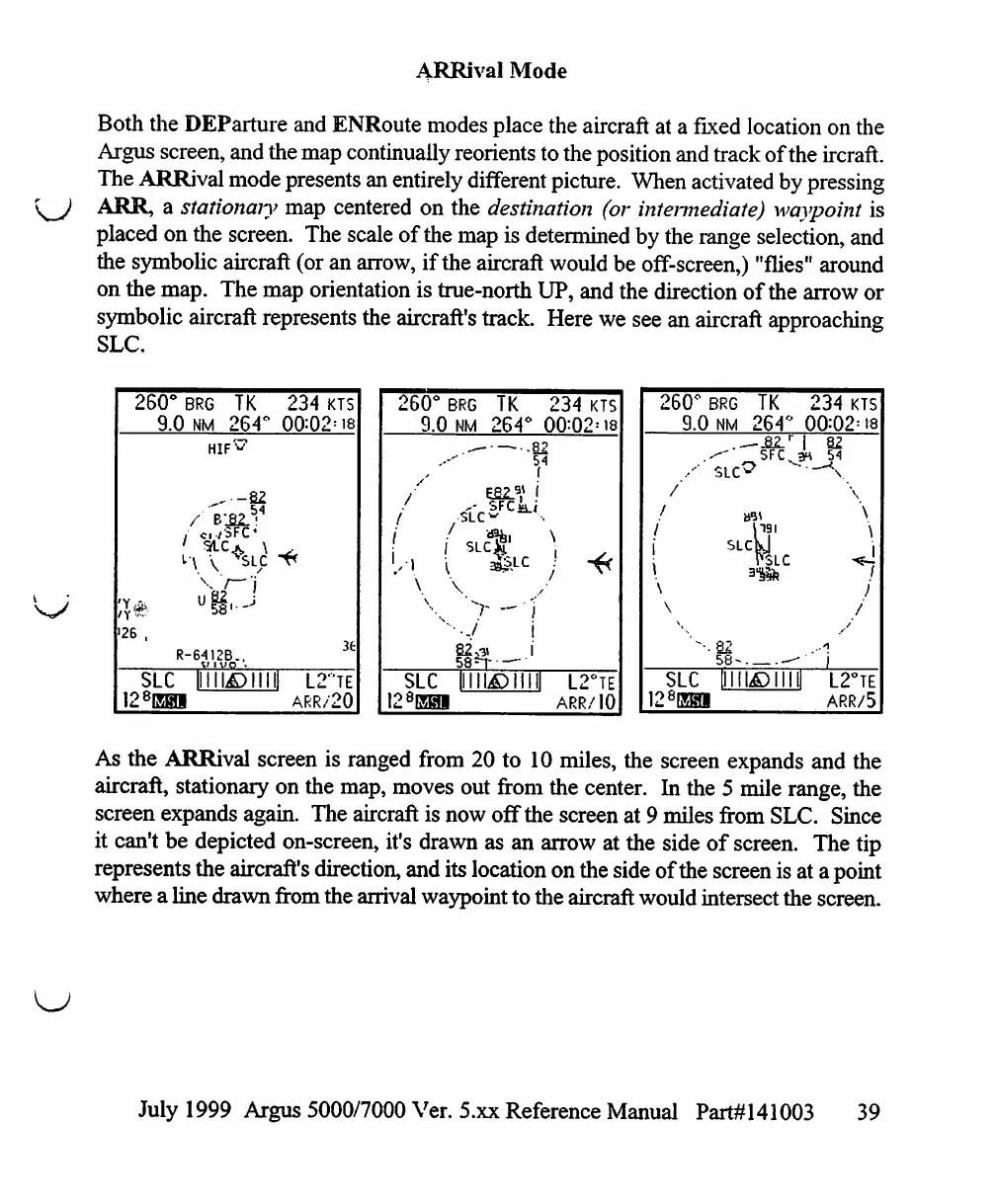
Here
we
see
an
aircraft
approaching
SLC.
260°
BRG
TK
9.0
NM
264°
'26
,
F
SLC
128EH
„,.
-22
ci/SFC4
!-6412B..
V
1
WO
11111^)111
1
234
00=0
J
l:
KTS
2=18
36
!-"TE
ARR/20
260°
BRG
TK
234
KTS
9.0
NM 264°
0Q:Q2'
is
LC
SLC
illll^)TTTI
LTte
ARR/10
260°
[
9.0
i
\
\
SLC
128EHi
3RG
NM
TK
264°
slc^SFCn
1191
SLclj
r^Lc
31U.?.V
82
58-
"TO
234
KTS
00:02=18
1
82
3H
54
\
\
j
-■'
i
J
L2°TE
ARR/5
As
the
ARRival
screen
is
ranged
from
20
to
10
miles, the
screen
expands
and
the
aircraft,
stationary
on
the
map,
moves
out
from
the
center.
In
the
5
mile
range,
the
screen
expands
again.
The
aircraft
is
now
off
the
screen
at
9
miles
from
SLC.
Since
it
can't
be
depicted
on-screen,
it's
drawn
as
an
arrow
at
the
side
of
screen.
The
tip
represents
the
aircraft's
direction,
and
its
location
on
the
side
of
the
screen
is
at
a
point
where
a
line
drawn
from
the
arrival
waypoint
to
the
aircraft
would
intersect
the
screen.
July
1999
Argus
5000/7000
Ver. 5.xx
Reference
Manual
Part#141003
39

Table of Contents

Other manuals for Eventide ARGUS 5000

Related product manuals