EasyManua.ls Logo

Eventide ARGUS 5000 - RESET P.P. to (CENTER CDI) Function

Eventide ARGUS 5000
237 pages
Print Icon
To Next Page IconTo Next Page
To Previous Page IconTo Previous Page
Loading...
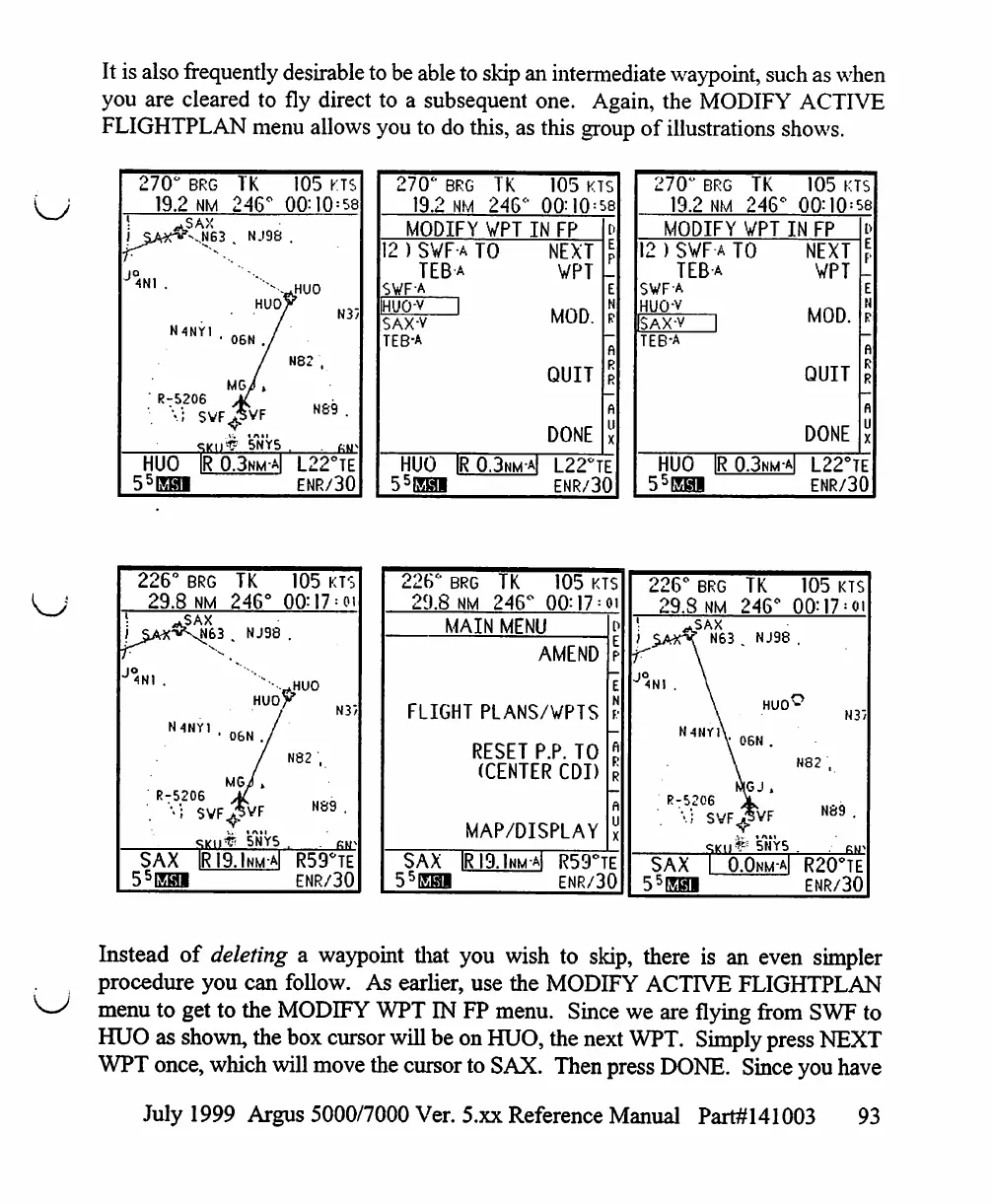
It
is
also
frequently
desirable
to
be
able
to
skip
an
intermediate
waypoint,
such
as
when
you
are
cleared
to
fly
direct
to
a
subsequent
one.
Again,
the
MODIFY
ACTIVE
FLIGHTPLAN
menu
allows
you
to
do
this,
as
this
group
of
illustrations
shows.
270°
BRG
TK
105
KTS
19.2
NM
246°
00:10
=
58
N37
N89
5NY5
HUO
IR
0.3^
L22°TE
55EHI
ENR/30
270°
BRG
19.2
NM
TK
246°
105
KTS
00:10
=
58
MODIFY
VPT
IN
FP
12
)
SVF
a
TO
TEBa
SWF-A
H'JO-V
I
SAX-V
TEB-A
NEXT
VPT
MOD.
QUIT
DONE
HUO
IR0.3nm-a|
L22°TE
55ESI
ENR/30
270°
BRG
19.2
NM
TK
246*
105
KTS
00:10
=
58
MODIFY
VPT
IN
FP
12
)
SVF
a
TO
TEBa
SWFA
HUO-V
SAX-v
TEB-A
NEXT
VPT
MOD.
QUIT
DONE
HUO
IR0.3nma|
L22°TE
55E@1
ENR/30
226°
BRG
29.8
NM
V
JO
N4NY1
,
R-5206
.
'••;
svf
TK
246°
1,
NJ98
HUO
06N
./
/
MG/»
■^VF
^
5NY5
SAX
IRI9.Inm-a|
55EH1
105
KTS
&HU0
^
N3>
N82
,
N89
.
KM"
R59*TE
ENR/30
i2b
BRG
IK
105
KTS
29.8
NM
246"
00:17
=
oi
MAIN
MENU
d
AMEND
FLIGHT
PLANS/VPTS
RESET
P.P.
TO
(CENTER
CDI)
MAP/DISPLAY
SAX
|RI9.1hma|
R59°TE
55EHI
ENR/30
226°
brg
TK
105
KTS
29.8
NM
246°
OO:17
=
oi
SAX
I
0.0nm-a|
R20°TE
ENR/30
Instead
of
deleting
a
waypoint
that
you
wish
to
skip,
there
is
an
even
simpler
procedure
you
can
follow.
As
earlier,
use
the
MODIFY
ACTIVE
FLIGHTPLAN
menu
to
get
to
the
MODIFY
WPT
IN
FP
menu.
Since
we
are flying
from
SWF
to
HUO
as
shown,
the
box
cursor
will
be
on
HUO,
the
next
WPT.
Simply
press
NEXT
WPT
once,
which
will
move
the
cursor
to
SAX.
Then
press
DONE.
Since
you
have
July
1999
Argus
5000/7000
Ver.
5.xx
Reference
Manual
Part#141003
93

Table of Contents

Other manuals for Eventide ARGUS 5000

Related product manuals