EasyManua.ls Logo

Eventide ARGUS 5000 - Page 101

Eventide ARGUS 5000
237 pages
Print Icon
To Next Page IconTo Next Page
To Previous Page IconTo Previous Page
Loading...
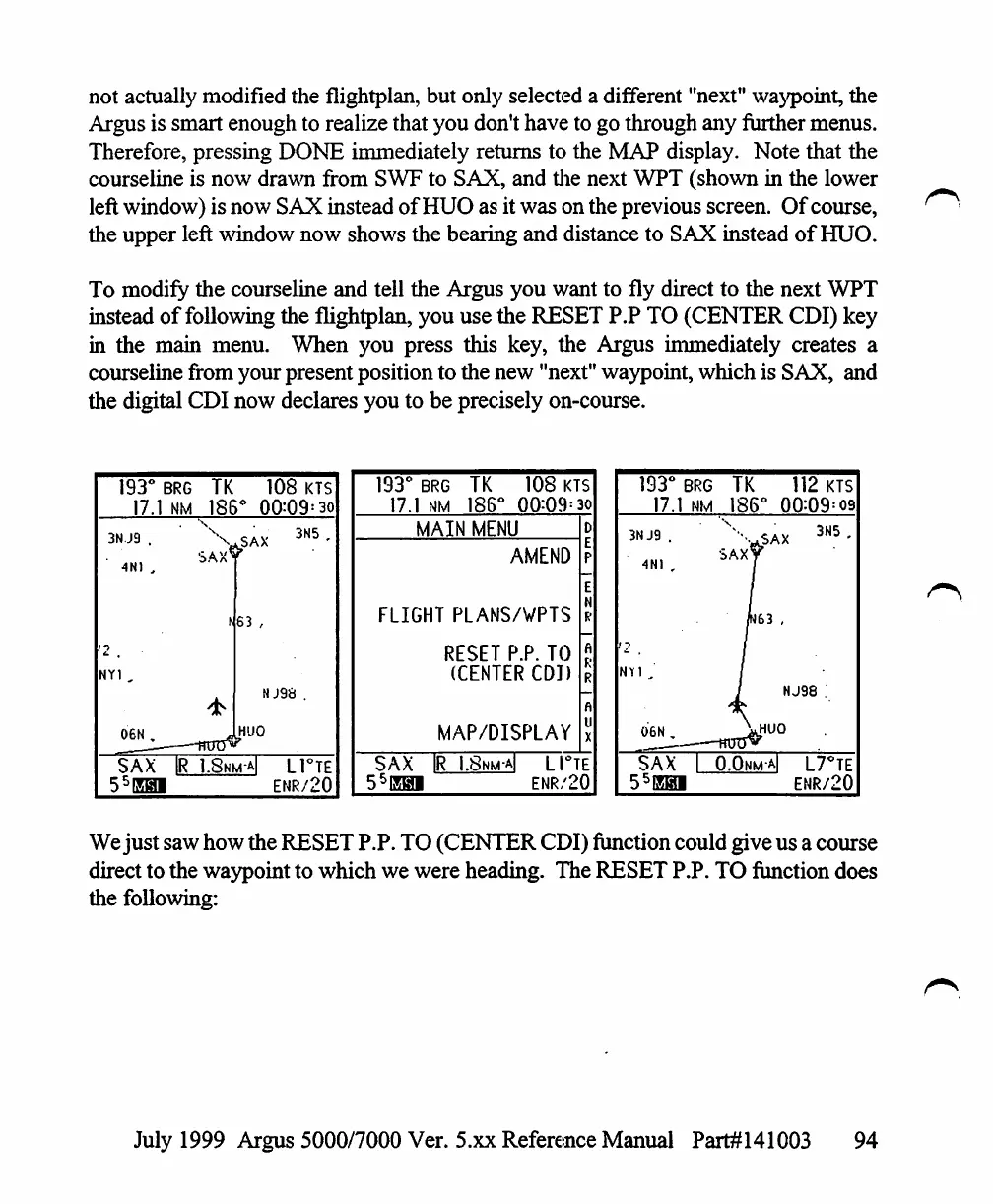
not
actually
modified
the
flightplan,
but
only
selected
a
different
"next"
waypoint,
the
Argus
is
smart
enough
to
realize
that
you
don't
have
to
go
through
any
further
menus.
Therefore,
pressing
DONE
immediately
returns
to
the
MAP
display.
Note
that
the
courseline
is
now
drawn
from
SWF
to
SAX,
and
the
next
WPT
(shown
in
the
lower
left
window)
is
now
SAX
instead
of
HUO
as
it
was
on
the
previous
screen.
Of
course,
the
upper
left
window
now
shows
the
bearing
and
distance
to
SAX
instead
of
HUO.
To
modify
the
courseline
and
tell
the
Argus
you
want
to
fly
direct
to
the
next
WPT
instead
of
following
the
flightplan,
you
use
the
RESET
P.P
TO
(CENTER
CDI)
key
in
the
main
menu.
When
you
press
this
key,
the
Argus
immediately
creates
a
courseline
from
your
present
position
to
the
new
"next"
waypoint,
which
is
SAX,
and
the
digital
CDI
now
declares
you
to
be
precisely
on-course.
193°
BRG
17.1
NM
3N.J9
.
4NI
,
'2
.
NY1
.,
06N
,
_—
SAX
-
|R
TK
186
SAX^
108
KTS
»°
00=09=30
SAX
3N5
'
NJ9S
.
MUO
1.8nm-a|
L1°TE
ENR/20
193°
BRG
17.1
NM
TK
186'
108
KTS
00:09=30
MAIN
MENU
AMEND
FLIGHT
PLANS/VPTS
RESET
P.P.
TO
(CENTER
CDI)
MAP/DISPLAY
SAX
IR
I.Snm-aI
LI°TE
55EHI
ENR/20
193°
17.
3NJ9
.
4N1
,
NY1
,
SAX
55EH
BRG
1
NM
_—~—
1
1
TK
186°
SAX^
W63
L
O.Onma
112
KTS
00:09=09
X
3N5'
<
HJ98
.
L7°TE
ENR/20
We
just
saw
how
the
RESET
P.P.
TO
(CENTER
CDI)
function
could
give
us
a
course
direct
to
the
waypoint
to
which
we
were
heading.
The
RESET
P.P.
TO
function
does
the
following:
July
1999
Argus
5000/7000
Ver. 5.xx
Reference
Manual
Part#141003
94

Table of Contents

Other manuals for Eventide ARGUS 5000

Related product manuals