EasyManua.ls Logo

Eventide ARGUS 5000 - Creating a User Waypoint

Eventide ARGUS 5000
237 pages
Print Icon
To Next Page IconTo Next Page
To Previous Page IconTo Previous Page
Loading...
Creating
a
User
Waypoint
Another
important
feature
and
task
is
the
ability
to
create
your
own
waypoints.
The
Argus
can
store
over
600
user
waypoints.
(The
memory
used
to
store
them
is
shared
with
flight
plans,
so
you
will
probably
not
be
able
to
save
the
full
complement.)
In
addition
to
the
obvious
usefulness
of
creating
waypoints
for
procedures
you
normally
follow
and
paths
you
normally
fly,
the
remarkable
accuracy
of
GPS
and
Loran
can
frequently
be
used
to
lead
you
back
to
the
same
spot
on
an
airport,
or
the
correct
end
of
the
runway
instead
of
the
generic
"Airport
Reference
Point"
supplied
by
most
databases.
Here's
how
to
create
your
own
waypoint:
217°
BRG
.2
NM
TK
194'
21
KTS
0Q:Q0'34
CREATE
USER
WPT
t
NEV
USER
WPT
AT
CURRENT
POS.
COPY
DATABASE
WPT
NEW
OFFSET
WPT
647
WPTS
LEFT
QUIT
TEB
IIIMOfllll
R64°TE
29EBI
ENR/.2
250°
BRG
TK
1.7
NM
230'
100
KTS
CREATE
USER
WPT
t>
30)
MYWP
T
u
N
40
W074
51.91'
01.
80'
DOWN
NEXT
DONE
TEB
I
O.Onm-aI
L20oTE
29EHI
ENR/2
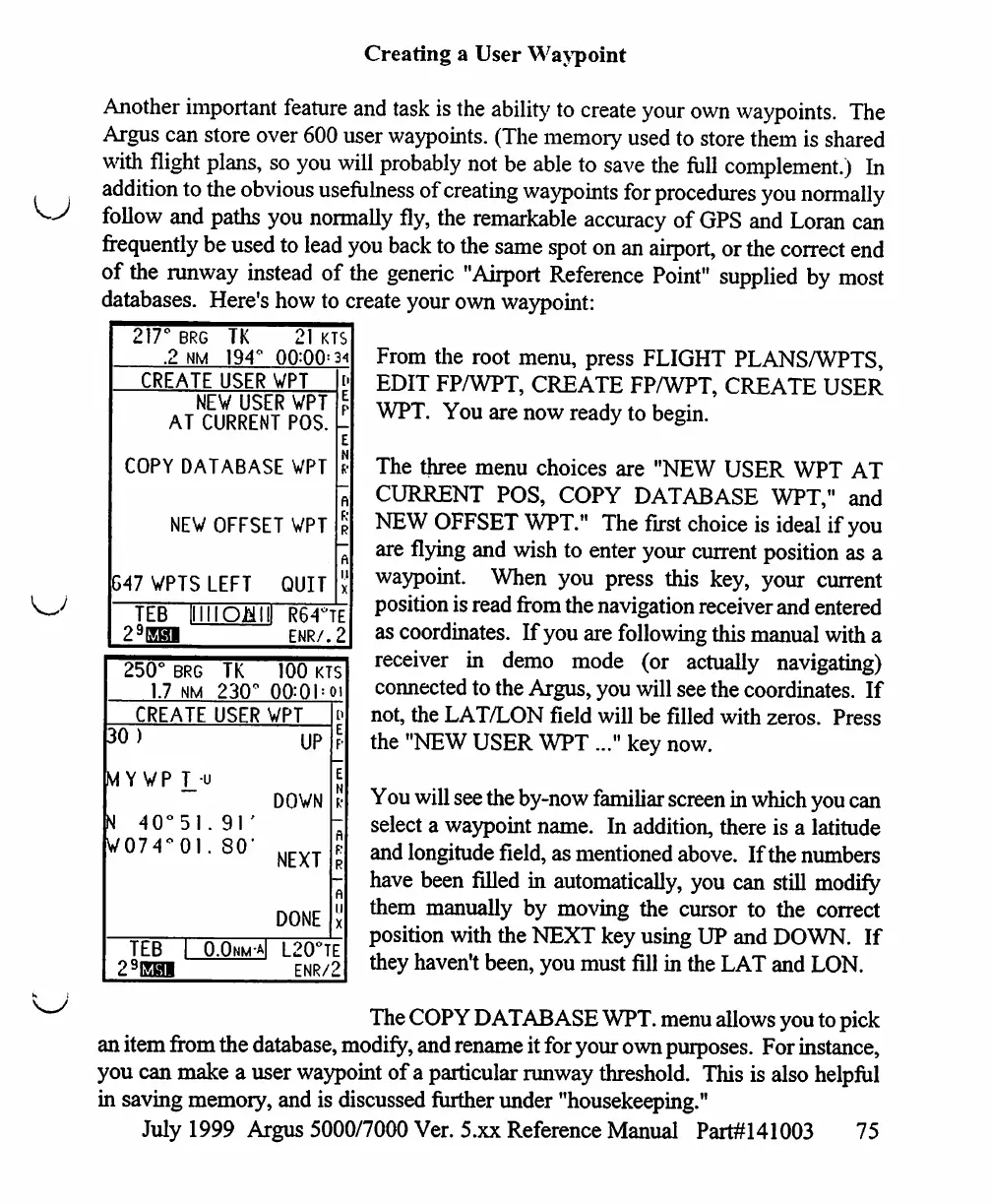
From
the
root
menu,
press
FLIGHT
PLANS/WPTS,
EDIT
FP/WPT,
CREATE
FP/WPT,
CREATE
USER
WPT.
You
are
now
ready
to
begin.
The
three
menu
choices
are
"NEW
USER
WPT
AT
CURRENT
POS,
COPY DATABASE
WPT,"
and
NEW
OFFSET
WPT."
The
first
choice
is
ideal
if
you
are
flying
and
wish
to
enter
your
current
position
as
a
waypoint.
When
you
press
this
key,
your
current
position
is
read
from
the
navigation
receiver
and
entered
as
coordinates.
If
you
are
following
this
manual
with
a
receiver
in
demo
mode
(or
actually
navigating)
connected
to
the
Argus,
you
will
see the
coordinates.
If
not,
the
LAT/LON
field
will
be
filled
with
zeros.
Press
the
"NEW
USER
WPT
..."
key
now.
You
will
see the
by-now
familiar
screen
in
which
you
can
select
a
waypoint
name.
In
addition,
there
is
a
latitude
and
longitude
field,
as
mentioned
above.
If
the
numbers
have been
filled
in
automatically,
you
can
still
modify
them
manually
by
moving
the
cursor
to
the
correct
position
with
the
NEXT
key
using
UP
and
DOWN.
If
they
haven't
been,
you
must
fill
in
the
LAT
and
LON.
The
COPY
DATABASE
WPT.
menu
allows
you
to
pick
an
item
from
the
database,
modify,
and
rename
it
for
your
own
purposes.
For
instance,
you
can
make
a
user
waypoint
of
a
particular
runway
threshold.
This
is
also
helpful
in
saving
memory,
and
is
discussed
further
under
"housekeeping."
July
1999
Argus
5000/7000
Ver.
5.xx
Reference
Manual
Part#141003
75

Table of Contents

Other manuals for Eventide ARGUS 5000

Related product manuals