EasyManua.ls Logo

Eventide ARGUS 5000 - Selecting a Waypoint

Eventide ARGUS 5000
237 pages
Print Icon
To Next Page IconTo Next Page
To Previous Page IconTo Previous Page
Loading...
Selecting
a
Waypoint
In
almost
all
cases,
selecting
a
waypoint
involves
entering
its
alphanumeric
identifier
and
verifying
that
the
waypoint
found
is
the
one
you
want.
(Creating
a
waypoint
also
involves
entering
its
alphanumeric
identifier.)
After
this
explanation,
we
will
substitute
the
phrase
"select
waypoint
XYZ"
(or
"create
waypoint
XYZ")
for
the
more
lengthy
process.
The
following
explanation
presupposes
that
you
have
not
selected
any
waypoints
or
screen
objects
yet.
If
you
have,
the
Argus
will
"default"
to
the
most
recently
selected
appropriate
waypoint
name,
and
give
you
the
opportunity
to
use
or
modify
it
instead
of
creating
a
new
one.
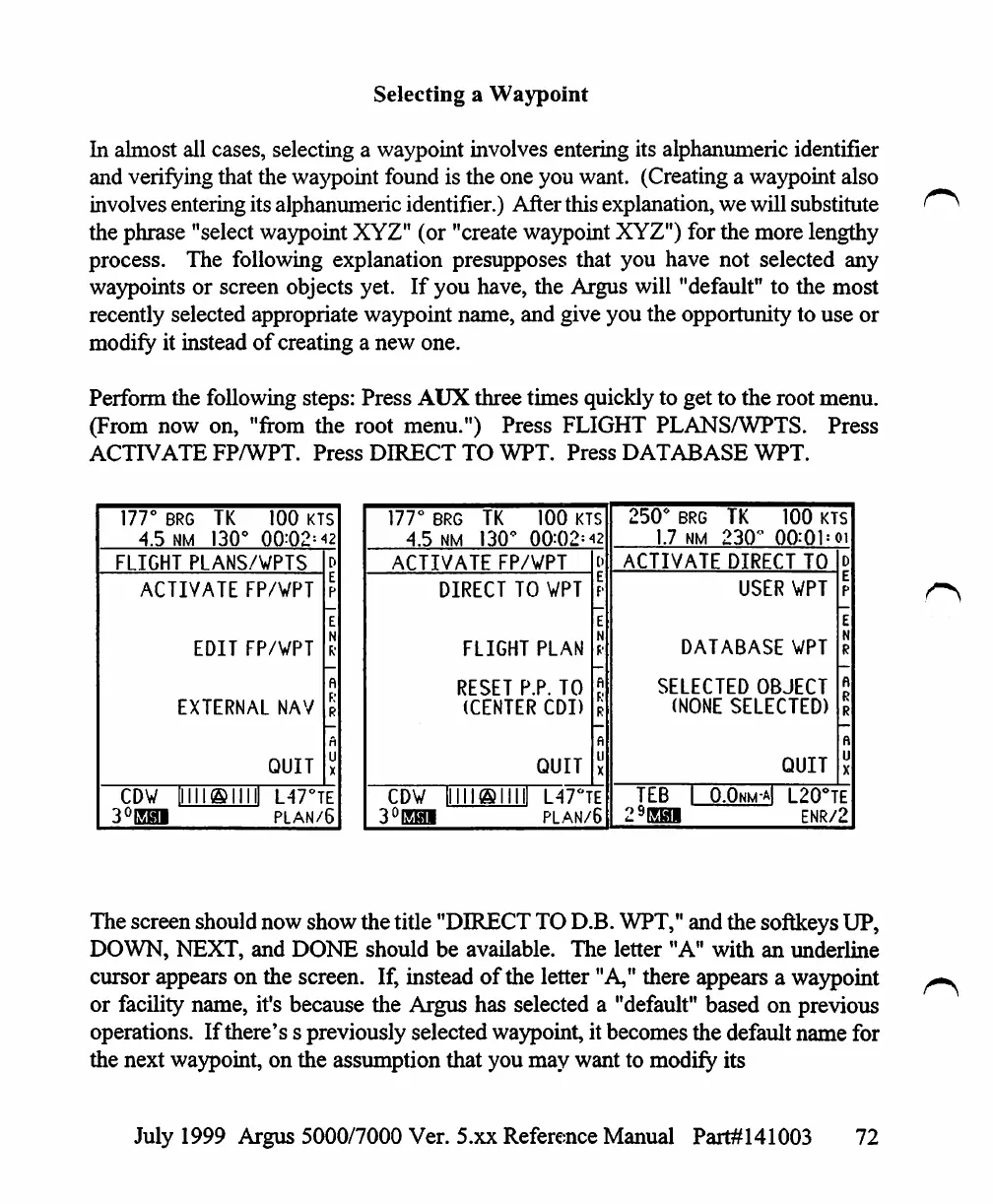
Perform
the
following
steps:
Press
AUX
three
times
quickly
to
get
to
the
root
menu.
(From
now
on,
"from
the
root
menu.")
Press
FLIGHT
PLANS/WPTS.
Press
ACTIVATE
FP/WPT.
Press
DIRECT
TO
WPT.
Press
DATABASE
WPT.
177°
BRG
TK
4.5
NM
130'
100
KTS
FLIGHT
PLANS/VPTS
ACTIVATE
FP/WPT
EDIT
FP/VPT
EXTERNAL
NAV
QUIT
CDW
3°EHI
L47°TE
plan/6
177°
BRG
4.5
NM
TK
I3O<
100
KTS
00:02:42
ACTIVATE
FP/WPT
DIRECT
TO
VPT
FLIGHT
PLAN
RESET
P.P.
TO
(CENTER
CDI)
QUIT
CDV
3°EHI
L47°TE
PLAN/6
250°
BRG
1.7
NM
TK
100
KTS
00:01=oi
ACTIVATE
DIRECT
TO
USER
WPT
DATABASE
WPT
SELECTED
OBJECT
(NONE
SELECTED)
QUIT
TEB
29EH1
O.Okm-aI
L20°TE
ENR/2
The
screen
should
now
show
the
title
"DIRECT
TO
D.B.
WPT,"
and
the
softkeys
UP,
DOWN,
NEXT,
and
DONE
should
be
available.
The
letter
"A"
with
an
underline
cursor
appears
on
the
screen.
If,
instead
of
the
letter
"A,"
there
appears
a
waypoint
or
facility
name,
it's
because
the
Argus
has
selected
a
"default"
based
on
previous
operations.
If
there's
s
previously
selected
waypoint,
it
becomes
the
default
name
for
the
next
waypoint,
on
the
assumption
that
you
may
want
to
modify
its
July
1999
Argus
5000/7000
Ver. 5.xx
Reference
Manual
Part#141003
72

Table of Contents

Other manuals for Eventide ARGUS 5000

Related product manuals