EasyManua.ls Logo

Eventide ARGUS 5000 - Page 122

Eventide ARGUS 5000
237 pages
Print Icon
To Next Page IconTo Next Page
To Previous Page IconTo Previous Page
Loading...
248°
BPG
TK
210
kt
262.8
NM
088°
01:15
o
ILS-DME
(R)
/NONE
ASPH/CONC
LITED
SAN
PHX-a
L160°TE
ENR/10
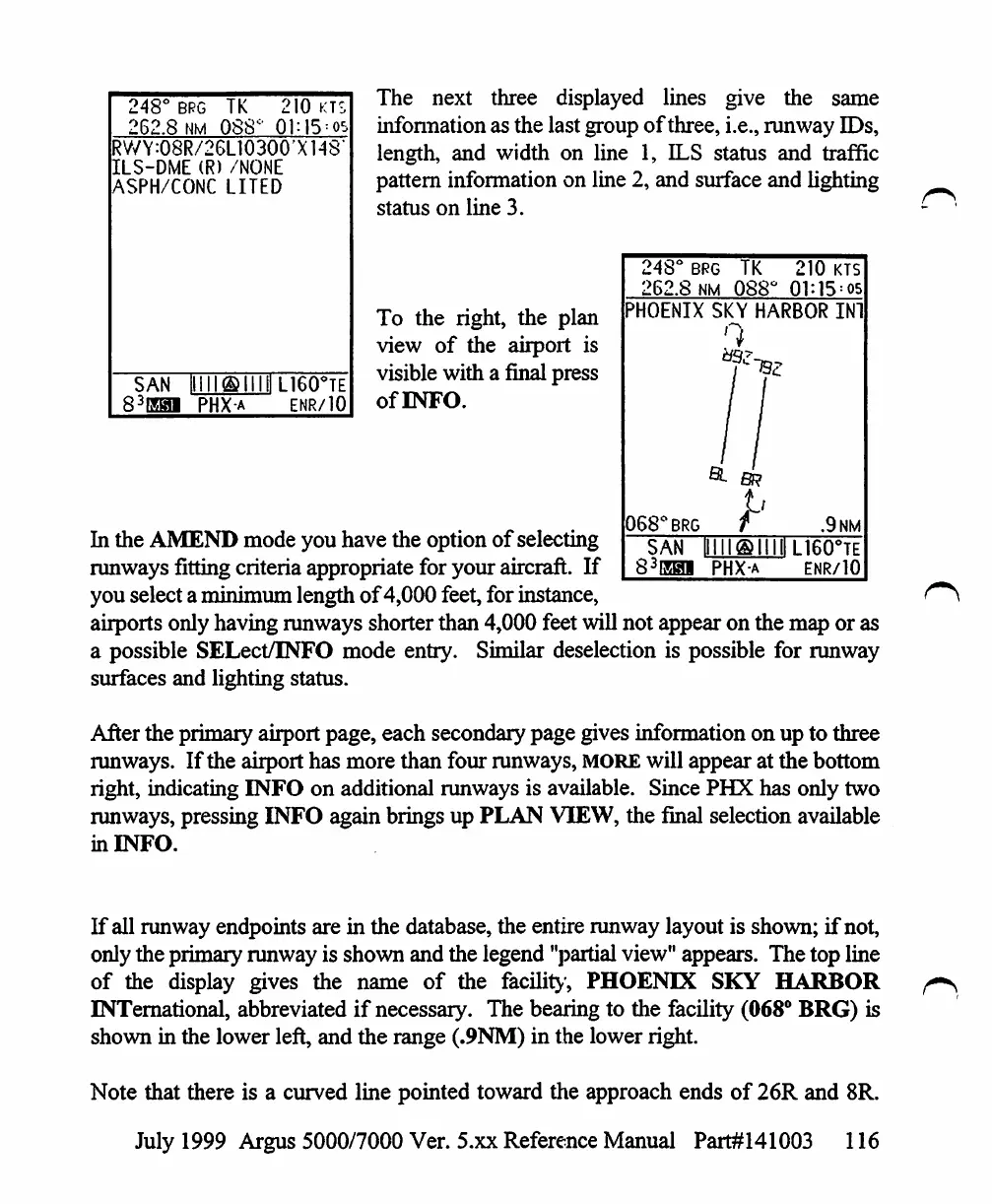
The
next
three
displayed
lines
give
the
same
information
as
the
last
group
of
three,
i.e.,
runway
IDs,
length,
and
width
on
line
1,
ILS
status
and
traffic
pattern
information
on
line 2,
and
surface
and
lighting
status
on
line
3.
To
the
right,
the
plan
view
of
the
airport
is
visible
with
a
final
press
ofBVFO.
248°
brg
TK
262.8
nm
088c
210
kts
•HOENIX
SKY
HARBOR
IN!
068*BRG
.9nm
SAN
[1III®IIIIIL16O°TE
83EHI
PHX-a
enr/10
In
the
AMEND
mode
you
have
the
option
of
selecting
runways
fitting
criteria
appropriate
for
your
aircraft.
If
you
select
a
minimum
length
of
4,000
feet,
for
instance,
airports
only
having
runways
shorter
than
4,000
feet
will
not
appear
on
the
map
or
as
a
possible
SELect/INFO
mode
entry.
Similar
deselection
is
possible
for
runway
surfaces
and
lighting
status.
After
the
primary
airport
page,
each
secondary
page
gives
information
on up
to
three
runways.
If
the
airport
has
more
than
four
runways,
MORE
will
appear
at
the
bottom
right,
indicating
INFO
on
additional
runways
is
available.
Since
PHX
has
only
two
runways,
pressing
INFO
again
brings
up
PLAN
VIEW,
the
final
selection
available
in
INFO.
If
all
runway
endpoints
are
in
the database,
the
entire
runway
layout
is
shown;
if
not,
only
the
primary
runway
is
shown
and
the
legend
"partial
view"
appears.
The
top
line
of
the
display
gives
the
name
of
the
facility,
PHOENIX
SKY
HARBOR
INTernational,
abbreviated
if
necessary.
The
bearing
to
the
facility
(068°
BRG)
is
shown
in
the
lower
left,
and
the
range
(.9NM)
in
the
lower
right.
Note
that
there
is
a
curved
line
pointed
toward
the
approach
ends
of
26R
and
8R.
July
1999
Argus
5000/7000
Ver. 5.xx
Reference
Manual
Part#141003
116

Table of Contents

Other manuals for Eventide ARGUS 5000

Related product manuals