EasyManua.ls Logo

Eventide ARGUS 5000 - Page 69

Eventide ARGUS 5000
237 pages
Print Icon
To Next Page IconTo Next Page
To Previous Page IconTo Previous Page
Loading...
Airways
The
Argus
can
display
airways.
The
first
AMEND
page
allows
you
to
select
ALL
airways,
SELECTED
airways, or
NO
airways.
The
AIRWAYS
page
lets
you
qualify
these
selections
for
your
particular
convenience.
For
instance,
"ALL"
can
refer
to
victor
airways,
jet
airways,
or
both.
And
you
can
select
up
to
two
airways,
V
or
J
in
combination,
for
display
when
SELECTED
is
chosen.
AIRWAYS
ALL
AVY
TYPES:
Y=V
YU
SELECTED
AVYS:
FIRST
AIRWAY
J
2
2 3
SECOND
AIRWAY
Y
4
1
9
Y
SHOW
MEA
Y
SHOW
MOCA
|PAGE||LINE
CHG
II
RTH
139°
17.5
\
\
\
V
j
TEB
3°BH!
BRG
>
NM
419
>
223
TK
280°
J
223
180
\
IMIIOMI
!
142
KTS
00:07'23
J
223^
180
A
/
/
Al
1
7
1
R14VTE
DEP/10
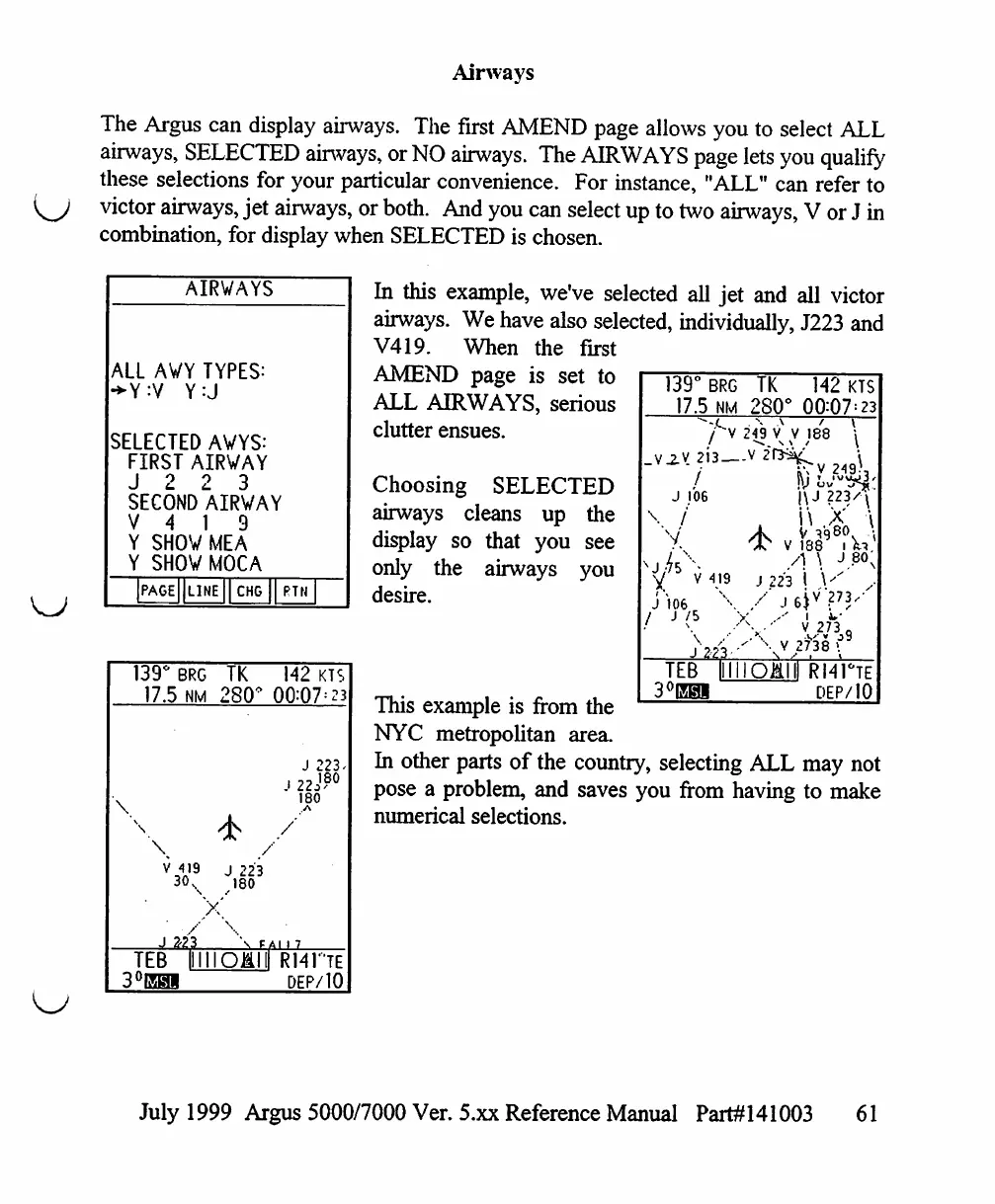
In
this
example,
we've
selected
all
jet
and
all
victor
airways.
We
have
also
selected,
individually,
J223
and
V419.
When
the
first
AMEND
page
is
set
to
ALL
AIRWAYS,
serious
clutter
ensues.
Choosing
SELECTED
airways
cleans
up
the
display
so
that
you
see
only
the
airways
you
desire.
139°
BRG
17.5
NM
TK
280
142
KTS
00:07
=
23
249
V
V
188
/
J
106
|\J
223/\
V
r
J
10i
V
419
X
V
188
A
\
j
223
I
V
X
\
/
J
223
I
Ju-'
V273(
'
\
V
2f38
(■
I1I11O1II)
R141°TE
DEP/10
This
example
is
from
the
NYC
metropolitan
area.
In
other
parts
of
the
country,
selecting
ALL
may
not
pose
a
problem,
and
saves
you
from
having
to
make
numerical
selections.
July
1999
Argus
5000/7000
Ver.
5.xx
Reference
Manual
Part#141003
61

Table of Contents

Other manuals for Eventide ARGUS 5000

Related product manuals