EasyManua.ls Logo

Eventide ARGUS 5000 - Page 94

Eventide ARGUS 5000
237 pages
Print Icon
To Next Page IconTo Next Page
To Previous Page IconTo Previous Page
Loading...
navigation
source
was
showing
TEB
as
the
destination.)
The
PLAN
mode,
screen
9,
shows
your
position
along
the
flightplan
at
a
glance.
Next,
in
the
ENRoute
mode
as
you
approach
waypoint
HUO,
the
Argus
notifies
you
of
the
required
turn
and
direction
by
a
blinking
reverse
video
bar
above
the
bottom
window.
This
bar
remains
on
the
screen
for
one
minute
or
until
you
press
the
AUX
key.
If
you
don't press
AUX
and
continue
flying
the
flightplan,
the
TURN
TO
heading
will
be
continuously
updated.
(Pressing
any key
will
cancel
the
bunking
bar.
However,
the
key
will
also
perform
its
normal
function.)
Screen
11
shows
the
ARRival
mode
as
the
destination
WPT
is
approached
after
the
turn
at
HUO.
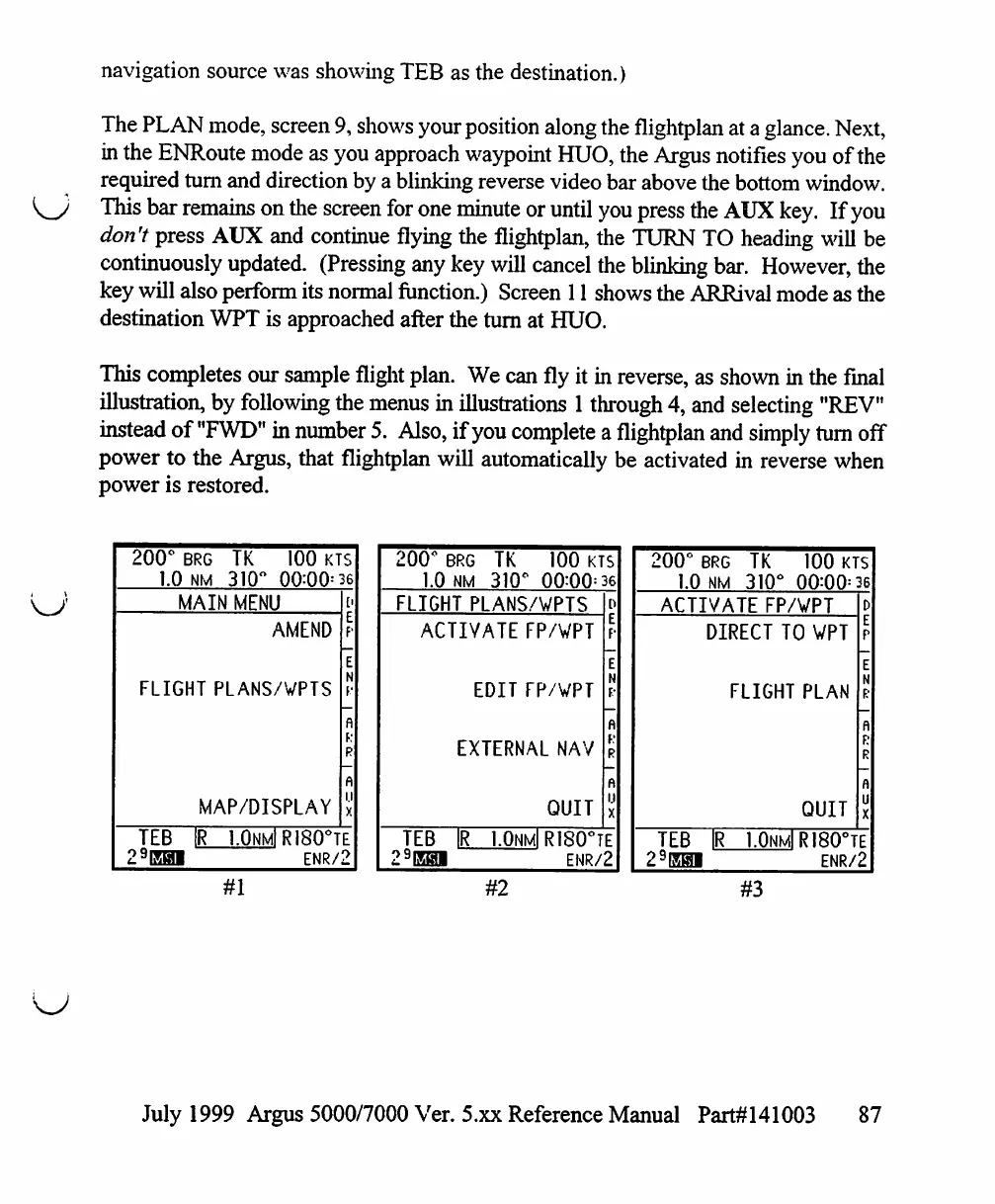
This
completes
our
sample
flight
plan.
We
can
fly
it
in
reverse,
as
shown
in
the
final
illustration,
by
following
the
menus
in
illustrations
1
through
4,
and
selecting
"REV"
instead
of
"FWD"
in
number
5.
Also,
if
you
complete
a
flightplan
and
simply
turn
off
power
to
the
Argus,
that
flightplan
will
automatically
be
activated
in
reverse
when
power
is
restored.
200°
BRG
L0
NM
TK
310'
100
KTS
00:00=36
MAIN
MENU
AMEND
FLIGHT
PLANS/WPTS
MAP/DISPLAY
TEB
1R
I.OnmI
RISQUE
29EH1
ENR/2
#1
200°
BRG
1.0
NM
TK
310'
100
kts
00:00=36
FLIGHT
PLANS/WPTS
ACTIVATE
FP/WPT
EDIT
FP/VPT
EXTERNAL
NAV
QUIT
TEB
1R
1.0hmIR1S0°TE
29EHI
ENR/2
200°
BRG
1.0
NM
TK
310'
100
kts
00:00=36
ACTIVATE
FP/VPT
DIRECT
TO
WPT
FLIGHT
PLAN
QUIT
TEB
29EHI
1.0nm1R180°TE
ENR/2
#2
#3
July
1999
Argus
5000/7000
Ver. 5.xx
Reference
Manual
Part#141003
87

Table of Contents

Other manuals for Eventide ARGUS 5000

Related product manuals