exacqVision User Manual
1/24/2011
Live Mode Overview
Live Mode
System, you must first click the Live Operating Mode button.
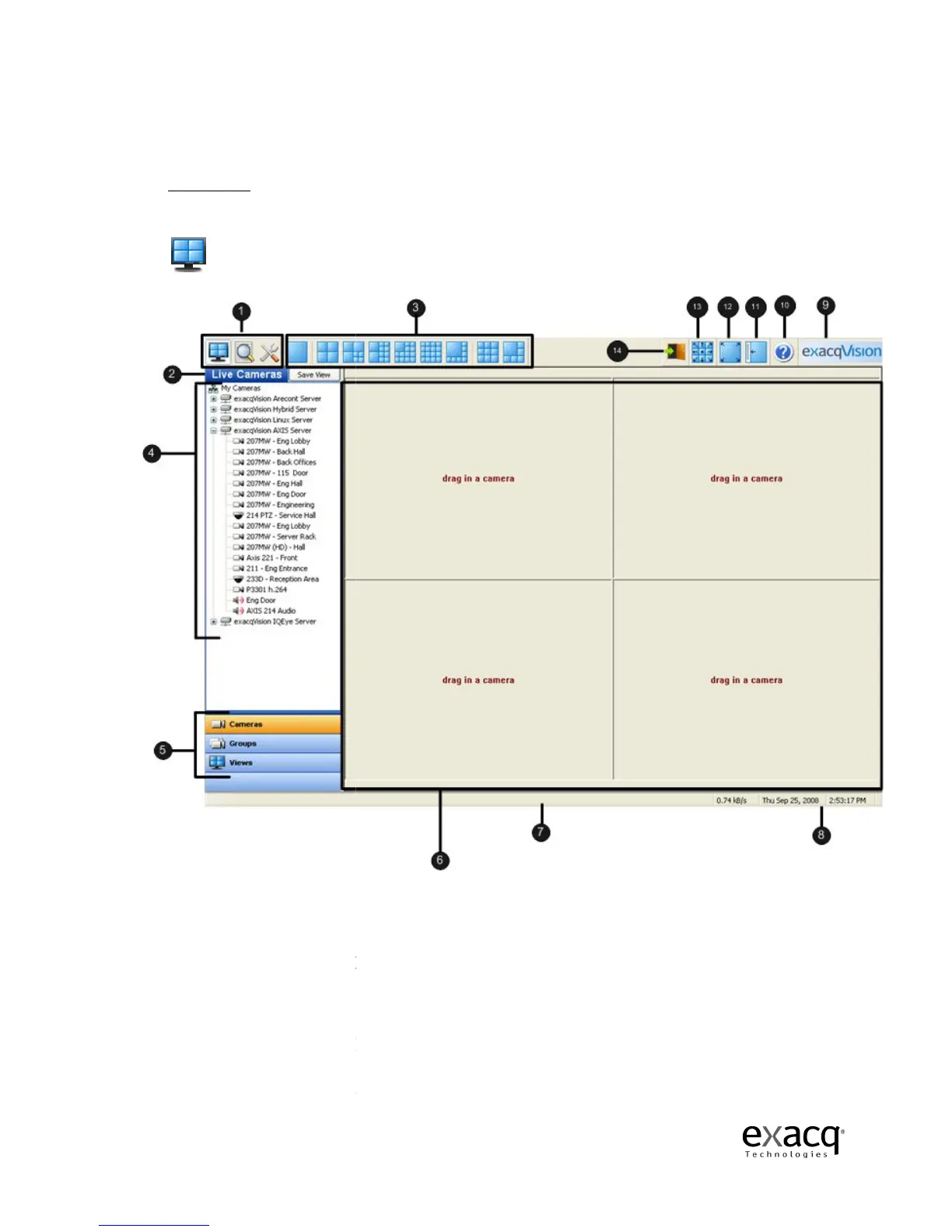
(1)
(2) Title bar –
displays exacqVision Local and Remote Client application title.
(3) Layout Buttons –
(4) Site Tree –
displays icons representing exacqVision systems,
alarms, monitor & audio inputs
(5) Navigation Pane
(6)
(7) Message –
displays system messages providing feedback and information about
Page 36
to view live video.
To view live video on your exacqVisio
System, you must first click the Live Operating Mode button.
–
displays the three available views, Live, Search, and Setup.
displays exacqVision Local and Remote Client application title.
allows you to
organize your camera views to fit your needs.
displays icons representing exacqVision systems,
alarms, monitor & audio inputs
.
Also displays setup icons used to configure
displays cameras and video in organized groups and views.
– displays video of cameras.
displays system messages providing feedback and information about
To view live video on your exacqVisio
n
displays the three available views, Live, Search, and Setup.
displays exacqVision Local and Remote Client application title.
organize your camera views to fit your needs.
s, PTZ cameras,
Also displays setup icons used to configure
displays cameras and video in organized groups and views.
displays system messages providing feedback and information about



 To Next Page