exacqVision User Manual
1/24/2011
Exporting Files
Once you have downloaded a video segment, you can use the
video,
print a picture, or burn saved files to a CD or DVD
There may be instances when you want to save a single frame to a file or print it in hard copy.
Drag the Scrub Handle along the Scrub Bar until
Save Picture to File
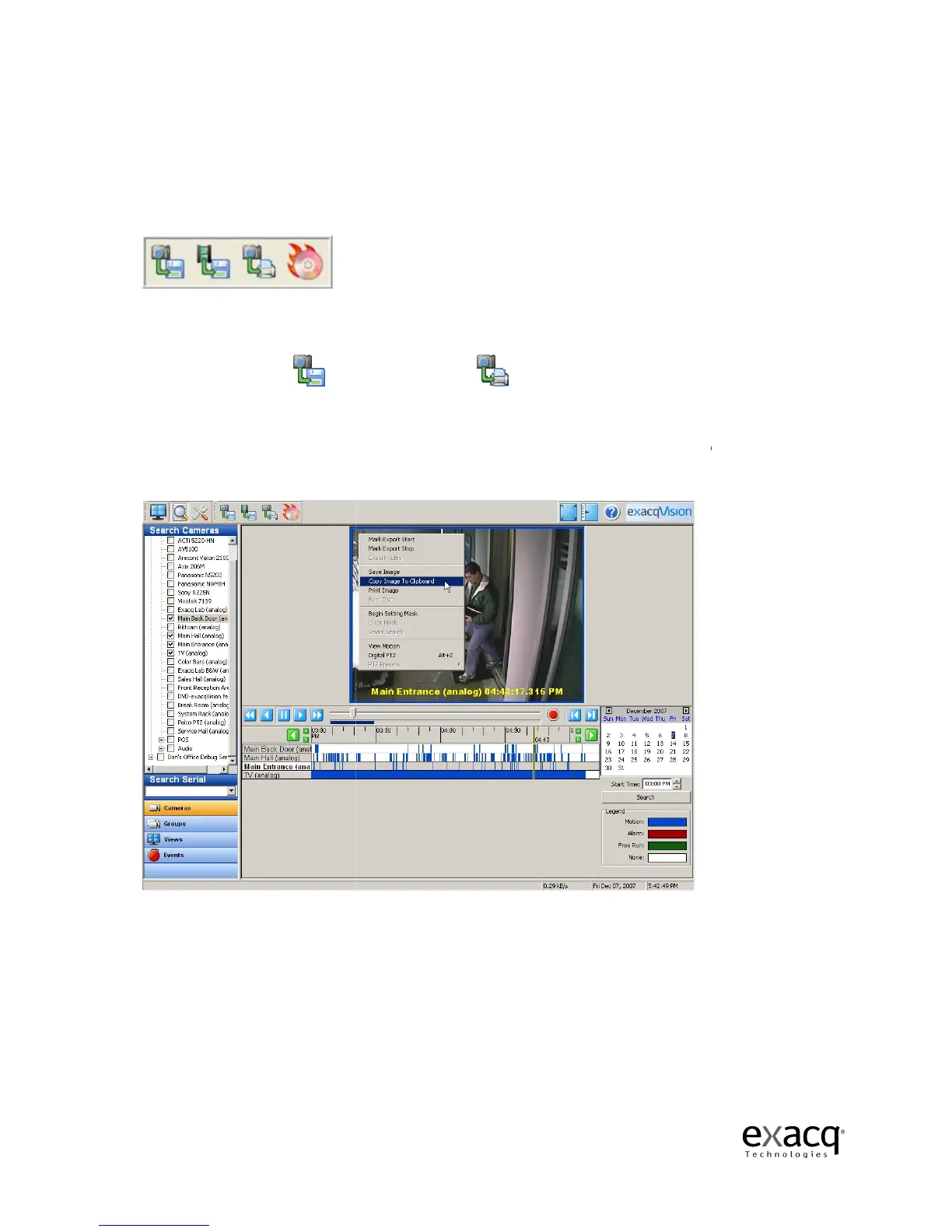
You can also copy a picture to a clip board and paste it into a document.
you need, right-click
Clipboard.
The image will be stored, and you can paste it into your document.
Page 84
Once you have downloaded a video segment, you can use the
print a picture, or burn saved files to a CD or DVD
(including DVD+R and DVD+RW)
There may be instances when you want to save a single frame to a file or print it in hard copy.
Drag the Scrub Handle along the Scrub Bar until
you find the frame you need and then select the
or both, depending on your need.
You can also copy a picture to a clip board and paste it into a document.
in the Video Playback window and select Copy Image to
The image will be stored, and you can paste it into your document.
to save a picture or
(including DVD+R and DVD+RW)
.
There may be instances when you want to save a single frame to a file or print it in hard copy.
you find the frame you need and then select the
or both, depending on your need.
in the Video Playback window and select Copy Image to
The image will be stored, and you can paste it into your document.



 To Next Page