exacqVision User Manual
1/24/2011
RAID Setup
Your exacqVision RAID system has redundant hard drive to protect data upon hard drive failure.
In the
event that one hard drive fails, the information can be recreated once the hard drive is
replaced.
You will want to create a notification and link it to a health event on the RAID server to alert you
when there is an issue with one of the hard drives.
Follow the instructions in the
Once you have configured
health event on the RAID server.
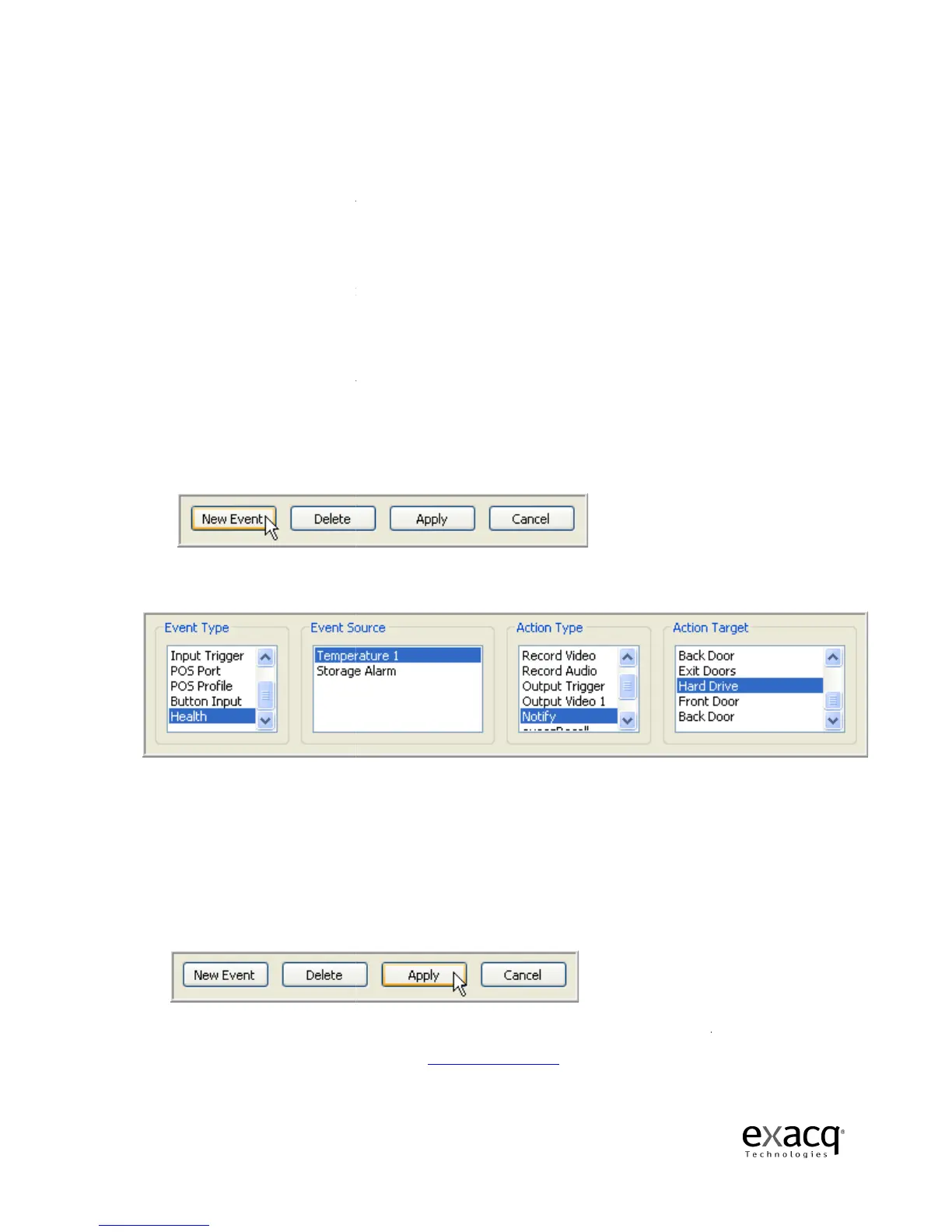
1. Click the New Event
2.
Select Health as the Event Type.
3.
Select Storage Alarm as the Event Source.
4.
Select Notify as the Action Type.
5.
Select the Action Target that matches your
6.
Click the Apply button to apply these settings to the event.
Your RAID system will now send an email notification when it detects a hard drive
you receive this notification, go to the
follow the st
eps for replacing the hard drive.
Page 192
Your exacqVision RAID system has redundant hard drive to protect data upon hard drive failure.
event that one hard drive fails, the information can be recreated once the hard drive is
You will want to create a notification and link it to a health event on the RAID server to alert you
when there is an issue with one of the hard drives.
Follow the instructions in the
Notifications section, page 166
, to set up the email notification.
message profile
, follow these steps to link the notification to the
health event on the RAID server.
button to add the event to the Event List.
Select Health as the Event Type.
Select Storage Alarm as the Event Source.
Select Notify as the Action Type.
Select the Action Target that matches your
Message Profile Description
Click the Apply button to apply these settings to the event.
Your RAID system will now send an email notification when it detects a hard drive
you receive this notification, go to the
Trouble Shooting section, page 201
eps for replacing the hard drive.
Your exacqVision RAID system has redundant hard drive to protect data upon hard drive failure.
event that one hard drive fails, the information can be recreated once the hard drive is
You will want to create a notification and link it to a health event on the RAID server to alert you
, to set up the email notification.
, follow these steps to link the notification to the
Message Profile Description
.
Your RAID system will now send an email notification when it detects a hard drive
issue. Should


 To Next Page