exacqVision User Manual
1/24/2011
Smart Search
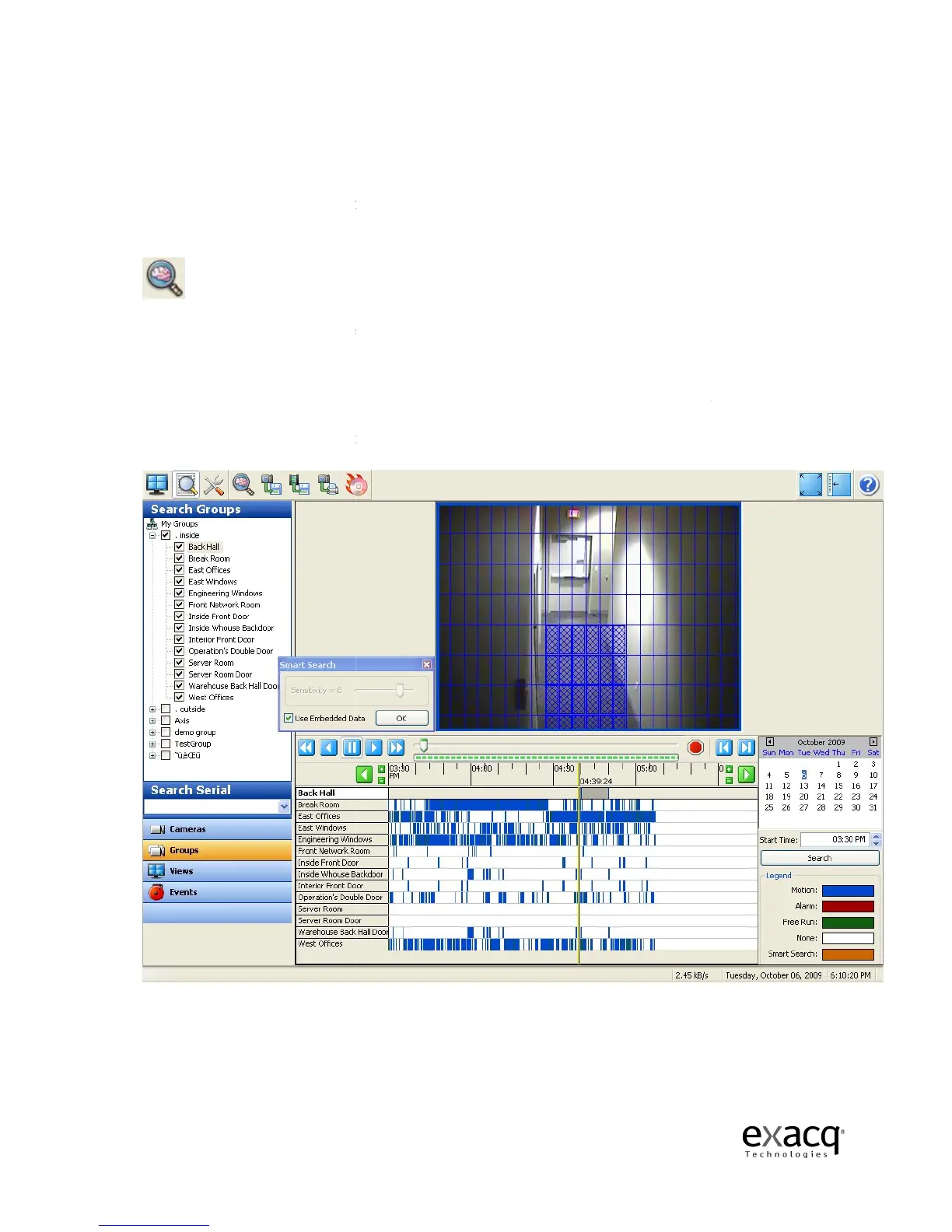
Smart Search allows you to search for occurrences of motion in specific areas of a video window.
To activate Smart Search,
complete a search as described in the previous section and
Smart Search button:
NOTE:
Smart Search can be run only on
When you click on the Smart Search button, a Smart Search box appears and a grid is displayed
over the video window. Use the mouse cursor to select
you want to view all instances of
box, click it again.
To select multiple adjacent boxes, click and drag the cursor.
Page 77
Smart Search allows you to search for occurrences of motion in specific areas of a video window.
complete a search as described in the previous section and
Smart Search can be run only on
a 1 x 1 video window layout.
When you click on the Smart Search button, a Smart Search box appears and a grid is displayed
over the video window. Use the mouse cursor to select
grid boxes in the
you want to view all instances of
motion. The selected boxes are filled in with blue
To select multiple adjacent boxes, click and drag the cursor.
Smart Search allows you to search for occurrences of motion in specific areas of a video window.
complete a search as described in the previous section and
click the
When you click on the Smart Search button, a Smart Search box appears and a grid is displayed
where
motion. The selected boxes are filled in with blue
; to deselect a
To select multiple adjacent boxes, click and drag the cursor.



 To Next Page