41
PUMP TORQUE LIMITER ADJUSTMENT
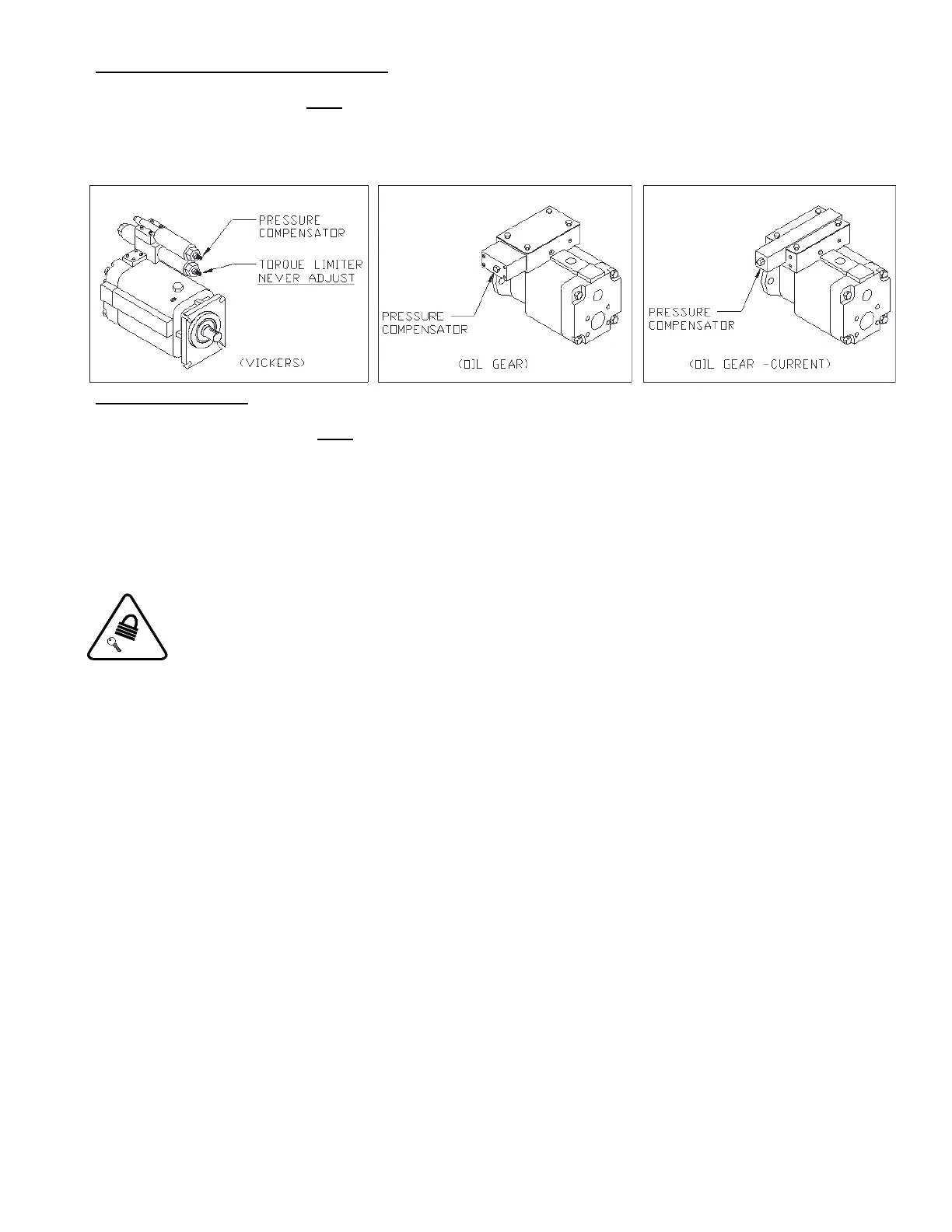
The pump is factory preset and must never be adjusted. The warranty will be void if the pump adjustment is tampered with. For more
information, contact an EXCEL Manufacturing representative.
Diagram O. Pump Compensator and Torque Limiter Locations.
PUMP ADJUSTMENT
The pump is factory preset and must never be adjusted. The warranty will be void if the pump adjustment is tampered with before
contacting Excel manufacturing. For more information, contact an EXCEL Manufacturing representative.
PHOTO EYE ADJUSTMENT
Perform this adjustment with the baler in hand position and photo eye off.
1. Fully retract the platen.
Observe Lock Out/Tag Out Procedure when making Photo Eye adjustments.
2 Remove the guard covering the Photo Eye.
HORIZONTAL ADJUSTMENT
3 Loosen the screws on the bottom of the mounting bracket. Slightly move the eye left and right to sweep the beam across the
reflector. As the beam falls off each edge of the reflector, the red indicator light on top of the Photo Eye lights up. Retighten the
screws so that the beam is held steady halfway between each indicated edge.
VERTICAL ADJUSTMENT
4 Loosen the screws on the side of the mounting bracket and adjust the beam as done in the previous procedure, sweeping the
beam up and down.



 To Next Page