EXCELL PRECISION CO., LTD.
45046
Chapter 2 External Function Settings
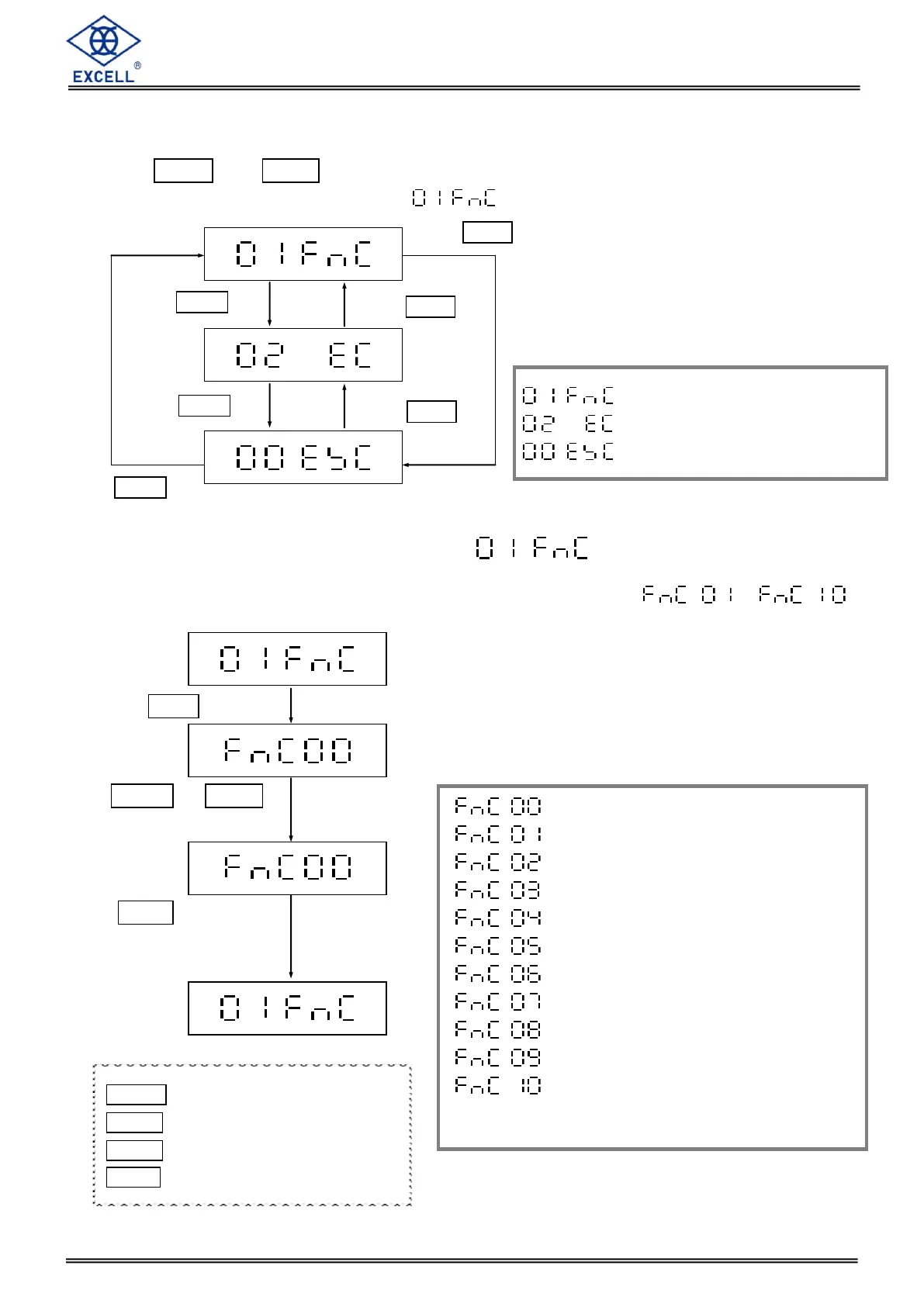
Press the ZERO and TARE keys together in the WEIGHING MODE to enter into the advanced
functions settings and the display shows .
2-1 General Function Settings
There are 10 functions in the General Function settings menu from ~ .
General Function Settings
Weight Calibration Settings
Exit External Function
Press MODE or HOLD
key to choose the para-
meters “00~10”
Press TARE key to enter
setting. If the parameter is
“00”, it will return to the
upper level
(Exit general function
settings)
MODE Upward digit selecting (0-9)
HOLD Downward digit selecting (9-0)
ZERO No function
TARE Confirm
Return to the upper level
Power-save timer settings
Auto. power-off timer settings
Set point control settings
Hold function settings
Environment Parameter Settings
Zero point record settings
High and low resolution shift
Digital Filter Setting
Remote Control Configuration
Display Wireless ID or Clear
Paired Devices (option)


 To Next Page