EXCELL PRECISION CO., LTD.
45046
Pairing
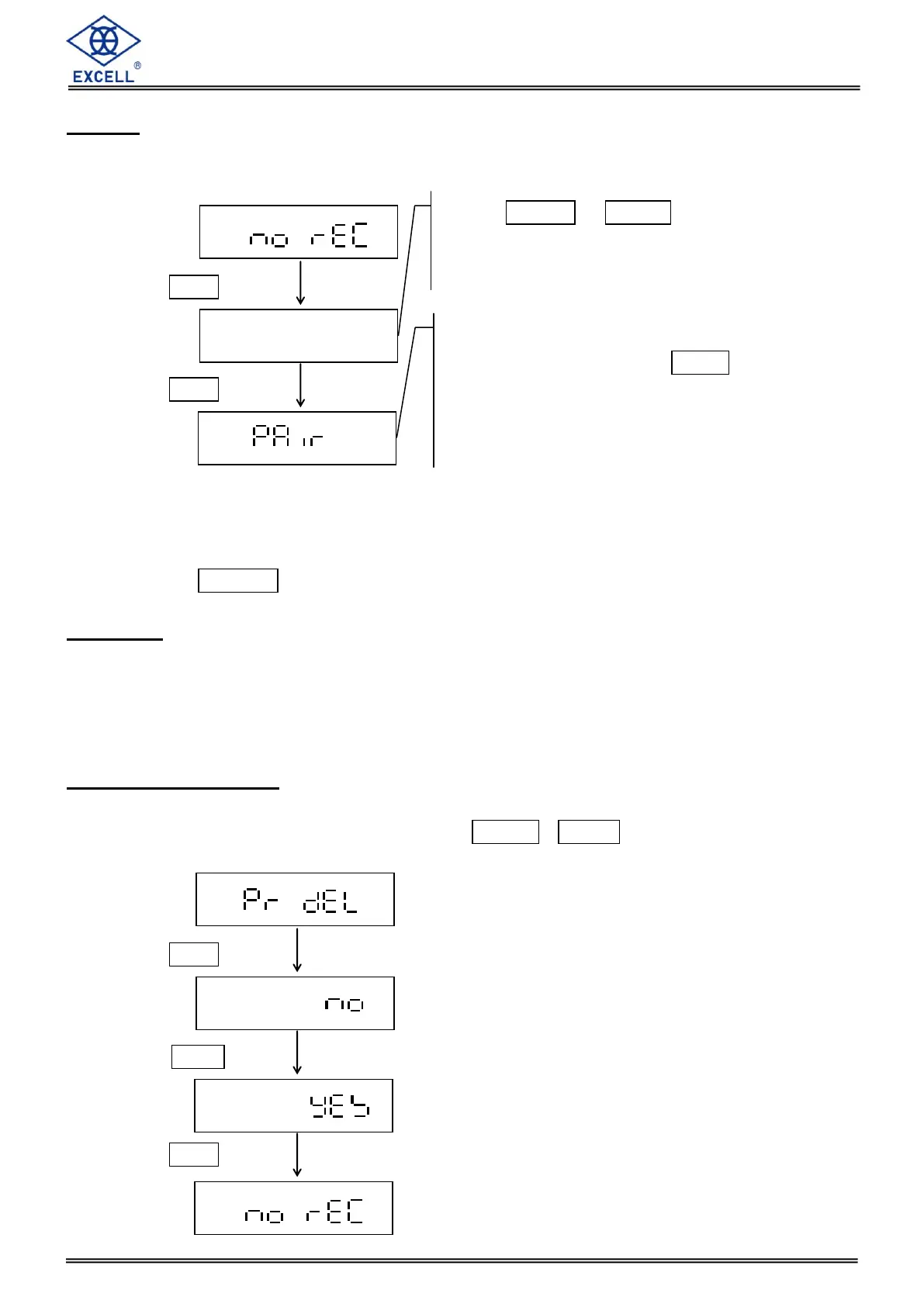
Please turn on the display controller, and please ensure that it displays "No REC"; otherwise,
please proceed with "Clear Paired devices" steps.
While display controller is in pairing mode and displays "No REC", it will not enter stand-by
mode.
While saving paired devices, LCD display “SAVE” over 3s that means data failed to save.
Please press ON/OFF key to restart and perform pairing again.
Paire Fail
“PR FAL” shows on display and caused by following reasons:
Pairing in wireless FJ5 is cleared but not in display controller.
When connecting, FJ5 is turned off or wireless signal is weak which cause pairing
unsuccessful.
Clear Paired devices
Please turn on the display controller. LCD displays "No REC" which represents no paired
devices. Otherwise operating as following: Press [MODE + HOLD and LCD displays
"PR DEL".
Press MODE or HOLD key to
select wireless FJ5. To see ID of
wireless FJ5, please see 2-1-10.
If displays “No BLE” or can not scan
wireless FJ5, please press ZERO key
to re-scan. (Please ensure paired
device of FJ5 has been cleared and
switch behind FJ5 is on.


 To Next Page