Maintenance
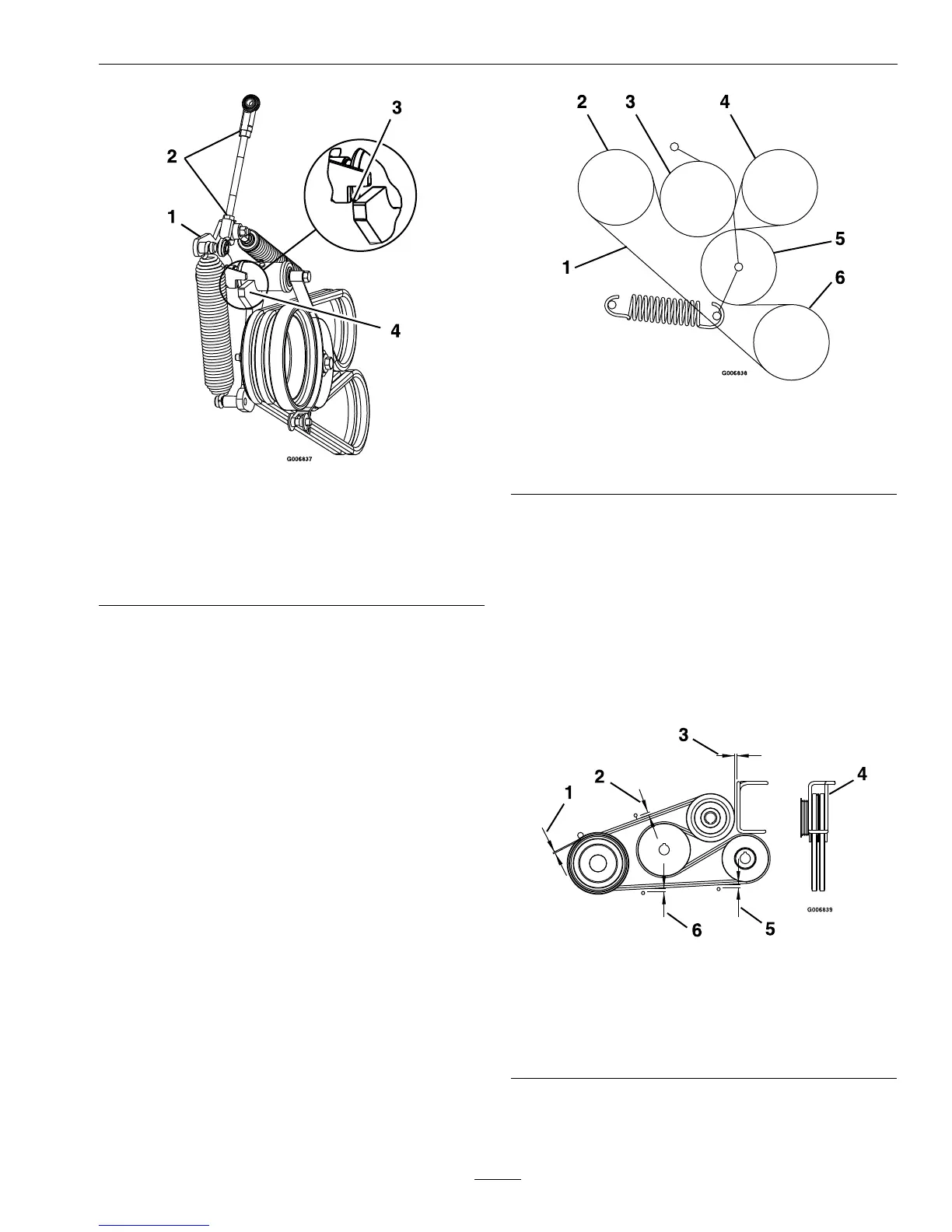
Figure25
1.TensionArm
2.Loosenjamnuts
3.WhenPTOisengaged,aligntopofidlerarmwithbottom
ofnotchontensionarm,asshown.
4.IdlerArm
13.TightenjamnutsanddisengagePTOlever.
Re-engagePTOleverandcheckalignment.
14.CheckandadjustbeltguidesasstatedinBelt
GuideAdjustmentsection.
PumpDriveBelt
Replacement
1.Stopengine,waitforallmovingpartstostop,and
removekey.Engageparkingbrake.
2.RemovePTOBelts.SeePTOBeltReplacement
sectionforremovalinstructions.
3.Pullspringidlerorremovespringtorelievepump
drivebelttension.Removeoldbelt.
4.Routenewbeltontosheavesasshowninthe
decallocatedonthebackoftheleftdriveshield
(seeFigure26).
Figure26
1.PumpDriveBelt4.Pump
2.Pump5.Idler
3.Idler6.Engine
5.ReinstallPTOBeltsasstatedinthePTOBelt
Replacementsection
BeltGuideAdjustment
1.Stopengine,waitforallmovingpartstostop,and
removekey.Engageparkingbrake.
2.EngagePTOlever.
3.AdjustbeltguidesasshowninFigure27.
Figure27
1.1/8inch(3mm)4.Rotatewireformguideto
centerbeltsinguide.
2.7/16inch(11mm)5.1/4inch(6mm)
3.1/8inch(3mm)
Clearance
6.5/16inch(8mm)
41


 To Next Page
 Loading...