This document is considered an uncontrolled copy when printed. Always ensure that you print and use a current version.
Copyright 2023 ExRobotics B.V.
7.3. “Click and Inspect” Navigation
7.3.1. The Click and Inspect Screen
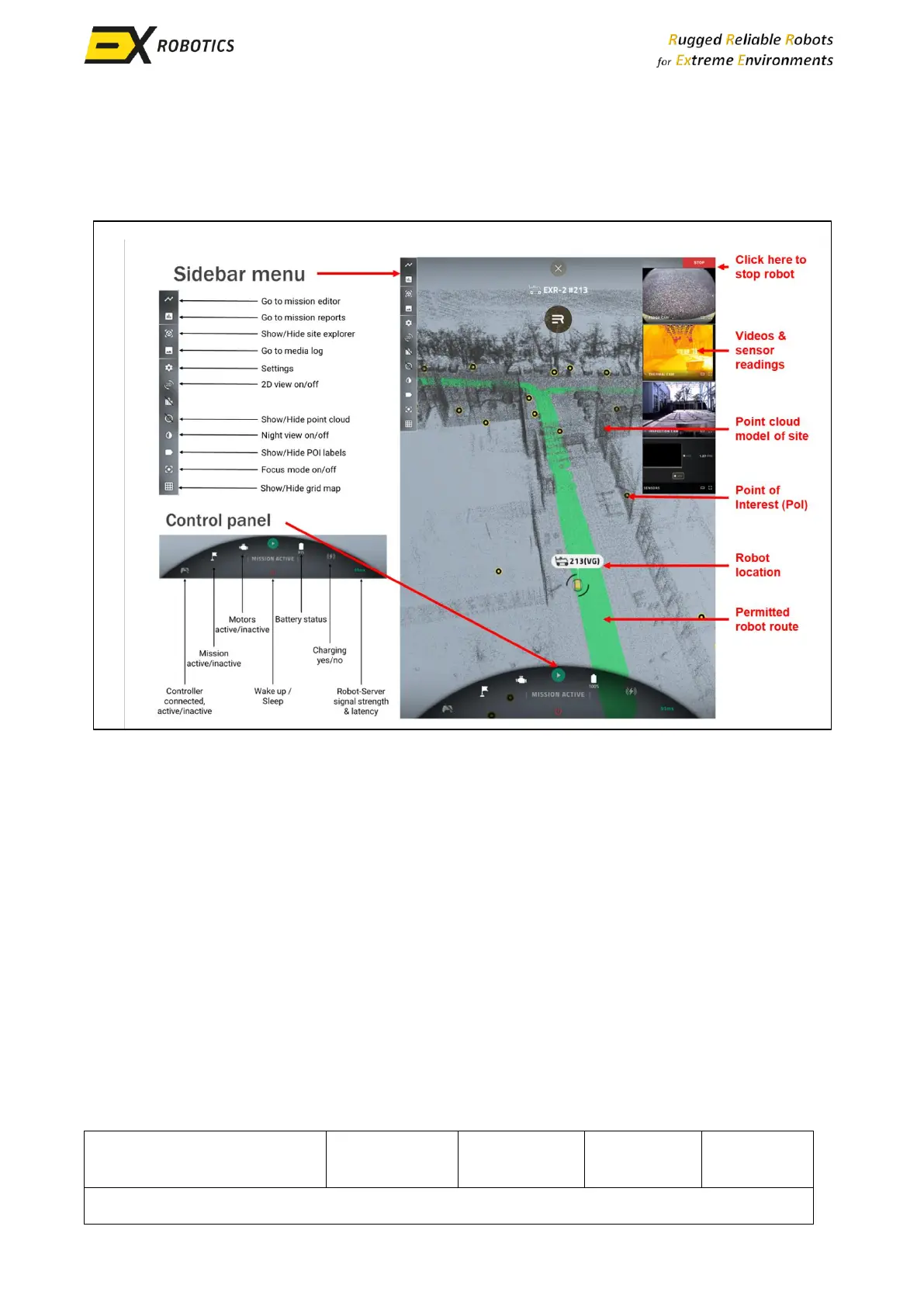
Click and Inspect missions are programmed and executed using this screen.
When the screen is opened, the control panel and video/sensor panels are not visible. They appear
when you click on the pulsating robot icon that is at the robot location. They disappear when you
switch off focus mode using the Sidebar menu. The Settings tab in that menu allows you to adjust
the graphics to suit your control station and gives an explanation of the controller buttons. The
other Sidebar options are self-explanatory.
Expanding the video/sensor panels and capturing videos/snapshots are essentially the same as
when doing so in remote control mode (Section 6.2).
The point cloud image can be adjusted as follows:
▪ Left click and drag to rotate the map around its central pivot point.
▪ Right click and drag to pan the map.
▪ Zoom in and out using the mouse wheel
More information about this screen and its use is available in an Energy Robotics’ presentation
(Reference 2).



 To Next Page