This document is considered an uncontrolled copy when printed. Always ensure that you print and use a current version.
Copyright 2023 ExRobotics B.V.
8.2. Security, Authorisation & Authentication
Robots are fitted with security features:
▪ People can’t connect to the robot unless they have the necessary authentication.
▪ Communications are protected by sophisticated IT security (Reference 3).
▪ Multi-factor authentication (MFA) can be activated using the “Account Settings” option in the
User Menu (See Section 6.1).
▪ The 4G network provider will be able to locate the robot when it’s powered on.
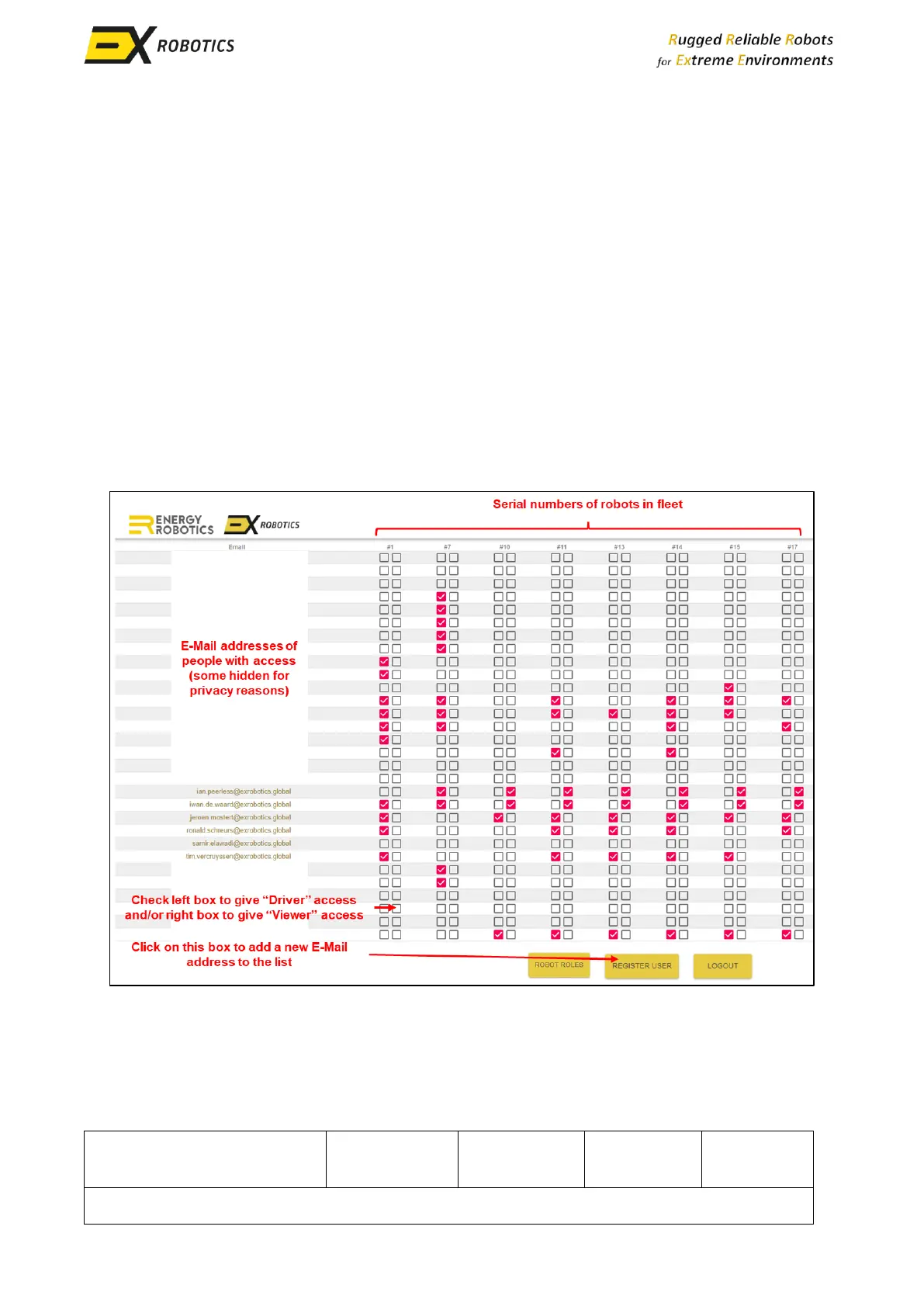
Customers will appoint a Fleet Manager(s) that controls access to robots. He/she will allocate the
following roles to individuals:
▪ Drivers control robots.
▪ Viewers access the data streams from robots.
Fleet Managers will control access with the “User Management” screen (see below) which is
accessed from the User Menu.
When a new user is registered they will receive an E-Mail that will prompt them to change their
password before full access is granted. It’s then possible to connect to robots by visiting this
address using Google Chrome: https://login.energy-robotics.com.



 To Next Page